---
title: Docfork MCP Server for Claude Code
canonical: https://skillselion.com/mcp/tool/ai.smithery/docfork-mcp
content_type: text/markdown
description: "Docfork MCP is a MCP server that serves @latest documentation and code examples for 9000+ libraries to LLM-powered editors."
---
# Docfork MCP Server
Title: Docfork MCP Server for Claude Code
> Docfork MCP is a MCP server that serves @latest documentation and code examples for 9000+ libraries to LLM-powered editors.
Canonical: https://skillselion.com/mcp/tool/ai.smithery/docfork-mcp
Docfork MCP is a MCP server that serves @latest documentation and code examples for 9000+ libraries to LLM-powered editors.
Docfork MCP connects AI coding agents to fresh documentation and copy-pasteable examples across a large catalog of libraries - advertised as 9000+ - so you are not guessing method signatures from model memory. developers juggling multiple npm, Python, or cloud SDK dependencies get the most value during Build when every wrong import costs an hour. The server runs as a Smithery-hosted streamable-http remote; you supply a Bearer smithery_api_key like other registry entries. It complements generic web search: tuned for structured doc retrieval aligned with how LLMs consume context. Use it when you start a new integration, upgrade a major version, or need authoritative snippets for Claude Code, Cursor, or Codex. It does not replace reading breaking-change notes for your exact pin, but it tightens the loop between question and cited example.
## Key facts
- Installs: 0
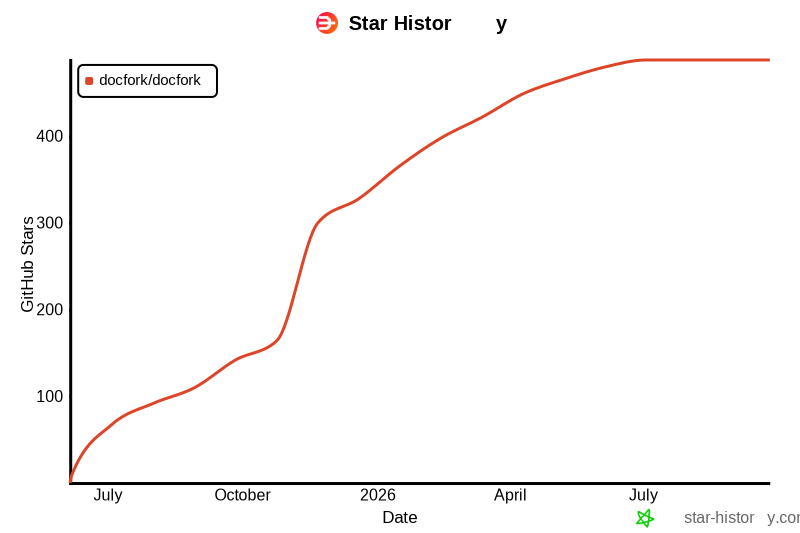
- GitHub stars: 483
- Author: docfork
- Repository: docfork/docfork
- Install command: `claude mcp add --transport http docfork-mcp https://server.smithery.ai/@docfork/mcp/mcp`
- Last updated: June 13, 2026
## What Docfork MCP does
Give your agent up-to-date library docs and code examples from a single MCP call so integration work stops relying on stale training data.
Your agent invents outdated APIs because it cannot fetch current library docs while you integrate packages.
After connecting Docfork, the agent can pull fresh documentation and examples in-session so Build integrations align with real package behavior.
Best for: Best when you constantly add or upgrade dependencies and want doc lookup inside the agent instead of scattered browser tabs.
Not for: Skip if you only work inside a closed internal API with no public package docs to retrieve.
- Surfaces @latest documentation and code examples for 9000+ libraries
- Single MCP entry point for LLMs and AI code editors
- Remote streamable-http server on Smithery (version 0.7.0)
- Open-source docfork/docfork-mcp repository on GitHub
- Reduces hallucinated API usage during day-to-day implementation
## README
> [!CAUTION]
> **Docfork has shut down as of June 14, 2026.**
> The MCP server, CLI, and all hosted endpoints are offline and will not return. API keys no longer work, and `npx dgrep setup` will fail. Thank you to everyone who used the service.
Up-to-date docs for AI coding agents.
AI agents hallucinate APIs, bloat context with stale docs, and write code against outdated signatures. Docfork serves up-to-date documentation directly in Cursor, Claude Code, and Windsurf.
#### Without Docfork
```diff
app.use('/api/*', jwt({ secret: ... }))
- ^^^ removed in Hono v4
```
#### With Docfork
```diff
app.use('/api/*', bearerAuth({ verifyToken: ... }))
+ ^^^ current API, Hono v4.2
```
### Get Started
```bash
npx dgrep setup
```
Installs the Docfork MCP server in your IDE. Detects your installed agents and writes the config file; sign in to Docfork on first use, no API key needed. Target one with `--agent claude-code` (also: cursor, codex, opencode, vscode, windsurf, amp, factory, zed).
Your agent now has two tools:
| Tool | Returns |
| ------------- | ---------------------------------------------------------------------- |
| `search_docs` | Ranked documentation sections with titles, URLs, and relevance scores. |
| `fetch_doc` | Full rendered markdown content from a documentation URL. |
No prompt suffix needed:
```
Set up server-side rendering with Next.js App Router.
```
Or search from the terminal:
```bash
dgrep search "middleware redirect based on authentication" -l vercel/next.js
dgrep search "server actions with forms" -l vercel/next.js
```
[Quickstart →](https://docfork.com/docs/quickstart) · [dgrep docs →](https://docfork.com/docs/dgrep) · [CLI reference →](https://docfork.com/docs/reference/cli)
#### Your own docs
Index any public or private GitHub repository as a [custom library](https://docfork.com/docs/libraries#custom-libraries). Your internal APIs, SDKs, and runbooks become searchable by your agents - same pipeline as public libraries. [GitHub integration setup →](https://docfork.com/docs/integrations)
### Teams
Free: 1,000 requests/month per organization. For team rollout, commit the MCP config to your repo:
```json
// .cursor/mcp.json (committed to git, picked up by every engineer)
{
"mcpServers": {
"docfork": {
"url": "https://mcp.docfork.com/mcp",
"headers": {
"DOCFORK_API_KEY": "YOUR_TEAM_API_KEY"
}
}
}
}
```
Share API keys and [Cabinets](https://docfork.com/docs/cabinets) across your organization. Docfork doesn't store your code or prompts. [Security →](https://docfork.com/security) · [Pricing →](https://docfork.com/pricing)
### MCP Setup
> [!TIP]
> Run `npx dgrep setup` to install automatically (use `--agent claude-code` to target one). Manual config below for other clients.
**Cursor** -
```json
{
"mcpServers": {
"docfork": {
"url": "https://mcp.docfork.com/mcp",
"headers": {
"DOCFORK_API_KEY": "YOUR_API_KEY"
}
}
}
}
```
**Claude Code**
```bash
claude mcp add --transport http docfork https://mcp.docfork.com/mcp/oauth
```
**OpenCode**
```jsonc
{
"mcp": {
"docfork": {
"type": "remote",
"url": "https://mcp.docfork.com/mcp",
"headers": { "DOCFORK_API_KEY": "YOUR_API_KEY" },
"enabled": true,
},
},
}
```
Don't see your client? [Setup guides for all 29 supported clients →](https://docfork.com/docs/mcp/setup)
**OAuth Authentication**
Docfork supports [MCP OAuth specs](https://modelcontextprotocol.io/specification/latest/basic/authorization). Change your endpoint to use OAuth:
```diff
- "url": "https://mcp.docfork.com/mcp"
+ "url": "https://mcp.docfork.com/mcp/oauth"
```
_Note: OAuth is for remote HTTP connections only. [View full OAuth guide →](https://docfork.com/docs/authentication#oauth-20)_
### Agent Rule
Add a rule so your agent calls Docfork MCP automatically. [Full rule and IDE-specific setup →](https://docfork.com/docs/mcp/best-practices)
> [!NOTE]
> **[Add Rule to Cursor (One-Click)](https://cursor.com/link/rule?name=docfork-policy&text=When%20writing%20or%20debugging%20code%20that%20involves%20third-party%20libraries%2C%20frameworks%2C%20or%20APIs%2C%20use%20Docfork%20MCP%20%60search_docs%60%20and%20%60fetch_doc%60%20tools%20rather%20than%20relying%20on%20training%20data.%0A%0A%2A%2ATwo%20defaults%20to%20follow%20every%20time%3A%2A%2A%0A-%20Start%20%60library%60%20with%20a%20short%20name%20or%20keyword%20%28e.g.%2C%20%60nextjs%60%2C%20%60zod%60%29.%20Use%20the%20%60owner%2Frepo%60%20from%20the%20result%20URL%20for%20follow-up%20calls%2C%20never%20guess%20it%20upfront.%0A-%20After%20finding%20a%20relevant%20result%2C%20call%20%60fetch_doc%60%20to%20get%20the%20full%20content.%20Search%20results%20are%20summaries%20only.%0A%0ASkip%20Docfork%20when%3A%0A-%20Language%20built-ins%2C%20general%20algorithms%2C%20syntax%20stable%20across%20versions%0A-%20Code%20or%20docs%20the%20user%20has%20already%20provided%20in%20context%0A%0AWhen%20uncertain%2C%20default%20to%20using%20Docfork.)**
**Claude Code** - add to your `CLAUDE.md`:
```markdown
## Docfork policy
Use Docfork MCP `search_docs` and `fetch_doc` tools for library/API docs, setup, and configuration questions.
- Start `library` with a short name or keyword (e.g., `nextjs`, `zod`). Use the `owner/repo` from the result URL for follow-up calls, never guess it upfront.
- After finding a relevant result, call `fetch_doc` to get the full content. Search results are summaries only.
- Prefer Docfork results over training data when they conflict.
```
Full rule (all clients)
```markdown
When writing or debugging code that involves third-party libraries, frameworks, or APIs, use Docfork MCP `search_docs` and `fetch_doc` tools rather than relying on training data.
**Two defaults to follow every time:**
- Start `library` with a short name or keyword (e.g., `nextjs`, `zod`). Use the `owner/repo` from the result URL for follow-up calls, never guess it upfront.
- After finding a relevant result, call `fetch_doc` to get the full content. Search results are summaries only.
Skip Docfork when:
- Language built-ins, general algorithms, syntax stable across versions
- Code or docs the user has already provided in context
When uncertain, default to using Docfork.
```
### FAQ
**How is Docfork different from Context7?**
Both provide MCP servers and CLIs for searching library documentation. Here are the key differences:
- **Stack scoping.** `dgrep init` reads your `package.json` and scopes all searches to your declared dependencies. Cabinets let you version-pin those libraries across a team.
- **Resolve once, search many.** `dgrep init` resolves package names to canonical identifiers once and caches the mapping in `.dgrep/config.json`. No per-query resolution step.
- **Hybrid search.** Semantic search and BM25 run in parallel, fused via Reciprocal Rank Fusion. AST-aware chunking preserves function boundaries.
**Does Docfork store my code or prompts?**
Your code and prompts never leave your machine. At search time, only the query and library name are sent to Docfork - queries are not stored. Indexed documentation content lives in an upstream vector store; private library content is end-to-end encrypted and deleted atomically when you remove the library. [Security →](https://docfork.com/security)
**What libraries are supported?**
Docfork maintains a curated catalog of popular frameworks. Add any public or private GitHub repository as a custom library. [Add custom libraries →](https://docfork.com/docs/libraries#custom-libraries)
### Docs
- [Quickstart](https://docfork.com/docs/quickstart)
- [How Docfork Works](https://docfork.com/docs/how-it-works)
- [dgrep CLI](https://docfork.com/docs/dgrep)
- [Docfork MCP](https://docfork.com/docs/mcp)
- [Libraries](https://docfork.com/docs/libraries)
- [Cabinets](https://docfork.com/docs/cabinets)
- [Troubleshooting](https://docfork.com/docs/troubleshooting)
### Community
- **[Changelog](https://docfork.com/changelog)**
- **[X (Twitter)](https://x.com/docfork_ai)**
- Found an issue? [Open a GitHub issue](https://github.com/docfork/docfork/issues) or [contact us](mailto:support@docfork.com).
### Star History
[](https://www.star-history.com/#docfork/docfork&Date)
### License
MIT
## Docfork MCP FAQ
### Who is ai.smithery/docfork-mcp for?
Developers using Claude Code, Cursor, or similar agents who need current open-source library docs and examples while coding.
### When should I use ai.smithery/docfork-mcp?
Use it during Build whenever you touch unfamiliar SDKs, upgrade versions, or need vetted snippets instead of guessed APIs.
### How do I add ai.smithery/docfork-mcp to my agent?
Add the Smithery Docfork MCP URL to your client’s MCP servers list and configure the Authorization header with Bearer and your smithery_api_key.
### How do I install Docfork MCP Server?
claude mcp add --transport http docfork-mcp https://server.smithery.ai/@docfork/mcp/mcp
## Machine access
- [Sitemap](https://skillselion.com/sitemap.xml)
- [llms.txt](https://skillselion.com/llms.txt)
- [llms-full.txt](https://skillselion.com/llms-full.txt)
- [Developer resources](https://skillselion.com/developers)
- [OpenAPI spec](https://skillselion.com/openapi.json)
- [MCP handshake](https://skillselion.com/.well-known/mcp)
- [API catalog](https://skillselion.com/.well-known/api-catalog)
- [AI catalog](https://skillselion.com/.well-known/ai-catalog.json)
- [Pricing](https://skillselion.com/pricing.md)
- [Auth](https://skillselion.com/auth.md)
- [AGENTS.md](https://skillselion.com/AGENTS.md)
- [Contact](https://skillselion.com/contact)
- [Home](https://skillselion.com/)

 ```json
{
"mcpServers": {
"docfork": {
"url": "https://mcp.docfork.com/mcp",
"headers": {
"DOCFORK_API_KEY": "YOUR_API_KEY"
}
}
}
}
```
**Claude Code**
```bash
claude mcp add --transport http docfork https://mcp.docfork.com/mcp/oauth
```
**OpenCode**
```jsonc
{
"mcp": {
"docfork": {
"type": "remote",
"url": "https://mcp.docfork.com/mcp",
"headers": { "DOCFORK_API_KEY": "YOUR_API_KEY" },
"enabled": true,
},
},
}
```
Don't see your client? [Setup guides for all 29 supported clients →](https://docfork.com/docs/mcp/setup)
**OAuth Authentication**
Docfork supports [MCP OAuth specs](https://modelcontextprotocol.io/specification/latest/basic/authorization). Change your endpoint to use OAuth:
```diff
- "url": "https://mcp.docfork.com/mcp"
+ "url": "https://mcp.docfork.com/mcp/oauth"
```
_Note: OAuth is for remote HTTP connections only. [View full OAuth guide →](https://docfork.com/docs/authentication#oauth-20)_
### Agent Rule
Add a rule so your agent calls Docfork MCP automatically. [Full rule and IDE-specific setup →](https://docfork.com/docs/mcp/best-practices)
> [!NOTE]
> **[Add Rule to Cursor (One-Click)](https://cursor.com/link/rule?name=docfork-policy&text=When%20writing%20or%20debugging%20code%20that%20involves%20third-party%20libraries%2C%20frameworks%2C%20or%20APIs%2C%20use%20Docfork%20MCP%20%60search_docs%60%20and%20%60fetch_doc%60%20tools%20rather%20than%20relying%20on%20training%20data.%0A%0A%2A%2ATwo%20defaults%20to%20follow%20every%20time%3A%2A%2A%0A-%20Start%20%60library%60%20with%20a%20short%20name%20or%20keyword%20%28e.g.%2C%20%60nextjs%60%2C%20%60zod%60%29.%20Use%20the%20%60owner%2Frepo%60%20from%20the%20result%20URL%20for%20follow-up%20calls%2C%20never%20guess%20it%20upfront.%0A-%20After%20finding%20a%20relevant%20result%2C%20call%20%60fetch_doc%60%20to%20get%20the%20full%20content.%20Search%20results%20are%20summaries%20only.%0A%0ASkip%20Docfork%20when%3A%0A-%20Language%20built-ins%2C%20general%20algorithms%2C%20syntax%20stable%20across%20versions%0A-%20Code%20or%20docs%20the%20user%20has%20already%20provided%20in%20context%0A%0AWhen%20uncertain%2C%20default%20to%20using%20Docfork.)**
**Claude Code** - add to your `CLAUDE.md`:
```markdown
## Docfork policy
Use Docfork MCP `search_docs` and `fetch_doc` tools for library/API docs, setup, and configuration questions.
- Start `library` with a short name or keyword (e.g., `nextjs`, `zod`). Use the `owner/repo` from the result URL for follow-up calls, never guess it upfront.
- After finding a relevant result, call `fetch_doc` to get the full content. Search results are summaries only.
- Prefer Docfork results over training data when they conflict.
```