
Air Q Cloud MCP
- Updated August 5, 2026
- CorantGmbH/mcp-airq-cloud
air-Q Cloud MCP is a MCP server that queries the air-Q Cloud API so agents can use remote air quality data from anywhere.
About
air-Q Cloud MCP connects coding agents to the air-Q Cloud API so you can access air quality measurements when devices are not on your LAN. Developers building health, workplace, or climate-adjacent products use it to prototype queries, compare locations, and feed analytics pipelines without writing OAuth-style glue in every chat. Configuration mirrors the local server: JSON config file path, inline devices array, and a secret API key at the device level or via AIRQ_CLOUD_API_KEY. Register the stdio server in Claude Code, Cursor, or Codex, then let the agent call MCP tools instead of raw REST. It is intermediate complexity because API keys and device JSON must be handled safely. Pair it with your backend during build, or with reporting once the product ships. Version 1.4.4 is published on PyPI as mcp-airq-cloud.
- PyPI package mcp-airq-cloud v1.4.4 with stdio MCP transport
- Remote air quality via air-Q Cloud API from any network
- Per-device or global AIRQ_CLOUD_API_KEY fallback configuration
- Device list via AIRQ_CLOUD_CONFIG_FILE or AIRQ_CLOUD_DEVICES JSON
- Complements local mcp-airq when sensors are cloud-managed only
Air Q Cloud MCP by the numbers
- Data as of Aug 10, 2026 (Skillselion catalog sync)
claude mcp add --env AIRQ_CLOUD_CONFIG_FILE=YOUR_AIRQ_CLOUD_CONFIG_FILE --env AIRQ_CLOUD_DEVICES=YOUR_AIRQ_CLOUD_DEVICES --env AIRQ_CLOUD_API_KEY=YOUR_AIRQ_CLOUD_API_KEY mcp-airq-cloud -- uvx mcp-airq-cloudAdd your badge
Show developers this MCP server is listed on Skillselion. Paste this into your README.

| Package | mcp-airq-cloud |
|---|---|
| Transport | STDIO |
| Auth | Required |
| Last updated | August 5, 2026 |
| Repository | CorantGmbH/mcp-airq-cloud ↗ |
What it does
Pull air-Q Cloud API air quality data into agent workflows for remote sites, multi-location apps, or hosted dashboards.
Who is it for?
Best when you have cloud-linked air-Q accounts and need agent access to multi-site or off-LAN air quality metrics.
Skip if: Setups where every sensor is only reachable on local HTTP—mcp-airq is the better fit.
What you get
After setup, your agent uses MCP tools against air-Q Cloud with configured devices and API keys in one place.
- MCP tools backed by air-Q Cloud HTTP API
- Centralized secret and device config for agent sessions
By the numbers
- Published server version 1.4.4
- 3 documented environment variables including secret API key
- Stdio transport via PyPI identifier mcp-airq-cloud
README.md
mcp-airq-cloud







MCP server for the air-Q Cloud API — access air quality data from anywhere.
Unlike mcp-airq (which communicates directly with devices on the local network), this server uses the air-Q Cloud REST API to retrieve sensor data remotely.
The same mcp-airq-cloud executable also works as a direct CLI when you pass a
tool name as a subcommand.
Tools
| Tool | Description |
|---|---|
list_devices |
List configured air-Q Cloud devices |
get_air_quality |
Get latest sensor readings (supports device/location/group selection) |
get_air_quality_history |
Get historical data within a time range as column-oriented JSON |
plot_air_quality_history |
Render one historical chart per sensor across all matching devices |
export_air_quality_history |
Export one historical sensor as one csv or xlsx across matching devices |
All tools are read-only — the Cloud API does not support device configuration or control.
Installation
pip install mcp-airq-cloud
Or install from source:
git clone https://github.com/CorantGmbH/mcp-airq-cloud.git
cd mcp-airq-cloud
uv sync --frozen --extra dev
CLI Usage
Use the same command directly from the shell:
mcp-airq-cloud list-devices
mcp-airq-cloud get-air-quality --device "Living Room"
mcp-airq-cloud get-air-quality-history --device "Living Room" --last-hours 24 --sensors co2 pm2_5
mcp-airq-cloud plot-air-quality-history --sensor co2 --output-format png --output co2.png
mcp-airq-cloud export-air-quality-history --sensor co2 --output-format xlsx --output co2.xlsx
For historical plots and exports:
- omit
device,location, andgroupto combine all configured devices into one artifact - use
locationorgroupto combine only the matching devices plot_air_quality_historyreturns one file per requested sensor, with one series per matching deviceexport_air_quality_historyreturns one CSV/XLSX file per request, with rows for all matching devices
The CLI subcommands mirror the MCP tool names. Both styles work:
mcp-airq-cloud list-devices
mcp-airq-cloud list_devices
To force MCP server mode from an interactive terminal, run:
mcp-airq-cloud serve
The CLI is pipe-friendly: successful command output goes to stdout, while
tool errors go to stderr with exit code 1. Plot commands can also stream
directly to stdout.
mcp-airq-cloud get-air-quality --device "Living Room" | jq '.co2'
mcp-airq-cloud get-air-quality-history --device "Living Room" --compact-json | jq '.columns.co2'
mcp-airq-cloud get-air-quality-history --device "Living Room" --yaml | yq '.columns.co2'
mcp-airq-cloud plot-air-quality-history --sensor co2 --device "Living Room" --output - > co2.png
mcp-airq-cloud export-air-quality-history --sensor co2 --device "Living Room" --output - > co2.xlsx
Historical Data
Three tools provide access to historical sensor data via the air-Q Cloud API:
Plotting charts
plot_air_quality_history renders a chart for one sensor. When multiple devices
match, each device becomes a separate series in the same chart.
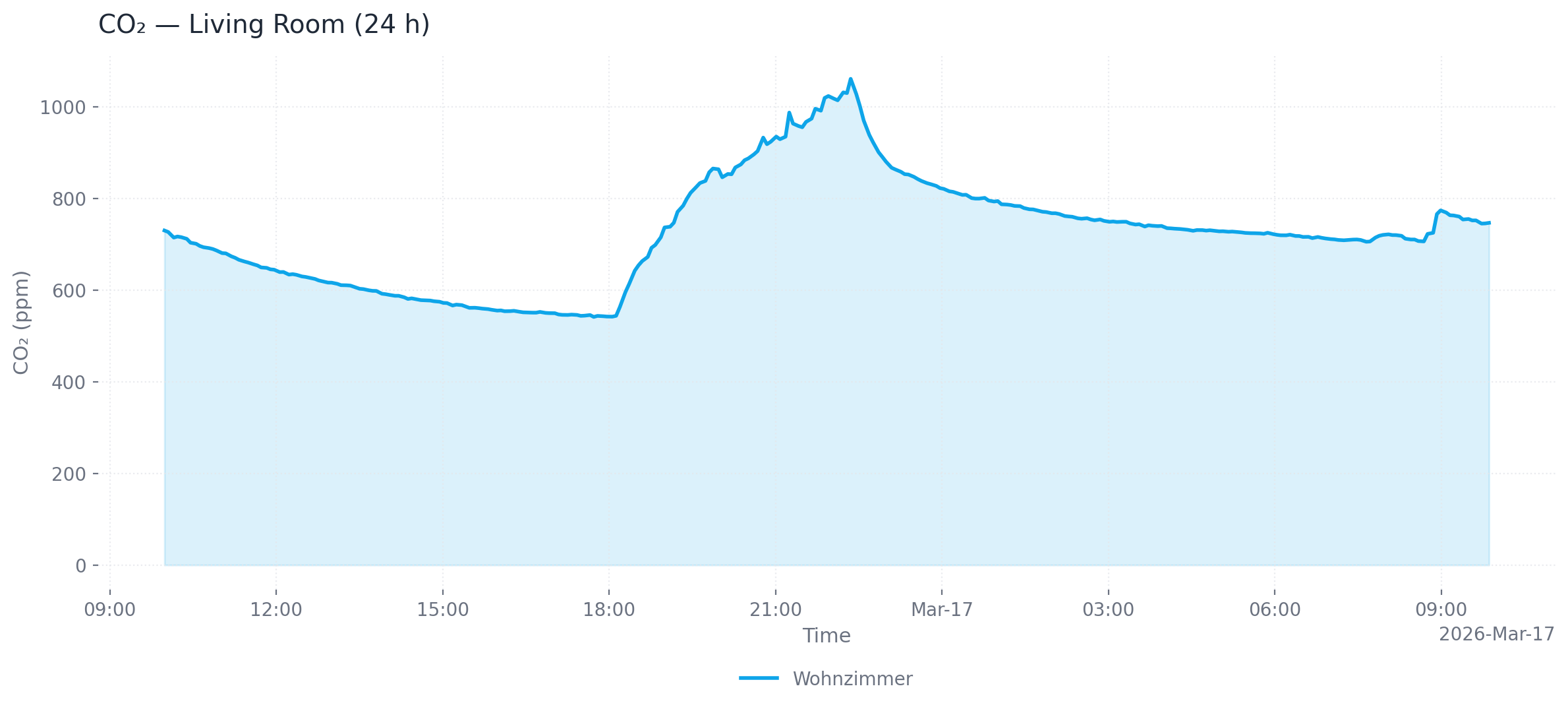
Single device (24 h, area chart, PNG)
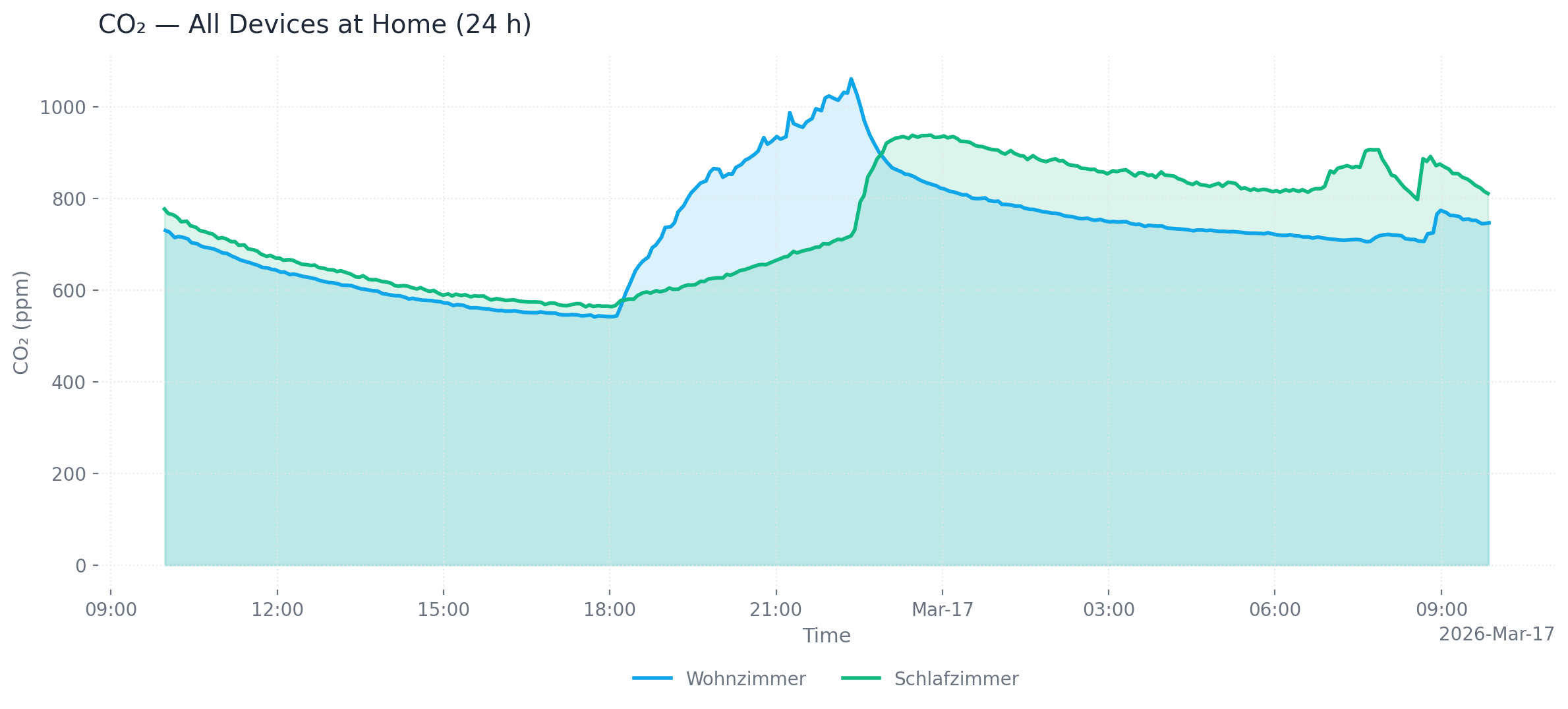
Multiple devices at one location (24 h, area chart, PNG)
# Single device, last 24 hours (default), PNG output (default)
mcp-airq-cloud plot-air-quality-history --sensor co2 --device "Living Room"

# All devices at a location, custom time range, SVG output
mcp-airq-cloud plot-air-quality-history --sensor co2 --location "Living Room" \
  --from-datetime "2026-03-16T00:00:00" --to-datetime "2026-03-17T00:00:00" \
  --output-format svg --output co2.svg

# All configured devices, dark mode, line chart
mcp-airq-cloud plot-air-quality-history --sensor co2 --dark --chart-type line

# Save to file
mcp-airq-cloud plot-air-quality-history --sensor co2 --output co2_chart.png
Output formats: png (default), webp, svg, html (interactive Plotly chart with hover tooltips and zoom)
Customization: --title, --x-axis-title, --y-axis-title, --chart-type (line/area), --dark, --timezone-name
Exporting data
export_air_quality_history produces one CSV or Excel file containing all matching devices.
# CSV export (default)
mcp-airq-cloud export-air-quality-history --sensor co2 --device "Living Room" --last-hours 48

# Excel export for all devices at a location
mcp-airq-cloud export-air-quality-history --sensor co2 --location "Home" \
  --output-format xlsx --output co2.xlsx
Common parameters
| Parameter | Default | Description |
|---|---|---|
--last-hours |
1 (history) / 24 (plot) | Hours of data to retrieve |
--from-datetime / --to-datetime |
— | ISO 8601 time range (overrides --last-hours) |
--max-points |
300 | Downsample to at most N evenly spaced points |
--timezone-name |
UTC | IANA timezone for timestamps (e.g. Europe/Berlin) |
Configuration
You need a Cloud API key and the 32-character device ID for each device. Both can be obtained at my.air-q.com.
Option 1: Environment variable (inline JSON)
export AIRQ_CLOUD_DEVICES='[{"id": "de45d2ed777780c96c0deae7a220b745", "api_key": "your-api-key", "name": "Living Room"}]'
Option 2: Default config file (recommended)
Place a JSON file at ~/.config/airq-cloud-devices.json — no environment variable needed:
[
  {"id": "de45d2ed777780c96c0deae7a220b745", "api_key": "your-api-key", "name": "Living Room"}
]
Option 3: Custom config file path
export AIRQ_CLOUD_CONFIG_FILE=/path/to/devices.json
Option 4: Global API key
If all devices share the same API key, set it once:
export AIRQ_CLOUD_API_KEY="your-api-key"
export AIRQ_CLOUD_DEVICES='[{"id": "de45d2ed777780c96c0deae7a220b745", "name": "Living Room"}]'
Device config fields
| Field | Required | Description |
|---|---|---|
id |
yes | 32-character cloud device ID |
api_key |
no | Per-device API key (falls back to AIRQ_CLOUD_API_KEY) |
name |
no | Friendly name (defaults to first 8 chars of ID) |
location |
no | Location for grouping (e.g. "Wohnzimmer") |
group |
no | Group for grouping (e.g. "zu Hause") |
Usage with Claude Desktop
Add to claude_desktop_config.json:
{
  "mcpServers": {
    "air-Q Cloud": {
      "command": "mcp-airq-cloud",
      "env": {
        "AIRQ_CLOUD_DEVICES": "[{\"id\": \"<device-id>\", \"api_key\": \"<key>\", \"name\": \"Living Room\"}]"
      }
    }
  }
}
Usage with Claude Code
claude mcp add air-Q-Cloud mcp-airq-cloud \
  -e AIRQ_CLOUD_DEVICES='[{"id":"<ID>","api_key":"<KEY>","name":"<Name>"}]'
Development
uv sync --frozen --extra dev
uv run pre-commit install
uv run pytest
The repository uses a project-local .venv plus uv.lock for reproducible
tooling. Run developer commands through uv run, for example:
uv run ruff check .
uv run ruff format --check .
uv run pyright
uv run pre-commit run --all-files
License
Apache 2.0 — see LICENSE.
Recommended MCP Servers
 Agent Audit MCPImmutable audit trail for agent-to-agent interactions2
 Agentguard47 MCPRead-only MCP server for coding-agent traces, alerts, costs, usage, and budget health.4
 Agentic Observability MCPAgent tracing, cost tracking, anomaly detection for LLM agents
 Agent Incident Relay MCPAgent Incident Relay MCP — Article 73 5-clock broadcaster.
 Agent Infra MCP18 tools: agent memory, API drift detection, and HMAC-signed trust receipts
 Agentmonitorrelay MCPAI agent run monitoring with incident replay and SLA receipts.
How it compares
Cloud API MCP connector, not an on-LAN HTTP device skill or generic database server.
FAQ
Who is Air Q Cloud MCP MCP for?
Developers and small teams using Air Q Cloud MCP who want their AI coding agent to read remote air quality through the official MCP stdio server.
When should I use Air Q Cloud MCP MCP?
Use it when building or operating apps that need cloud-hosted air-Q readings and you want MCP tools instead of manual API calls in each session.
How do I add Air Q Cloud MCP MCP to my agent?
Install mcp-airq-cloud from PyPI, configure stdio in your MCP settings, and set AIRQ_CLOUD_API_KEY plus AIRQ_CLOUD_CONFIG_FILE or AIRQ_CLOUD_DEVICES.