
Ui Evidence
- 5 repo stars
- Updated March 28, 2026
- 0xBrewing/ui-evidence
ui-evidence is a Claude Code skill that captures before/after UI screenshots via a Playwright-based CLI and generates a local review page to see what changed.
About
ui-evidence is a Claude Code skill that drives a repo-local CLI to capture before and after UI screenshots (or a current-UI snapshot) for a web app and generate a local HTML review page. It uses Playwright to capture stable screens, compares two states side by side, and can use a git ref such as main as the before baseline. A developer uses it to verify what an agent actually changed in the UI during frontend work and to catch missed screens during a design-system rollout.
- Captures before/after UI screenshots with Playwright and builds a local review page a human can scan
- Supports git-ref baselines (main or another ref) as the 'before' state
- Thin skill that wraps a repo-local ui-evidence CLI engine
Ui Evidence by the numbers
- Data as of Jul 7, 2026 (Skillselion catalog sync)
ui-evidence capabilities & compatibility
- Capabilities
- visual regression · screenshot capture · ui review
- Works with
- playwright
- Use cases
- testing · frontend · ui design
/plugin marketplace add 0xBrewing/ui-evidence/plugin install ui-evidence@0xBrewing/ui-evidenceAdd your badge
Show developers this skill is listed on Skillselion. Paste this into your README.

| repo stars | ★ 5 |
|---|---|
| Last updated | March 28, 2026 |
| Repository | 0xBrewing/ui-evidence ↗ |
What it does
Capture and review before/after UI screenshots to verify what an AI actually changed on frontend screens.
Who is it for?
reviewing multi-screen UI changes after AI-driven frontend edits or design-system rollouts
Skip if: asserting pixel-diff pass/fail in CI without human review; it is a review-surface generator, not an assertion engine
When should I use this skill?
an agent needs to capture, configure, or run before/after UI screenshot capture or a UI review for a web app
What you get
A local review page with side-by-side before/after captures that a human can scan quickly.
- before/after screenshots
- pair comparison images
- local review/index.html
By the numbers
- showcase run covers four related mobile screens in one run
README.md
ui-evidence
AI changed the UI. Review the evidence.
ui-evidence helps you review what AI actually changed in the UI. It captures stable before/after screenshots or current UI snapshots, builds side-by-side comparisons, and generates a local review page a human can scan quickly.
I built it after AI coding tools started changing the wrong UI or quietly skipping related screens during frontend work. It became useful immediately in a real design-system rollout because missing screens and inconsistent button updates were easy to spot.
Why it exists
- AI can touch the wrong UI while fixing a small frontend task.
- AI can miss related screens during a design-system rollout.
- Chat screenshots are a poor review surface when a human needs to scan multiple screens quickly.
What it does
- captures stable UI screens with Playwright
- compares
beforeandafterimages - writes a local
review/index.html - supports
mainor another git ref as thebeforebaseline - attaches to an already running app when you do not want ui-evidence to launch the server
- resumes long runs and skips raw captures that already succeeded
- captures the current UI into a history snapshot bundle when you only need human review
- keeps each stage folder and snapshot run folder self-contained so you can zip one folder and share it
- opens generated HTML directly with
file://or Finder/Explorer without running a local server - scaffolds repo-local bootstrap files after the skill or package is installed
The package is the local CLI. The skill is the easiest install surface for Codex, Claude Code, and other SKILL.md-based clients.
The skill gets the workflow into the agent. The package provides the repo-local executable that actually runs captures.
Real output
Archive ledger mobile button refresh
This showcase captures a real mobile archive flow before and after a button design-system rollout. One run covers four related screens, builds pair comparisons, and produces a review surface a human can scan quickly.
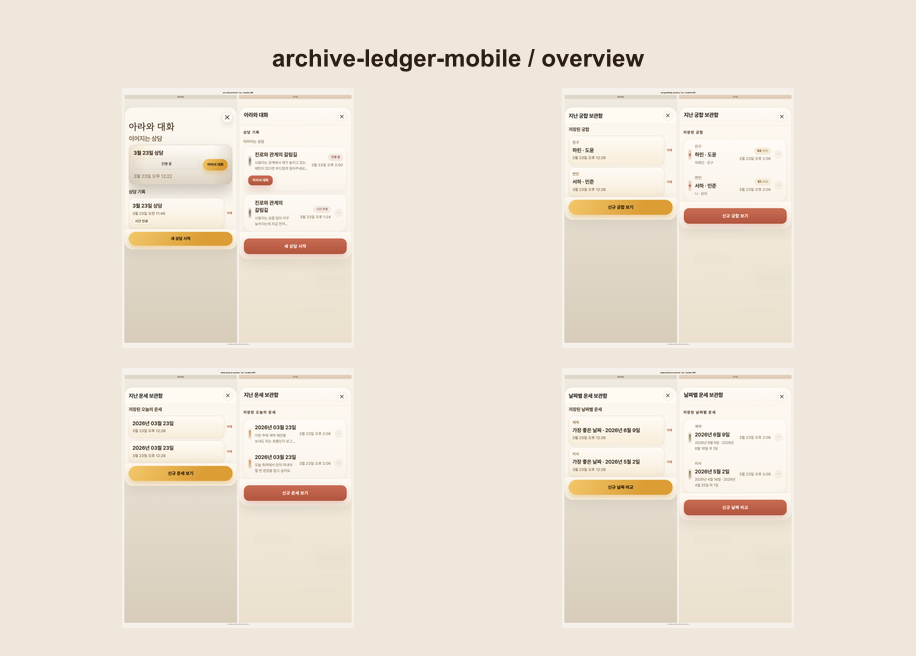
Artifacts:
Works with
- the open agent skills ecosystem through
SKILL.md - Codex, Claude Code, and other clients that support
skills add - local web apps with a stable route and wait target
- repos where
beforecan come from the current checkout, a running URL, or another git ref
Supported project types
- single-package Next.js apps
- single-package Vite/React apps
- Storybook setups with a stable review route
- generic web apps that can be opened by URL and waited on with a stable selector
- JavaScript workspaces using
pnpm,yarn, ornpmworkspaces where the review app lives under a declared workspace package such asapps/*orpackages/*
Current limit:
- arbitrary nested apps without workspace metadata are not a discovery target yet
Install
Skill-first install
Install the skill with the ecosystem-native installer:
pnpm dlx skills add 0xBrewing/ui-evidence
pnpm dlx skills add 0xBrewing/ui-evidence -a codex
pnpm dlx skills add 0xBrewing/ui-evidence -a claude-code
pnpm dlx skills add 0xBrewing/ui-evidence -g -a codex
Interactive install lets the user choose the target agent, project or global scope, and symlink or copy mode.
Equivalent npx skills add ... commands work too.
By convention, the skill lands in:
.agents/skills/for Codex and other.agentsclients.claude/skills/for Claude Code
After the skill is installed, ask the agent to use it. On first use, the skill installs the ui-evidence package into the current repo and runs the repo bootstrap step automatically.
That bootstrap aligns with agent-native paths too. It writes repo-local skill copies to .agents/skills/ui-evidence/ for Codex and .claude/skills/ui-evidence/ for Claude Code, so skills add installs and installation.md bootstrap converge on recognized locations.
Shortest prompt after install:
Use ui-evidence to compare the checkout modal against main.
Direct CLI install
If you want the package without using skills add, install it from GitHub:
pnpm add -D github:0xBrewing/ui-evidence
pnpm exec ui-evidence install --agent both --config ./ui-evidence/config.yaml
pnpm exec ui-evidence doctor --config ./ui-evidence/config.yaml
pnpm exec ui-evidence doctor --config ./ui-evidence/config.yaml --ready
Equivalent install commands:
npm install -D github:0xBrewing/ui-evidence
yarn add -D github:0xBrewing/ui-evidence
bun add -d github:0xBrewing/ui-evidence
This direct CLI path still bootstraps the same agent-native local skill locations: .agents/skills/ui-evidence/ and .claude/skills/ui-evidence/.
For LLM setup
If you want to hand an installation playbook to an LLM directly:
Read https://raw.githubusercontent.com/0xBrewing/ui-evidence/main/docs/installation.md
and set up ui-evidence for this repository.
Prefer the installed ui-evidence skill if it is already available.
Keep the first setup minimal and ask only about unresolved route, wait target, auth, or baseline details.
If ui-evidence is already installed in the repo, this also works:
Read node_modules/ui-evidence/docs/installation.md and set up ui-evidence for this repository.
Quick start
Run one stage:
pnpm exec ui-evidence run --config ./ui-evidence/config.yaml --stage primary-flow
Compare the current branch against main:
pnpm exec ui-evidence run --config ./ui-evidence/config.yaml --stage primary-flow --before-ref main
Attach to an already running app and resume only the missing or failed raw captures:
pnpm exec ui-evidence run --config ./ui-evidence/config.yaml --stage primary-flow --after-attach http://127.0.0.1:3000 --resume
Capture the current UI only:
pnpm exec ui-evidence snapshot --config ./ui-evidence/config.yaml --scope design-system-rollout
If a stage has no before/after comparison artifacts yet, ui-evidence review --stage <stage-id> now reuses the latest snapshot current captures for that stage. If neither stage artifacts nor snapshot artifacts exist, the command fails clearly instead of generating an empty review.
When that fallback happens, ui-evidence materializes the needed snapshot images into the stage bundle so ui-evidence/screenshots/<stage-id>/ stays portable on its own.
Profiles and params let you keep one config instead of spawning config.mobile-ko.yaml style variants:
pnpm exec ui-evidence snapshot --config ./ui-evidence/config.yaml --stage primary-flow --profile mobile-en
pnpm exec ui-evidence run --config ./ui-evidence/config.yaml --stage primary-flow --params locale=ko,variant=core
Open:
ui-evidence/screenshots/<stage-id>/review/index.html
You can open the generated HTML directly from disk. A local web server is not required.
Common prompts
Use ui-evidence to compare the checkout modal against mainCapture before and after screenshots for the login screenBootstrap ui-evidence for this repo and keep the first setup minimal
Open skill bundle
This repo ships the standard pieces expected by the open skills ecosystem:
agent-skill/ui-evidence/SKILL.mdagent-skill/ui-evidence/agents/openai.yaml.claude-plugin/marketplace.json
The Claude plugin mirror is generated into plugins/ui-evidence/ from the canonical skill source during prepare, and is intentionally not committed so marketplace indexing sees only the canonical source path.
Minimal config shape
version: 1
project:
  name: my-app
  rootDir: ..
artifacts:
  rootDir: ui-evidence/screenshots
runtime:
  stateDir: ui-evidence/state
  tempDir: ui-evidence/tmp
capture:
  baseUrl: http://127.0.0.1:3000
  browser:
    headless: true
  viewports:
    - id: mobile-390
      device: iPhone 13
      viewport:
        width: 390
        height: 844
servers:
  after:
    command: pnpm dev
    baseUrl: http://127.0.0.1:3000
profiles:
  mobile-en:
    viewportIds:
      - mobile-390
    params:
      locale: en
stages:
  - id: primary-flow
    title: Primary Flow
    description: Stable UI surface for before/after review.
    defaultViewports:
      - mobile-390
    screens:
      - id: home
        label: Home
        path: /
        params:
          locale: en
          variant: core
        waitFor:
          testId: screen-home
scopes:
  - id: design-system-rollout
    title: Design System Rollout
    description: Current UI snapshot for touched and related screens.
    targets:
      - stageId: primary-flow
        screenIds:
          - home
Output
Each stage writes:
ui-evidence/screenshots/<stage-id>/
  before/
  after/
  comparison/
    pairs/
    overview/
  review/
    index.html
  notes.<lang>.md
  report.<lang>.md
  manifest.json
Durable runtime state and temporary worktrees now live under the canonical runtime layout:
ui-evidence/state/
  capture/
  shared/
  fixtures/
ui-evidence/tmp/
  runs/
  baseline/
Snapshot runs write:
ui-evidence/screenshots/snapshots/<run-id>/
  captures/
  overview/
  review/
    index.html
  notes.<lang>.md
  report.<lang>.md
  manifest.json
Repository files worth reading
Contributing
Issues and pull requests are welcome.
If you want to improve setup UX, skill metadata, or HTML review output, start with:
License
Related skills
 TddFollow test-driven development with a strict red-green-refactor loop when creating reliable features or fixing bugs.544k196k
 Test Driven DevelopmentEnforce writing failing tests before any production implementation code.181k264kQaRun conversational QA sessions that turn user-reported bugs into well-written, domain-aware GitHub issues without manual ticket writing.179k196kMigrate To ShoehornAutomatically update TypeScript test files that rely on unsafe `as` type assertions by replacing them with type-safe partial objects from @total-typescript/shoehorn.164k196k
 Webapp TestingVerify frontend behavior, debug UI issues, capture screenshots, and inspect logs of a running local web application using Playwright.123k165k
 Playwright CliRun browser automation, generate element snapshots, inspect DOM attributes, and execute Playwright tests from the terminal.102k12.3k
FAQ
What does ui-evidence produce?
A self-contained review folder with before and after captures, pair comparisons, an overview image, and a local review/index.html you can open with file:// without a server.
Can it use a git branch as the baseline?
Yes, it supports main or another git ref as the before baseline via --before-ref.