
Vector Rag Gui
- 1 repo stars
- Updated December 7, 2025
- dnvriend/vector-rag-gui
vector rag gui
About
vector-rag-gui is a Claude Code skill for ai & agent building. vector rag gui It helps developers move faster with AI-assisted coding.
- vector-rag-gui
- AI & Agent Building
- AI-coding skill
Vector Rag Gui by the numbers
- Data as of Jul 7, 2026 (Skillselion catalog sync)
/plugin marketplace add dnvriend/vector-rag-gui/plugin install vector-rag-gui@vector-rag-guiAdd your badge
Show developers this skill is listed on Skillselion. Paste this into your README.

| repo stars | ★ 1 |
|---|---|
| Last updated | December 7, 2025 |
| Repository | dnvriend/vector-rag-gui ↗ |
What it does
vector rag gui
README.md

vector-rag-gui


A Qt6 GUI for searching local FAISS vector stores with AI-powered research synthesis. Built as a custom agent using the Claude Code Agent SDK.
Architecture
This application is built on the Claude Code Agent SDK framework, providing an agentic research assistant with access to multiple tools.
Dependencies
| Library | Usage |
|---|---|
| vector-rag-tool | Local FAISS vector store search |
| aws-knowledge-tool | AWS documentation search |
| gemini-google-search-tool | Web search via Gemini with Google Search grounding |
| claude-code-sdk-python | Agent framework with @tool decorator and MCP server |
Agent Tools
The agent has access to 6 tools using the Claude Agent SDK @tool decorator:
| Tool | Description |
|---|---|
search_local_knowledge |
Search local FAISS vector stores |
search_aws_docs |
Search AWS documentation |
search_web |
Search the web with Google Search grounding |
glob_files |
Find files matching glob patterns |
grep_files |
Search for regex patterns in files |
read_file |
Read contents of a specific file |
Custom Prompts
The agent supports custom system prompts for specialized use cases:
- Research Prompt: Default prompt for multi-source research synthesis
- Obsidian Knowledge Prompt: Template for querying Obsidian vaults with wiki-link following and daily notes support
The Obsidian prompt instructs the agent to:
- Use RAG to find relevant notes
- Read full files (not just snippets)
- Follow
[[wiki links]]using glob + read - Search daily notes for date-related queries
Features
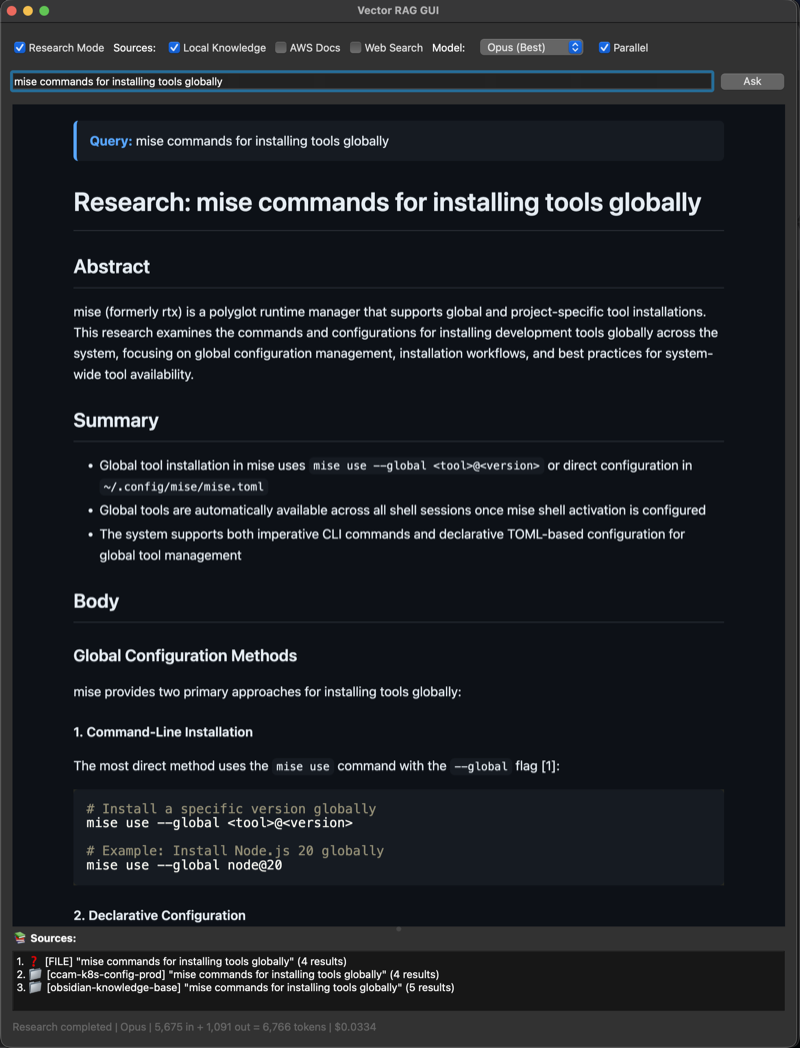
- Qt6 desktop GUI with GitHub-flavored markdown rendering
- Research mode with multi-source synthesis (local RAG, AWS docs, web search)
- Read-only file tools (glob, grep, read) for codebase exploration
- Multi-store selection for comprehensive local searches
- Real-time progress with token usage and cost tracking
- Dark/Light mode toggle
- System tray integration
- Built-in REST API server (starts automatically with GUI)
- Persistent settings (window position, selected stores, tools, model)
Installation
Requires Python 3.14+, uv, and vector-rag-tool.
git clone https://github.com/dnvriend/vector-rag-gui.git
cd vector-rag-gui
uv tool install .
Configuration
AWS Bedrock credentials via environment variables:
export AWS_PROFILE="your-profile"
export AWS_REGION="us-east-1"

# Optional: Override model inference profiles
export ANTHROPIC_DEFAULT_SONNET_MODEL="arn:aws:bedrock:..."
export ANTHROPIC_DEFAULT_OPUS_MODEL="arn:aws:bedrock:..."
export ANTHROPIC_DEFAULT_HAIKU_MODEL="arn:aws:bedrock:..."
Usage
# Launch GUI (REST API starts automatically)
vector-rag-gui

# Launch with custom API port
vector-rag-gui --port 9000

# Launch with specific store pre-selected
vector-rag-gui start --store my-knowledge-base

# List available stores
vector-rag-gui stores
vector-rag-gui stores --json

# Show configuration
vector-rag-gui config

# Verbose output
vector-rag-gui -v    # INFO
vector-rag-gui -vv   # DEBUG
vector-rag-gui -vvv  # TRACE
On startup, a banner displays the API endpoints:
╭─────────────────────────────────────────╮
│         Vector RAG GUI v0.1.0           │
├─────────────────────────────────────────┤
│  REST API: http://127.0.0.1:8000        │
│  Swagger:  http://127.0.0.1:8000/docs   │
╰─────────────────────────────────────────╯
Options
| Option | Description |
|---|---|
-p, --port |
REST API port (default: from settings or 8000) |
-v, --verbose |
Increase verbosity (repeatable) |
-h, --help |
Show help message |
--version |
Show version |
Commands
| Command | Description |
|---|---|
start |
Launch GUI (default) |
serve |
Start REST API server |
stores |
List available vector stores |
config |
Show current configuration |
completion |
Generate shell completion script |
REST API
Start the API server for programmatic access:
vector-rag-gui serve                        # Default: localhost:8000
vector-rag-gui serve --host 0.0.0.0 --port 8080
vector-rag-gui serve --reload               # Development mode
Endpoints
| Method | Endpoint | Description |
|---|---|---|
| GET | /api/v1/health |
Health check |
| GET | /api/v1/models |
List available Claude models |
| GET | /api/v1/tools |
List available research tools |
| GET | /api/v1/stores |
List available vector stores |
| POST | /api/v1/research |
Execute research synthesis |
Research Request
Minimal request (question and stores required):
curl -X POST http://localhost:8000/api/v1/research \
  -H "Content-Type: application/json" \
  -d '{"question": "How does X work?", "stores": ["obsidian-knowledge-base"]}'
Full request with all options:
curl -X POST http://localhost:8000/api/v1/research \
  -H "Content-Type: application/json" \
  -d '{
    "question": "How does X work?",
    "stores": ["obsidian-knowledge-base", "code-docs"],
    "model": "opus",
    "tools": ["local", "aws", "web", "glob", "grep", "read"],
    "top_k": 10
  }'
Request Parameters
| Field | Required | Default | Description |
|---|---|---|---|
question |
Yes | - | Research question |
stores |
Yes | - | Vector store names to query |
model |
No | sonnet |
Model: haiku, sonnet, opus |
tools |
No | ["local", "glob", "grep", "read"] |
Tools to enable |
top_k |
No | 5 |
Results per source (1-20) |
Available Tools
| Tool | Category | Description |
|---|---|---|
local |
search | Search local FAISS vector stores |
aws |
search | Search AWS documentation |
web |
search | Search the web |
glob |
file | Find files by pattern |
grep |
file | Search file contents |
read |
file | Read file contents |
API Documentation
- Swagger UI: http://localhost:8000/docs
- ReDoc: http://localhost:8000/redoc
- OpenAPI: http://localhost:8000/openapi.json
Keyboard Shortcuts
| Shortcut | Action |
|---|---|
Ctrl+L |
Focus search input |
Ctrl+R |
Refresh stores |
Ctrl+D |
Toggle dark/light mode |
Ctrl+I |
Show store info |
Ctrl+M |
Minimize to tray |
Ctrl+Q |
Quit |
Settings
Settings are persisted to ~/.config/vector-rag-gui/settings.json and restored on startup.
Saved settings include:
- Window position and size
- Splitter panel sizes
- Selected stores
- Research mode options (tools, model, dark mode)
- REST API port
Example settings file:
{
  "port": 8000,
  "selected_stores": ["obsidian-knowledge-base"],
  "window": {
    "x": 100,
    "y": 100,
    "width": 900,
    "height": 700,
    "splitter_sizes": [500, 120]
  },
  "research": {
    "research_mode": true,
    "use_local": true,
    "use_aws": false,
    "use_web": false,
    "model": "sonnet",
    "dark_mode": true,
    "full_content": false
  }
}
Development
make install    # Install dependencies
make test       # Run tests
make check      # Run all checks (format, lint, typecheck, test, security)
make pipeline   # Full CI pipeline
License
Author
Dennis Vriend - @dnvriend
Related skills
 Setup Matt Pocock SkillsScaffold the per-repo configuration that Matt Pocock’s engineering agent skills rely on so they understand the issue tracker, triage labels, and domain documentation la495k196k
 Lark AppsConnect Claude, Cursor or custom agents directly to Lark (Feishu) for messaging, document automation, approval workflows and enterprise data access.402k
 CavemanSlash token usage by roughly 75% while keeping every technical detail intact when working with Claude Code, Cursor or similar agents.391k94.7k
 Lark Skill MakerQuickly turn any Lark/Feishu OpenAPI call or multi-step workflow into a reusable agent skill with its own SKILL.md.386k16k
 Running Claude Code Via Litellm CopilotRun Claude Code at a fraction of the cost by routing requests through LiteLLM to the GitHub Copilot Chat API.270k72
 Codex PetGenerate a complete Codex Pet spritesheet and metadata from one reference image without needing an OpenAI key or Codex Pro.246k10