
Pretty Mermaid
- 50 installs
- 795 repo stars
- Updated January 31, 2026
- imxv/preety-mermaid-skills
This is a copy of pretty-mermaid by imxv - installs and ranking accrue to the original listing.
Helps with ai & agent building tasks.
About
pretty-mermaid is a Claude Code skill for ai & agent building. It helps solo builders move faster with AI-assisted development.
- pretty-mermaid
- AI & Agent Building
- AI-coding skill
Pretty Mermaid by the numbers
- 50 all-time installs (skills.sh)
- +1 installs in the week ending Aug 2, 2026 (Skillselion tracking)
- Data as of Aug 3, 2026 (Skillselion catalog sync)
npx skills add https://github.com/imxv/preety-mermaid-skills --skill pretty-mermaidAdd your badge
Show developers this skill is listed on Skillselion. Paste this into your README.

| Installs | 50 |
|---|---|
| repo stars | ★ 795 |
| Last updated | January 31, 2026 |
| Repository | imxv/preety-mermaid-skills ↗ |
What it does
Helps with ai & agent building tasks.
Files
Pretty Mermaid
Render stunning, professionally-styled Mermaid diagrams with one command. Supports SVG for web/docs and ASCII for terminals.
Quick Start
Render a Single Diagram
From a file:
node scripts/render.mjs \
  --input diagram.mmd \
  --output diagram.svg \
  --format svg \
  --theme tokyo-night
From user-provided Mermaid code: 1. Save the code to a .mmd file 2. Run the render script with desired theme
Batch Render Multiple Diagrams
node scripts/batch.mjs \
  --input-dir ./diagrams \
  --output-dir ./output \
  --format svg \
  --theme dracula \
  --workers 4
ASCII Output (Terminal-Friendly)
node scripts/render.mjs \
  --input diagram.mmd \
  --format ascii \
  --use-ascii
---
Workflow Decision Tree
Step 1: What does the user want?
- Render existing Mermaid code → Go to Rendering
- Create new diagram → Go to Creating
- Apply/change theme → Go to Theming
- Batch process → Go to Batch Rendering
Step 2: Choose output format
- SVG (web, docs, presentations) →
--format svg - ASCII (terminal, logs, plain text) →
--format ascii
Step 3: Select theme
- Dark mode docs →
tokyo-night(recommended) - Light mode docs →
github-light - Vibrant colors →
dracula - See all themes → Run
node scripts/themes.mjs
---
Rendering Diagrams
From File
When user provides a .mmd file or Mermaid code block:
1. Save to file (if code block):
   cat > diagram.mmd << 'EOF'
   flowchart LR
       A[Start] --> B[End]
   EOF
2. Render with theme:
   node scripts/render.mjs \
     --input diagram.mmd \
     --output diagram.svg \
     --theme tokyo-night
3. Verify output:
- SVG: Open in browser or embed in docs
- ASCII: Display in terminal
Output Formats
SVG (Scalable Vector Graphics)
- Best for: Web pages, documentation, presentations
- Features: Full color support, transparency, scalable
- Usage:
--format svg --output diagram.svg
ASCII (Terminal Art)
- Best for: Terminal output, plain text logs, README files
- Features: Pure text, works anywhere, no dependencies
- Usage:
--format ascii(prints to stdout) - Options:
--use-ascii- Use pure ASCII (no Unicode)--padding-x 5- Horizontal spacing--padding-y 5- Vertical spacing
Advanced Options
Custom Colors (overrides theme):
node scripts/render.mjs \
  --input diagram.mmd \
  --bg "#1a1b26" \
  --fg "#a9b1d6" \
  --accent "#7aa2f7" \
  --output custom.svg
Transparent Background:
node scripts/render.mjs \
  --input diagram.mmd \
  --transparent \
  --output transparent.svg
Custom Font:
node scripts/render.mjs \
  --input diagram.mmd \
  --font "JetBrains Mono" \
  --output custom-font.svg
---
Creating Diagrams
Using Templates
Step 1: List available templates
ls assets/example_diagrams/
# flowchart.mmd  sequence.mmd  state.mmd  class.mmd  er.mmd
Step 2: Copy and modify
cp assets/example_diagrams/flowchart.mmd my-workflow.mmd
# Edit my-workflow.mmd with user requirements
Step 3: Render
node scripts/render.mjs \
  --input my-workflow.mmd \
  --output my-workflow.svg \
  --theme github-dark
Diagram Type Reference
For detailed syntax and best practices, see DIAGRAM_TYPES.md.
Quick reference:
Flowchart - Processes, workflows, decision trees
flowchart LR
    A[Start] --> B{Decision}
    B -->|Yes| C[Action]
    B -->|No| D[End]
Sequence - API calls, interactions, message flows
sequenceDiagram
    User->>Server: Request
    Server-->>User: Response
State - Application states, lifecycle, FSM
stateDiagram-v2
    [*] --> Idle
    Idle --> Loading
    Loading --> [*]
Class - Object models, architecture, relationships
classDiagram
    User --> Post: creates
    Post --> Comment: has
ER - Database schema, data models
erDiagram
    USER ||--o{ ORDER : places
    ORDER ||--|{ ORDER_ITEM : contains
From User Requirements
Step 1: Identify diagram type
- Process/workflow → Flowchart
- API/interaction → Sequence
- States/lifecycle → State
- Object model → Class
- Database → ER
Step 2: Create diagram file
cat > user-diagram.mmd << 'EOF'
# [Insert generated Mermaid code]
EOF
Step 3: Render and iterate
node scripts/render.mjs \
  --input user-diagram.mmd \
  --output preview.svg \
  --theme tokyo-night

# Review with user, edit diagram.mmd if needed, re-render
---
Theming
List Available Themes
node scripts/themes.mjsOutput:
Available Beautiful-Mermaid Themes:

 1. zinc-light
 2. zinc-dark
 3. tokyo-night
 4. tokyo-night-storm
 5. tokyo-night-light
 6. catppuccin-mocha
 7. catppuccin-latte
 8. nord
 9. nord-light
10. dracula
11. github-dark
12. github-light
13. solarized-dark
14. solarized-light
15. one-dark

Total: 15 themes
Theme Selection Guide
For dark mode documentation:
tokyo-night⭐ - Modern, developer-friendlygithub-dark- Familiar GitHub styledracula- Vibrant, high contrastnord- Cool, minimalist
For light mode documentation:
github-light- Clean, professionalzinc-light- High contrast, printablecatppuccin-latte- Warm, friendly
Detailed theme information: See THEMES.md
Apply Theme to Diagram
node scripts/render.mjs \
  --input diagram.mmd \
  --output themed.svg \
  --theme tokyo-night
Compare Themes
Render the same diagram with multiple themes:
for theme in tokyo-night dracula github-dark; do
  node scripts/render.mjs \
    --input diagram.mmd \
    --output "diagram-${theme}.svg" \
    --theme "$theme"
done
---
Batch Rendering
Batch Render Directory
Step 1: Organize diagrams
diagrams/
├── architecture.mmd
├── workflow.mmd
└── database.mmd
Step 2: Batch render
node scripts/batch.mjs \
  --input-dir ./diagrams \
  --output-dir ./rendered \
  --format svg \
  --theme tokyo-night \
  --workers 4
Output:
Found 3 diagram(s) to render...
✓ architecture.mmd
✓ workflow.mmd
✓ database.mmd

3/3 diagrams rendered successfully
Batch with Multiple Formats
Render both SVG and ASCII:
# SVG for docs
node scripts/batch.mjs \
  --input-dir ./diagrams \
  --output-dir ./svg \
  --format svg \
  --theme github-dark

# ASCII for README
node scripts/batch.mjs \
  --input-dir ./diagrams \
  --output-dir ./ascii \
  --format ascii \
  --use-ascii
Performance Options
--workers N- Parallel rendering (default: 4)- Recommended:
--workers 8for 10+ diagrams
---
Common Use Cases
1. Architecture Diagram for Documentation
# User provides architecture description
# → Create flowchart.mmd
# → Render with professional theme

node scripts/render.mjs \
  --input architecture.mmd \
  --output docs/architecture.svg \
  --theme github-dark \
  --transparent
2. API Sequence Diagram
# User describes API flow
# → Create sequence.mmd
# → Render with clear theme

node scripts/render.mjs \
  --input api-flow.mmd \
  --output api-sequence.svg \
  --theme tokyo-night
3. Database Schema Visualization
# User provides table definitions
# → Create er.mmd
# → Render for database docs

node scripts/render.mjs \
  --input schema.mmd \
  --output database-schema.svg \
  --theme dracula
4. Terminal-Friendly Workflow
# For README or terminal display
node scripts/render.mjs \
  --input workflow.mmd \
  --format ascii \
  --use-ascii > workflow.txt
5. Presentation Slides
# High-contrast for projectors
node scripts/render.mjs \
  --input slides-diagram.mmd \
  --output presentation.svg \
  --theme zinc-light
---
Troubleshooting
beautiful-mermaid Not Installed
Error: Cannot find module 'beautiful-mermaid'Note: This should auto-install on first run. If it fails:
cd /path/to/pretty-mermaid-skill && npm installInvalid Mermaid Syntax
Error: Parse error on line 3Solution: 1. Validate syntax against DIAGRAM_TYPES.md 2. Test on https://mermaid.live/ 3. Check for common errors:
- Missing spaces in
A --> B - Incorrect node shape syntax
- Unclosed brackets
File Not Found
Error: Input file not found: diagram.mmdSolution: Verify file path is correct, use absolute path if needed
---
Resources
scripts/
Executable Node.js scripts for rendering operations:
render.mjs- Main rendering scriptbatch.mjs- Batch processing scriptthemes.mjs- Theme listing utility
references/
Documentation to inform diagram creation:
THEMES.md- Detailed theme reference with examplesDIAGRAM_TYPES.md- Comprehensive syntax guide for all diagram typesapi_reference.md- beautiful-mermaid API documentation
assets/
Template files for quick diagram creation:
example_diagrams/flowchart.mmd- Flowchart templateexample_diagrams/sequence.mmd- Sequence diagram templateexample_diagrams/state.mmd- State diagram templateexample_diagrams/class.mmd- Class diagram templateexample_diagrams/er.mmd- ER diagram template
---
Tips & Best Practices
Performance
- Batch render for 3+ diagrams (parallel processing)
- Keep diagrams under 50 nodes for fast rendering
- Use ASCII for quick previews
Quality
- Use
tokyo-nightorgithub-darkfor technical docs - Add transparency for dark/light mode compatibility:
--transparent - Test theme in target environment before batch rendering
Workflow
1. Start with templates from assets/example_diagrams/ 2. Iterate with user feedback 3. Apply theme last 4. Render both SVG (docs) and ASCII (README) if needed
Accessibility
- Use high-contrast themes for presentations
- Add text labels to all connections
- Avoid color-only information encoding
# macOS
.DS_Store
.AppleDouble
.LSOverride
*.swp
.DS_Store?

# Python
__pycache__/
*.py[cod]
*$py.class
*.so
.Python
build/
develop-eggs/
dist/
downloads/
eggs/
.eggs/
lib/
lib64/
parts/
sdist/
var/
wheels/
pip-wheel-metadata/
share/python-wheels/
*.egg-info/
.installed.cfg
*.egg
MANIFEST

# IDEs
.vscode/
.idea/
*.swp
*.swo
*~
.project
.pydevproject
.settings/

# Test outputs
/test-output/
/output/
*.svg
*.txt
!requirements.txt

# Node.js
node_modules/
npm-debug.log*
yarn-debug.log*
yarn-error.log*

# Environment files
.env
.env.local
.env.*.local

# OS
Thumbs.db
classDiagram
    class User {
        +String id
        +String name
        +String email
        +login()
        +logout()
    }

    class Post {
        +String id
        +String title
        +String content
        +Date createdAt
        +publish()
        +delete()
    }

    class Comment {
        +String id
        +String text
        +Date createdAt
        +edit()
        +delete()
    }

    User "1" --> "*" Post: creates
    Post "1" --> "*" Comment: has
    User "1" --> "*" Comment: writes
erDiagram
    USER ||--o{ ORDER : places
    USER {
        string id PK
        string name
        string email
        date created_at
    }

    ORDER ||--|{ ORDER_ITEM : contains
    ORDER {
        string id PK
        string user_id FK
        decimal total
        date created_at
    }

    ORDER_ITEM }o--|| PRODUCT : references
    ORDER_ITEM {
        string id PK
        string order_id FK
        string product_id FK
        int quantity
        decimal price
    }

    PRODUCT {
        string id PK
        string name
        decimal price
        int stock
    }
flowchart LR
    Start([Start]) --> Input[/Input Data/]
    Input --> Process[Process Data]
    Process --> Decision{Valid?}
    Decision -->|Yes| Success[Success]
    Decision -->|No| Error[Error Handler]
    Error --> Input
    Success --> End([End])
sequenceDiagram
    participant User
    participant Client
    participant Server
    participant Database

    User->>Client: Request Data
    Client->>Server: API Call
    Server->>Database: Query
    Database-->>Server: Result
    Server-->>Client: Response
    Client-->>User: Display Data
stateDiagram-v2
    [*] --> Idle
    Idle --> Loading: Start Request
    Loading --> Success: Data Received
    Loading --> Error: Request Failed
    Success --> Idle: Reset
    Error --> Idle: Retry
    Error --> [*]: Abort
MIT License

Copyright (c) 2026 Beautiful-Mermaid Contributors

Permission is hereby granted, free of charge, to any person obtaining a copy
of this software and associated documentation files (the "Software"), to deal
in the Software without restriction, including without limitation the rights
to use, copy, modify, merge, publish, distribute, sublicense, and/or sell
copies of the Software, and to permit persons to whom the Software is
furnished to do so, subject to the following conditions:

The above copyright notice and this permission notice shall be included in all
copies or substantial portions of the Software.

THE SOFTWARE IS PROVIDED "AS IS", WITHOUT WARRANTY OF ANY KIND, EXPRESS OR
IMPLIED, INCLUDING BUT NOT LIMITED TO THE WARRANTIES OF MERCHANTABILITY,
FITNESS FOR A PARTICULAR PURPOSE AND NONINFRINGEMENT. IN NO EVENT SHALL THE
AUTHORS OR COPYRIGHT HOLDERS BE LIABLE FOR ANY CLAIM, DAMAGES OR OTHER
LIABILITY, WHETHER IN AN ACTION OF CONTRACT, TORT OR OTHERWISE, ARISING FROM,
OUT OF OR IN CONNECTION WITH THE SOFTWARE OR THE USE OR OTHER DEALINGS IN THE
SOFTWARE.
{
  "name": "pretty-mermaid-skill",
  "version": "1.0.0",
  "private": true,
  "type": "module",
  "bin": {
    "render-mermaid": "./scripts/render.mjs",
    "batch-mermaid": "./scripts/batch.mjs",
    "list-mermaid-themes": "./scripts/themes.mjs"
  },
  "dependencies": {
    "beautiful-mermaid": "^0.1.3"
  }
}
<div align="center">
Pretty-Mermaid Skills
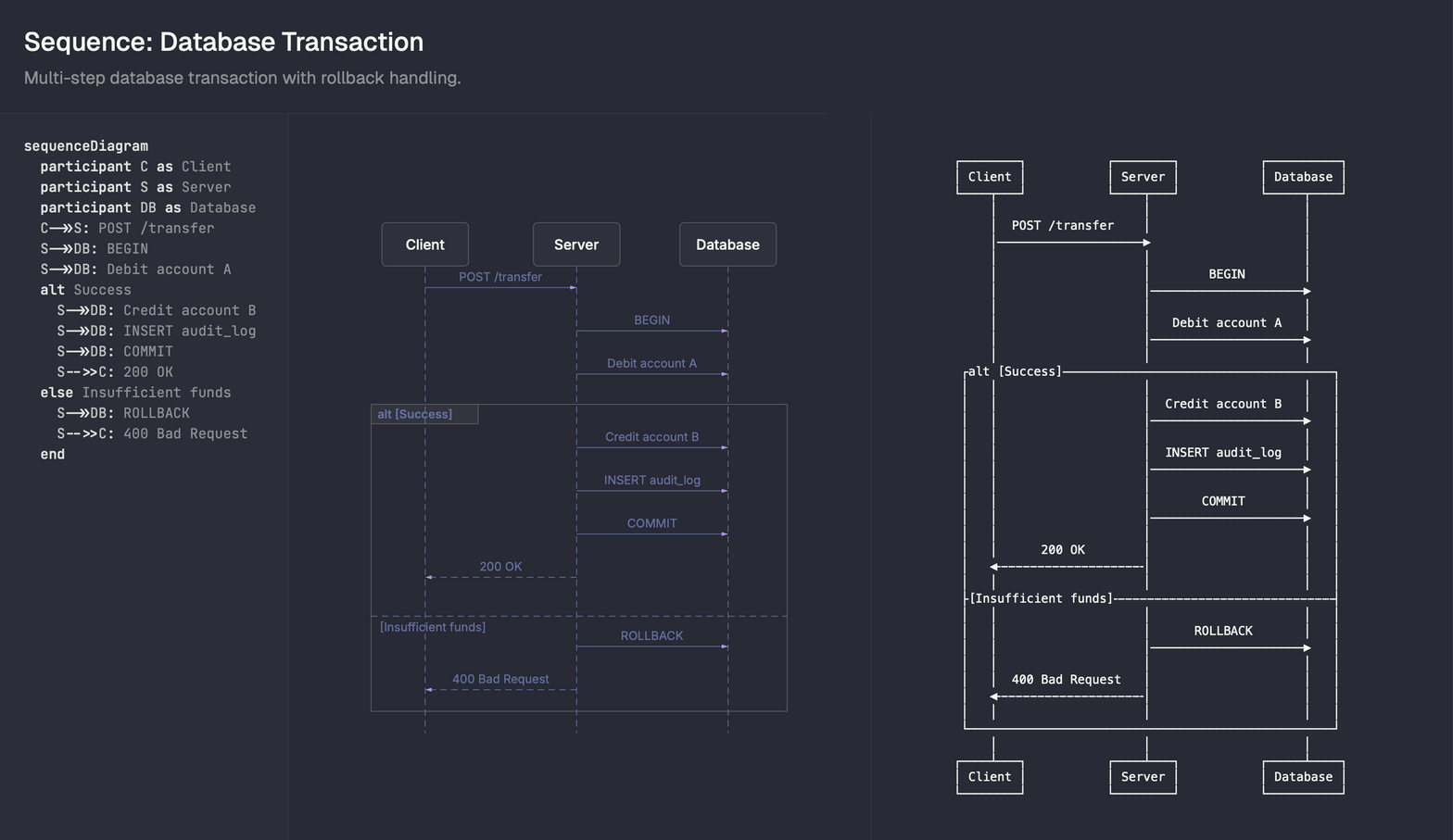
将 Mermaid 图表渲染为精美的 SVG 或 ASCII 艺术
极速、全主题支持、零 DOM 依赖。为 AI 而生。
  
中文 | English
</div>
简介
为 AI 提供的 Mermaid 图表渲染 Skill,支持 SVG 和 ASCII 双格式输出,让您的文档更加生动。
✨ 功能特性
- 📊 多格式支持:支持 SVG 和 ASCII 渲染导出
- 🎨 丰富主题:内置 15 种精美主题,满足不同场景需求
- 📈 全图表支持:支持 Flowchart, Sequence, State, Class, ER 等 5 种常用图表
- ⚡ 高效渲染:支持批量并行渲染,速度飞快
- 📚 开箱即用:提供完整的模板和详细文档
支持主题列表
| Light Themes | Dark Themes | Other |
|---|---|---|
| zinc-light | zinc-dark | nord |
| tokyo-night-light | tokyo-night | nord-light |
| cappuccin-latte | tokyo-night-storm | dracula |
| github-light | cappuccin-mocha | one-dark |
| solarized-light | github-dark | |
| solarized-dark |
🤖 AI 助手集成
支持与以下 AI 编程环境无缝集成,通过自然语言即可调用绘图能力:
- Claude Code
- Cursor
- Gemini CLI
- Antigravity
- OpenCode
- Codex
- qoder
🚀 安装步骤
一键安装
npx skills add https://github.com/imxv/pretty-mermaid-skills --skill pretty-mermaid验证安装
cd Pretty-mermaid
node scripts/themes.mjs提示:首次运行时会自动安装依赖,只需确保您的环境中有 Node.js。
📖 快速开始
列出可用主题
node scripts/themes.mjs渲染单个图表
node scripts/render.mjs \
  --input diagram.mmd \
  --output output.svg \
  --theme tokyo-night
批量渲染
node scripts/batch.mjs \
  --input-dir ./diagrams \
  --output-dir ./output \
  --theme dracula
📂 使用示例
查看 assets/example_diagrams/ 目录下的 5 个模板文件,快速上手:
flowchart.mmd- 流程图sequence.mmd- 时序图state.mmd- 状态图class.mmd- 类图er.mmd- ER 图
📚 完整文档
详细使用指南请参阅 SKILL.md
⚙️ 系统要求
- Node.js 14+
📄 许可证
MIT License
Star History

🙏 致谢
基于 beautiful-mermaid 项目
<div align="center">
Pretty-Mermaid Skills
Render Mermaid diagrams as beautiful SVGs or ASCII art
Ultra-fast, fully themeable, zero DOM dependencies. Built for the AI era.
  
English | 中文
</div>
Introduction
A Mermaid diagram rendering skill for AI, supporting both SVG and ASCII output formats to make your documentation more vivid.
✨ Features
- 📊 Multi-format Support: SVG and ASCII rendering export
- 🎨 Rich Themes: 15 built-in themes for different scenarios
- 📈 Full Diagram Support: Flowchart, Sequence, State, Class, ER and more
- ⚡ High Performance: Batch parallel rendering
- 📚 Ready to Use: Complete templates and detailed documentation
Supported Themes
| Light Themes | Dark Themes | Other |
|---|---|---|
| zinc-light | zinc-dark | nord |
| tokyo-night-light | tokyo-night | nord-light |
| cappuccin-latte | tokyo-night-storm | dracula |
| github-light | cappuccin-mocha | one-dark |
| solarized-light | github-dark | |
| solarized-dark |
🤖 AI Assistant Integration
Seamlessly integrates with the following AI coding environments:
- Claude Code
- Cursor
- Gemini CLI
- Antigravity
- OpenCode
- Codex
- qoder
🚀 Installation
One-click Install
npx skills add https://github.com/imxv/pretty-mermaid-skills --skill pretty-mermaidVerify Installation
cd Pretty-mermaid
node scripts/themes.mjsNote: Dependencies will be auto-installed on first run. Just ensure Node.js is available.
📖 Quick Start
List Available Themes
node scripts/themes.mjsRender Single Diagram
node scripts/render.mjs \
  --input diagram.mmd \
  --output output.svg \
  --theme tokyo-night
Batch Render
node scripts/batch.mjs \
  --input-dir ./diagrams \
  --output-dir ./output \
  --theme dracula
📂 Examples
Check the 5 template files in assets/example_diagrams/:
flowchart.mmd- Flowchartsequence.mmd- Sequence Diagramstate.mmd- State Diagramclass.mmd- Class Diagramer.mmd- ER Diagram
📚 Documentation
See SKILL.md for detailed usage guide.
⚙️ Requirements
- Node.js 14+
📄 License
MIT License
Star History

🙏 Acknowledgments
Based on beautiful-mermaid
Reference Documentation for Beautiful Mermaid
This is a placeholder for detailed reference documentation. Replace with actual reference content or delete if not needed.
Example real reference docs from other skills:
- product-management/references/communication.md - Comprehensive guide for status updates
- product-management/references/context_building.md - Deep-dive on gathering context
- bigquery/references/ - API references and query examples
When Reference Docs Are Useful
Reference docs are ideal for:
- Comprehensive API documentation
- Detailed workflow guides
- Complex multi-step processes
- Information too lengthy for main SKILL.md
- Content that's only needed for specific use cases
Structure Suggestions
API Reference Example
- Overview
- Authentication
- Endpoints with examples
- Error codes
- Rate limits
Workflow Guide Example
- Prerequisites
- Step-by-step instructions
- Common patterns
- Troubleshooting
- Best practices
Mermaid Diagram Types Reference
Flowchart / Graph
Basic Syntax
flowchart LR
    A[Node] --> B[Another Node]
    B --> C{Decision}
    C -->|Yes| D[Result 1]
    C -->|No| E[Result 2]
Node Shapes
[Text]- Rectangle([Text])- Stadium (rounded)[[Text]]- Subroutine (double border)[(Text)]- Cylindrical (database)((Text))- Circle>Text]- Asymmetric shape{Text}- Rhombus (decision){{Text}}- Hexagon[/Text/]- Parallelogram[\Text\]- Trapezoid (alt)
Connections
-->- Arrow---- Line-.->- Dotted arrow==>- Thick arrow--text-->- Arrow with text-->|text|- Arrow with text (alt syntax)
Direction
LR- Left to RightRL- Right to LeftTB/TD- Top to Bottom / Top DownBT- Bottom to Top
Best Practices
- Use
LRdirection for wide screens - Keep decision nodes distinct with
{}shape - Use stadium shapes
([])for start/end - Limit nesting depth to 3 levels
- Group related nodes visually
---
Sequence Diagram
Basic Syntax
sequenceDiagram
    participant A as Alice
    participant B as Bob

    A->>B: Hello Bob
    B-->>A: Hi Alice
    Note right of B: Bob is thinking
    A->>B: Another message
Participants
sequenceDiagram
    participant A
    actor B
    participant C
Message Types
->>- Solid line arrow-->>- Dotted line arrow-x- Solid line with cross--x- Dotted line with cross-)- Solid line with open arrow--)- Dotted line with open arrow
Activations
sequenceDiagram
    A->>+B: Request
    B-->>-A: Response
Notes
sequenceDiagram
    Note left of A: Note on left
    Note right of B: Note on right
    Note over A,B: Note spanning both
Loops & Alt
sequenceDiagram
    loop Every minute
        A->>B: Ping
    end

    alt Success
        B-->>A: OK
    else Failure
        B-->>A: Error
    end
Best Practices
- Use meaningful participant names
- Add notes for complex logic
- Keep sequence linear (avoid too many branches)
- Use activations to show processing time
- Limit to 5-7 participants for clarity
---
State Diagram
Basic Syntax
stateDiagram-v2
    [*] --> State1
    State1 --> State2: Transition
    State2 --> [*]
Composite States
stateDiagram-v2
    [*] --> Active

    state Active {
        [*] --> Running
        Running --> Paused
        Paused --> Running
        Running --> [*]
    }

    Active --> [*]
Choice
stateDiagram-v2
    state if_state <<choice>>
    [*] --> if_state
    if_state --> State1: condition 1
    if_state --> State2: condition 2
Concurrency
stateDiagram-v2
    [*] --> Active

    state Active {
        [*] --> Process1
        --
        [*] --> Process2
    }
Notes
stateDiagram-v2
    State1 --> State2
    note right of State1
        Important note here
    end note
Best Practices
- Start with
[*]for initial state - Use clear transition labels
- Limit composite state depth to 2 levels
- Group related states together
- Use choice nodes for complex branching
---
Class Diagram
Basic Syntax
classDiagram
    class ClassName {
        +String publicField
        -int privateField
        #bool protectedField
        ~String packageField

        +publicMethod()
        -privateMethod()
        #protectedMethod()
        ~packageMethod()
    }
Visibility
+Public-Private#Protected~Package/Internal
Relationships
classDiagram
    ClassA --|> ClassB : Inheritance
    ClassC --* ClassD : Composition
    ClassE --o ClassF : Aggregation
    ClassG --> ClassH : Association
    ClassI -- ClassJ : Link (solid)
    ClassK ..> ClassL : Dependency
    ClassM ..|> ClassN : Realization
Cardinality
classDiagram
    Customer "1" --> "*" Order
    Order "1" --> "1..*" OrderItem
Abstract & Interface
classDiagram
    class AbstractClass {
        <<abstract>>
        +abstractMethod()*
    }

    class Interface {
        <<interface>>
        +method()
    }
Best Practices
- Show only relevant attributes/methods
- Use inheritance sparingly
- Indicate cardinality on associations
- Group related classes visually
- Use interfaces for contracts
---
ER Diagram
Basic Syntax
erDiagram
    CUSTOMER ||--o{ ORDER : places
    ORDER ||--|{ ORDER_ITEM : contains
    PRODUCT ||--o{ ORDER_ITEM : "ordered in"
Cardinality
||--||- One to one}o--o{- Zero or more to zero or more||--o{- One to zero or more}o--||- Zero or more to one||--|{- One to one or more}|--|{- One or more to one or more
Attributes
erDiagram
    CUSTOMER {
        string id PK
        string name
        string email UK
        date created_at
    }

    ORDER {
        string id PK
        string customer_id FK
        decimal total
        date order_date
    }
Attribute Types
- Use standard SQL types:
string,int,decimal,date,bool - Add constraints:
PK(Primary Key),FK(Foreign Key),UK(Unique Key)
Best Practices
- Use UPPERCASE for entity names
- Use snake_case for attribute names
- Always mark PK and FK
- Show only essential attributes
- Keep relationship labels clear
- Limit to 6-8 entities per diagram
---
General Best Practices
Theming
- Use
tokyo-nightfor dark mode documentation - Use
github-lightfor light mode documentation - Use
draculafor vibrant, colorful diagrams - Use
monokaifor code-centric diagrams
Performance
- Keep diagrams under 50 nodes for fast rendering
- Split complex diagrams into multiple files
- Use batch rendering for multiple diagrams
Accessibility
- Add meaningful labels to all connections
- Use high-contrast themes
- Avoid relying solely on color to convey information
- Provide text descriptions for complex diagrams
File Organization
diagrams/
├── architecture/
│   ├── system-overview.mmd
│   └── data-flow.mmd
├── workflows/
│   ├── user-registration.mmd
│   └── checkout-process.mmd
└── database/
    ├── schema-users.mmd
    └── schema-orders.mmd
Beautiful-Mermaid 主题参考
Beautiful-Mermaid 提供 15 个精心设计的内置主题,涵盖亮色和暗色方案。每个主题都基于两种核心颜色(背景 bg 和前景 fg),并可通过可选的丰富色彩进行增强。
快速选择指南
亮色主题
| 主题 | 背景 | 前景 | 用途 |
|---|---|---|---|
zinc-light | #FFFFFF | 自动推导 | 通用亮色主题 |
tokyo-night-light | #d5d6db | #34548a | 柔和亮色 |
catppuccin-latte | #eff1f5 | #8839ef | 清爽亮色 |
nord-light | #eceff4 | #5e81ac | 冰蓝亮色 |
github-light | #ffffff | #0969da | GitHub 亮色风格 |
solarized-light | #fdf6e3 | #268bd2 | Solarized 亮色 |
暗色主题
| 主题 | 背景 | 前景 | 用途 |
|---|---|---|---|
zinc-dark | #18181B | 自动推导 | 通用暗色主题 |
tokyo-night | #1a1b26 | #a9b1d6 | 现代日本风格 |
tokyo-night-storm | #24283b | #a9b1d6 | Tokyo Night 变体 |
catppuccin-mocha | #1e1e2e | #cba6f7 | 温暖暗色 |
nord | #2e3440 | 自动推导 | 北欧冰蓝风格 |
dracula | #282a36 | #f8f8f2 | 经典暗色主题 |
github-dark | #0d1117 | #4493f8 | GitHub 暗色风格 |
solarized-dark | #002b36 | #268bd2 | Solarized 暗色 |
one-dark | #282c34 | 自动推导 | Atom One Dark 风格 |
---
主题详细说明
zinc-light (亮色)
特性: 清洁、通用的浅色主题,适合打印和高对比度场景。
配置:
{
  bg: '#FFFFFF',
  fg: '#27272A'
}
最佳用途:
- 正式文档和报告
- 打印输出
- 演示幻灯片
示例:
graph TD
  A[Start] --> B{Decision}
  B -->|Yes| C[Action]
  B -->|No| D[End]
---
zinc-dark (暗色)
特性: 纯暗色主题,前景色由系统推导。极简主义风格。
配置:
{
  bg: '#18181B',
  fg: '自动推导'
}
最佳用途:
- 终端应用
- 暗色 UI 集成
- 代码编辑器
---
tokyo-night (暗色) ⭐ 推荐
特性: 现代日本风格,柔和的蓝色调,专为开发者设计。
配置:
{
  bg: '#1a1b26',
  fg: '#a9b1d6',
  accent: '#7aa2f7'
}
最佳用途:
- 现代开发文档
- AI 辅助编程
- 代码示例和教程
视觉特性:
- 深蓝色背景(#1a1b26)
- 柔和紫色文字(#a9b1d6)
- 亮蓝色强调(#7aa2f7)
---
tokyo-night-storm (暗色)
特性: Tokyo Night 的深色变体,更深的背景色。
配置:
{
  bg: '#24283b',
  fg: '#a9b1d6',
  accent: '#7aa2f7'
}
最佳用途:
- 极低光环境
- OLED 屏幕优化
- 长时间阅读
---
tokyo-night-light (亮色)
特性: Tokyo Night 的亮色版本,保持同样的配色哲学。
配置:
{
  bg: '#d5d6db',
  fg: '#34548a'
}
最佳用途:
- 日间使用
- 高对比度需求
- 打印友好
---
catppuccin-mocha (暗色)
特性: 温暖、舒适的暗色主题,带有红紫色强调。
配置:
{
  bg: '#1e1e2e',
  fg: '#cba6f7'
}
最佳用途:
- 长时间阅读(眼睛友好)
- 创意项目
- 设计文档
---
catppuccin-latte (亮色)
特性: Catppuccin 的亮色变体,温暖而柔和。
配置:
{
  bg: '#eff1f5',
  fg: '#8839ef'
}
最佳用途:
- 日间亮色环境
- 紫色爱好者
- 设计导向的文档
---
nord (暗色)
特性: 北欧启发的冰蓝色调,专业且冷静。
配置:
{
  bg: '#2e3440',
  fg: '自动推导'
}
最佳用途:
- 企业文档
- 技术规范
- 系统架构图
视觉特性:
- 深灰蓝色背景
- 高对比度文字
- 冷色调整体
---
nord-light (亮色)
特性: Nord 的亮色版本。
配置:
{
  bg: '#eceff4',
  fg: '#5e81ac'
}
最佳用途:
- 日间亮色使用
- 印刷品
- 北欧风格项目
---
dracula (暗色) ⭐ 推荐
特性: 经典的深暗色主题,高对比度。
配置:
{
  bg: '#282a36',
  fg: '#f8f8f2'
}
最佳用途:
- 代码编辑器集成
- 开发者文档
- 命令行工具
视觉特性:
- 极深的背景色
- 明亮的文字
- 紫色和粉色强调
---
github-light (亮色)
特性: GitHub 亮色主题,Web 友好。
配置:
{
  bg: '#ffffff',
  fg: '#0969da'
}
最佳用途:
- GitHub README
- Web 文档
- 在线教程
---
github-dark (暗色)
特性: GitHub 暗色主题,GitHub 用户熟悉。
配置:
{
  bg: '#0d1117',
  fg: '#4493f8'
}
最佳用途:
- GitHub 文档
- GitHub Issues 和 Discussions
- 开源项目
---
solarized-light (亮色)
特性: Ethan Schoonover 设计的经典亮色主题。
配置:
{
  bg: '#fdf6e3',
  fg: '#268bd2'
}
最佳用途:
- 研究论文
- 学术文档
- 精确色彩工作
---
solarized-dark (暗色)
特性: Solarized 的暗色版本,精心调校的对比度。
配置:
{
  bg: '#002b36',
  fg: '#268bd2'
}
最佳用途:
- 长篇文档阅读
- 科学论文
- 编程教材
---
one-dark (暗色)
特性: Atom 编辑器的经典 One Dark 主题。
配置:
{
  bg: '#282c34',
  fg: '自动推导'
}
最佳用途:
- Atom 用户
- JavaScript 项目
- Web 开发文档
---
自定义主题
基础自定义(Mono Mode)
只需要两种颜色就能创建美观的主题:
python render_mermaid.py \
  --input diagram.mmd \
  --output output.svg \
  --bg '#0f0f0f' \
  --fg '#e0e0e0'
系统会自动推导所有其他颜色。
高级自定义(Enriched Mode)
对于更丰富的颜色方案,提供可选的强调色:
python render_mermaid.py \
  --input diagram.mmd \
  --output output.svg \
  --bg '#0f0f0f' \
  --fg '#e0e0e0' \
  --accent '#ff6b6b' \
  --muted '#666666' \
  --line '#4a90e2' \
  --surface '#1a1a1a' \
  --border '#2a2a2a'
颜色选择指南
| 参数 | 作用 | 示例 |
|---|---|---|
--bg | 背景色(必需) | #1a1a1a |
--fg | 文字色(必需) | #e0e0e0 |
--accent | 箭头头和强调 | #7aa2f7 |
--muted | 次级文字和标签 | #666666 |
--line | 边/连接线 | #3d59a1 |
--surface | 节点填充 | #292e42 |
--border | 节点边框 | #3d59a1 |
---
主题选择决策树
你想要的主题风格是什么?
├── 亮色 (Light)
│   ├── 极简/清洁? → zinc-light
│   ├── GitHub 风格? → github-light
│   ├── Solarized? → solarized-light
│   ├── 冰蓝色? → nord-light
│   ├── 紫色? → catppuccin-latte
│   └── 柔和日式? → tokyo-night-light
│
└── 暗色 (Dark)
    ├── 推荐通用? → tokyo-night ⭐
    ├── 经典暗色? → dracula ⭐
    ├── 极简/纯粹? → zinc-dark
    ├── 北欧风格? → nord
    ├── 温暖舒适? → catppuccin-mocha
    ├── GitHub 风格? → github-dark
    ├── 极深背景? → tokyo-night-storm
    ├── 学术/精确? → solarized-dark
    └── Atom 风格? → one-dark
---
实用示例
示例 1:在中文文档中使用 Tokyo Night
python render_mermaid.py \
  --input 架构图.mmd \
  --output 架构图.svg \
  --theme tokyo-night
示例 2:创建打印友好的图表
python render_mermaid.py \
  --input diagram.mmd \
  --output diagram.svg \
  --theme zinc-light
示例 3:批量应用主题
python batch_render.py \
  --input-dir ./diagrams \
  --output-dir ./output \
  --format svg \
  --theme dracula
示例 4:自定义企业主题
python render_mermaid.py \
  --input diagram.mmd \
  --output output.svg \
  --bg '#1a1a1a' \
  --fg '#ffffff' \
  --accent '#0066cc' \
  --border '#333333'
---
颜色值速查表
常用十六进制颜色
| 颜色名 | 十六进制 | 用途 |
|---|---|---|
| 纯白 | #FFFFFF | 亮色背景 |
| 纯黑 | #000000 | 深色背景 |
| 深灰 | #1a1a1a | 友好暗色 |
| 浅灰 | #f0f0f0 | 友好亮色 |
| 蓝色 | #0066cc | 强调色 |
| 绿色 | #00cc00 | 成功色 |
| 红色 | #cc0000 | 警告/错误 |
| 紫色 | #9966cc | 创意项目 |
---
常见问题
Q: 我应该使用哪个主题? A: 如果不确定,推荐使用 tokyo-night(暗色)或 zinc-light(亮色)。
Q: 如何为 GitHub README 选择主题? A: 使用 github-light 或 github-dark,与 GitHub 的主题相匹配。
Q: 我能混合多个主题的颜色吗? A: 可以,使用 Enriched Mode 自定义任意颜色组合。
Q: 主题是否支持透明背景? A: 支持,添加 --transparent 标志。
Q: 如何在 AI 聊天中推荐主题给用户? A: 根据项目类型:开发项目→Tokyo Night,企业→Nord,打印→Zinc Light。
#!/usr/bin/env node

import { execSync } from 'child_process';
import { dirname, join, resolve } from 'path';
import { fileURLToPath } from 'url';
import { readFileSync, writeFileSync, existsSync, mkdirSync, readdirSync } from 'fs';

const __dirname = dirname(fileURLToPath(import.meta.url));
const skillRoot = join(__dirname, '..');

async function loadBeautifulMermaid() {
  try {
    return await import('beautiful-mermaid');
  } catch {}

  console.error('[beautiful-mermaid] Dependency not found. Installing automatically...');
  try {
    execSync('npm install --no-fund --no-audit', {
      cwd: skillRoot,
      stdio: ['pipe', 'pipe', 'inherit'],
      timeout: 120000,
    });
    console.error('[beautiful-mermaid] Installed successfully.\n');
  } catch (e) {
    console.error(`[beautiful-mermaid] Auto-install failed: ${e.message}`);
    console.error(`Manual fix: cd ${skillRoot} && npm install`);
    process.exit(1);
  }

  try {
    const pkgPath = join(skillRoot, 'node_modules', 'beautiful-mermaid', 'dist', 'index.js');
    return await import(pkgPath);
  } catch (e) {
    console.error(`[beautiful-mermaid] Failed to load after install: ${e.message}`);
    process.exit(1);
  }
}

function parseArgs() {
  const args = process.argv.slice(2);
  const opts = {
    inputDir: null,
    outputDir: null,
    format: 'svg',
    theme: null,
    bg: null,
    fg: null,
    transparent: false,
    useAscii: false,
    workers: 4,
  };

  for (let i = 0; i < args.length; i++) {
    const key = args[i];
    const val = args[i + 1];

    switch (key) {
      case '--input-dir': case '-i': opts.inputDir = val; i++; break;
      case '--output-dir': case '-o': opts.outputDir = val; i++; break;
      case '--format': case '-f': opts.format = val; i++; break;
      case '--theme': case '-t': opts.theme = val; i++; break;
      case '--bg': opts.bg = val; i++; break;
      case '--fg': opts.fg = val; i++; break;
      case '--transparent': opts.transparent = true; break;
      case '--use-ascii': opts.useAscii = true; break;
      case '--workers': case '-w': opts.workers = parseInt(val); i++; break;
      case '--help': case '-h':
        console.log(`Usage: node batch.mjs --input-dir <dir> --output-dir <dir> [options]

Options:
  -i, --input-dir <dir>    Input directory containing .mmd files [required]
  -o, --output-dir <dir>   Output directory for rendered files [required]
  -f, --format <fmt>       Output format: svg | ascii (default: svg)
  -t, --theme <name>       Theme name (e.g. tokyo-night, dracula)
      --bg <hex>           Background color
      --fg <hex>           Foreground color
      --transparent        Transparent background (SVG only)
      --use-ascii          Pure ASCII instead of Unicode (ASCII only)
  -w, --workers <n>        Parallel workers (default: 4)`);
        process.exit(0);
    }
  }

  if (!opts.inputDir) {
    console.error('Error: --input-dir is required. Use --help for usage.');
    process.exit(1);
  }
  if (!opts.outputDir) {
    console.error('Error: --output-dir is required. Use --help for usage.');
    process.exit(1);
  }
  if (!existsSync(opts.inputDir)) {
    console.error(`Error: Input directory not found: ${opts.inputDir}`);
    process.exit(1);
  }

  return opts;
}

async function renderFile(file, inputDir, outputDir, opts, lib) {
  const { renderMermaid, renderMermaidAscii, THEMES } = lib;
  const inputPath = join(inputDir, file);
  const ext = opts.format === 'svg' ? '.svg' : '.txt';
  const outputPath = join(outputDir, file.replace(/\.mmd$/, ext));
  const input = readFileSync(inputPath, 'utf8');

  if (opts.format === 'ascii') {
    const ascii = renderMermaidAscii(input, { useAscii: opts.useAscii });
    writeFileSync(outputPath, ascii);
  } else {
    const theme = opts.theme ? THEMES[opts.theme] : undefined;
    const colors = theme || {
      ...(opts.bg && { bg: opts.bg }),
      ...(opts.fg && { fg: opts.fg }),
    };

    const svg = await renderMermaid(input, {
      ...colors,
      transparent: opts.transparent,
    });
    writeFileSync(outputPath, svg);
  }
}

async function main() {
  const opts = parseArgs();
  const lib = await loadBeautifulMermaid();

  mkdirSync(opts.outputDir, { recursive: true });

  const files = readdirSync(opts.inputDir).filter(f => f.endsWith('.mmd'));
  if (files.length === 0) {
    console.error(`No .mmd files found in ${opts.inputDir}`);
    process.exit(1);
  }

  console.log(`Found ${files.length} diagram(s) to render...`);

  let success = 0;
  const failed = [];

  // Process in batches of `workers` size
  for (let i = 0; i < files.length; i += opts.workers) {
    const batch = files.slice(i, i + opts.workers);
    const results = await Promise.allSettled(
      batch.map(file => renderFile(file, opts.inputDir, opts.outputDir, opts, lib))
    );

    results.forEach((result, idx) => {
      const file = batch[idx];
      if (result.status === 'fulfilled') {
        console.log(`\u2713 ${file}`);
        success++;
      } else {
        console.error(`\u2717 ${file}: ${result.reason?.message || result.reason}`);
        failed.push([file, result.reason?.message || String(result.reason)]);
      }
    });
  }

  console.log(`\n${success}/${files.length} diagrams rendered successfully`);

  if (failed.length > 0) {
    console.error(`\n${failed.length} failed:`);
    for (const [file, error] of failed) {
      console.error(`  - ${file}: ${error}`);
    }
    process.exit(1);
  }
}

main().catch(e => {
  console.error('Error:', e.message);
  process.exit(1);
});
#!/usr/bin/env node

import { execSync } from 'child_process';
import { dirname, join, resolve } from 'path';
import { fileURLToPath } from 'url';
import { readFileSync, writeFileSync, existsSync } from 'fs';

const __dirname = dirname(fileURLToPath(import.meta.url));
const skillRoot = join(__dirname, '..');

async function loadBeautifulMermaid() {
  try {
    return await import('beautiful-mermaid');
  } catch {}

  console.error('[beautiful-mermaid] Dependency not found. Installing automatically...');
  try {
    execSync('npm install --no-fund --no-audit', {
      cwd: skillRoot,
      stdio: ['pipe', 'pipe', 'inherit'],
      timeout: 120000,
    });
    console.error('[beautiful-mermaid] Installed successfully.\n');
  } catch (e) {
    console.error(`[beautiful-mermaid] Auto-install failed: ${e.message}`);
    console.error(`Manual fix: cd ${skillRoot} && npm install`);
    process.exit(1);
  }

  try {
    const pkgPath = join(skillRoot, 'node_modules', 'beautiful-mermaid', 'dist', 'index.js');
    return await import(pkgPath);
  } catch (e) {
    console.error(`[beautiful-mermaid] Failed to load after install: ${e.message}`);
    process.exit(1);
  }
}

function parseArgs() {
  const args = process.argv.slice(2);
  const opts = {
    input: null,
    output: null,
    format: 'svg',
    theme: null,
    bg: '#FFFFFF',
    fg: '#27272A',
    font: 'Inter',
    transparent: false,
    useAscii: false,
    paddingX: 5,
    paddingY: 5,
    boxBorderPadding: 1,
  };

  for (let i = 0; i < args.length; i++) {
    const key = args[i];
    const val = args[i + 1];

    switch (key) {
      case '--input': case '-i': opts.input = val; i++; break;
      case '--output': case '-o': opts.output = val; i++; break;
      case '--format': case '-f': opts.format = val; i++; break;
      case '--theme': case '-t': opts.theme = val; i++; break;
      case '--bg': opts.bg = val; i++; break;
      case '--fg': opts.fg = val; i++; break;
      case '--line': opts.line = val; i++; break;
      case '--accent': opts.accent = val; i++; break;
      case '--muted': opts.muted = val; i++; break;
      case '--surface': opts.surface = val; i++; break;
      case '--border': opts.border = val; i++; break;
      case '--font': opts.font = val; i++; break;
      case '--transparent': opts.transparent = true; break;
      case '--use-ascii': opts.useAscii = true; break;
      case '--padding-x': opts.paddingX = parseInt(val); i++; break;
      case '--padding-y': opts.paddingY = parseInt(val); i++; break;
      case '--box-border-padding': opts.boxBorderPadding = parseInt(val); i++; break;
      case '--help': case '-h':
        console.log(`Usage: node render.mjs --input <file> [options]

Options:
  -i, --input <file>       Input Mermaid file (.mmd) [required]
  -o, --output <file>      Output file (default: stdout)
  -f, --format <fmt>       Output format: svg | ascii (default: svg)
  -t, --theme <name>       Theme name (e.g. tokyo-night, dracula)
      --bg <hex>           Background color
      --fg <hex>           Foreground color
      --line <hex>         Edge/connector color
      --accent <hex>       Arrow heads and highlights color
      --muted <hex>        Secondary text color
      --surface <hex>      Node fill tint color
      --border <hex>       Node stroke color
      --font <name>        Font family (default: Inter)
      --transparent        Transparent background (SVG only)
      --use-ascii          Pure ASCII instead of Unicode (ASCII only)
      --padding-x <n>      Horizontal spacing (ASCII only, default: 5)
      --padding-y <n>      Vertical spacing (ASCII only, default: 5)
      --box-border-padding <n>  Padding inside node boxes (ASCII only, default: 1)`);
        process.exit(0);
    }
  }

  if (!opts.input) {
    console.error('Error: --input is required. Use --help for usage.');
    process.exit(1);
  }

  if (!existsSync(opts.input)) {
    console.error(`Error: Input file not found: ${opts.input}`);
    process.exit(1);
  }

  return opts;
}

async function main() {
  const opts = parseArgs();
  const { renderMermaid, renderMermaidAscii, THEMES } = await loadBeautifulMermaid();
  const input = readFileSync(opts.input, 'utf8');

  if (opts.format === 'ascii') {
    const ascii = renderMermaidAscii(input, {
      useAscii: opts.useAscii,
      paddingX: opts.paddingX,
      paddingY: opts.paddingY,
      boxBorderPadding: opts.boxBorderPadding,
    });
    if (opts.output) {
      writeFileSync(opts.output, ascii);
      console.log(`ASCII diagram saved to ${opts.output}`);
    } else {
      console.log(ascii);
    }
  } else {
    const theme = opts.theme ? THEMES[opts.theme] : undefined;
    const colors = theme || {
      bg: opts.bg,
      fg: opts.fg,
      ...(opts.line && { line: opts.line }),
      ...(opts.accent && { accent: opts.accent }),
      ...(opts.muted && { muted: opts.muted }),
      ...(opts.surface && { surface: opts.surface }),
      ...(opts.border && { border: opts.border }),
    };

    const svg = await renderMermaid(input, {
      ...colors,
      font: opts.font,
      transparent: opts.transparent,
    });

    if (opts.output) {
      writeFileSync(opts.output, svg);
      console.log(`SVG diagram saved to ${opts.output}`);
    } else {
      console.log(svg);
    }
  }
}

main().catch(e => {
  console.error('Error:', e.message);
  process.exit(1);
});
#!/usr/bin/env node

import { execSync } from 'child_process';
import { dirname, join } from 'path';
import { fileURLToPath } from 'url';

const __dirname = dirname(fileURLToPath(import.meta.url));
const skillRoot = join(__dirname, '..');

async function loadBeautifulMermaid() {
  try {
    return await import('beautiful-mermaid');
  } catch {}

  console.error('[beautiful-mermaid] Dependency not found. Installing automatically...');
  try {
    execSync('npm install --no-fund --no-audit', {
      cwd: skillRoot,
      stdio: ['pipe', 'pipe', 'inherit'],
      timeout: 120000,
    });
    console.error('[beautiful-mermaid] Installed successfully.\n');
  } catch (e) {
    console.error(`[beautiful-mermaid] Auto-install failed: ${e.message}`);
    console.error(`Manual fix: cd ${skillRoot} && npm install`);
    process.exit(1);
  }

  try {
    const pkgPath = join(skillRoot, 'node_modules', 'beautiful-mermaid', 'dist', 'index.js');
    return await import(pkgPath);
  } catch (e) {
    console.error(`[beautiful-mermaid] Failed to load after install: ${e.message}`);
    process.exit(1);
  }
}

async function main() {
  const { THEMES } = await loadBeautifulMermaid();
  const themes = Object.keys(THEMES);

  console.log('Available Beautiful-Mermaid Themes:\n');
  themes.forEach((theme, i) => {
    console.log(`${String(i + 1).padStart(2)}. ${theme}`);
  });

  console.log(`\nTotal: ${themes.length} themes`);
  console.log('\nUsage:');
  console.log('  node scripts/render.mjs --input diagram.mmd --theme <theme-name> --output output.svg');
}

main().catch(e => {
  console.error('Error:', e.message);
  process.exit(1);
});
Related skills
 Setup Matt Pocock SkillsScaffold the per-repo configuration that Matt Pocock’s engineering agent skills rely on so they understand the issue tracker, triage labels, and domain documentation la495k196k
 Lark AppsConnect Claude, Cursor or custom agents directly to Lark (Feishu) for messaging, document automation, approval workflows and enterprise data access.402k
 CavemanSlash token usage by roughly 75% while keeping every technical detail intact when working with Claude Code, Cursor or similar agents.391k94.7k
 Lark Skill MakerQuickly turn any Lark/Feishu OpenAPI call or multi-step workflow into a reusable agent skill with its own SKILL.md.386k16k
 Running Claude Code Via Litellm CopilotRun Claude Code at a fraction of the cost by routing requests through LiteLLM to the GitHub Copilot Chat API.270k72
 Codex PetGenerate a complete Codex Pet spritesheet and metadata from one reference image without needing an OpenAI key or Codex Pro.246k10