ArcadeDB MCPサーバー
- GitHubスター 1259
- 2026年11月22日更新
com.arcadedb/mcp-serverは、ArcadeDBのグラフ、ドキュメント、ベクトル、時系列データベースへの、内蔵のstdioアクセスを提供するMCPサーバーです。
ArcadeDB MCPとは?
com.arcadedb/mcp-serverは、グラフ、ドキュメント、ベクトル、時系列のワークロードを1つのシステムにまとめたマルチモデルデータベース、ArcadeDBにバンドルされている、公式のModel Context Protocolの窓口です。Postgres、ベクトルDB、グラフツールを継ぎはぎして使うよりもArcadeDBを選んだ開発者は、stdioのMCPを通じて、コーディングエージェントをデータベースに直接つなぐことができます。ローカルやコンテナ化された開発ループにも適しています。レジストリには、docker.io/arcadedata/arcadedbのOCI識別子とともに、バージョン26.4.1-SNAPSHOTが記載されており、ソースと更新はArcadeDataのGitHubリポジトリを参照できます。典型的な用途は、スキーマの調査、エージェントが下書きできるCypherやSQLスタイルの操作、RAGやナレッジグラフ機能のプロトタイピング、独自のMCPブリッジを手作りしないバックエンド連携の改善です。データベースのコンテナ(または同等のインストール)を起動し、MCPクライアントをstdioに接続します。成果物は、APIやエージェントツールの背後にある、照会可能なマルチモデルデータとして扱ってください。自分でデプロイしない限り、クラウド専用のマネージドSaaSではありません。
- ArcadeDBに同梱された内蔵MCPサーバーで、別のアダプターのリポジトリは不要
- マルチモデル対応:グラフ、ドキュメント、ベクトル、時系列を1つのエンジンで提供
- OCIパッケージdocker.io/arcadedata/arcadedb:26.4.1-SNAPSHOTによるstdioトランスポート
- github.com/ArcadeData/arcadedbで公開されているオープンソースプロジェクト
数字で見るArcadeDB MCP Server
- 2026年11月23日時点のデータ(Skillselionカタログ同期)
claude mcp add mcp-server -- docker run -i --rm docker.io/arcadedata/arcadedb:26.4.1-SNAPSHOTArcadeDB MCP Serverのバッジを追加する
このMCPサーバーがSkillselionに掲載されていることを開発者に示せます。READMEに貼り付けてください。

埋め込みコードを取得
| GitHubスター | ★ 1259 |
|---|---|
| パッケージ | docker.io/arcadedata/arcadedb:26.4.1-SNAPSHOT |
| トランスポート | STDIO |
| 認証 | 不要 |
| 最終更新 | 2026年11月22日 |
| リポジトリ | ArcadeData/arcadedb ↗ |
ユースケースと機能
ArcadeDB MCPは何をしますか?
公式のDockerイメージに含まれる、内蔵のstdio MCPサーバーを通じて、ArcadeDBのマルチモデルデータベース(グラフ、ドキュメント、ベクトル、時系列)をエージェントに公開します。
ArcadeDB MCPはどんな人に向いていますか?
グラフとRAG、または時系列の機能をプロトタイピングしていて、DockerのArcadeDBに統一し、アドホックなSQLクライアントではなくネイティブのMCPを使いたい場合に最適です。
見送ったほうがよい場合: マルチモデルの必要がなく、標準のPostgresだけを使うと決めているチームや、自分でデータベースのコンテナを運用したくない方には向きません。
ArcadeDB MCPは何を生成しますか?
stdioでMCPを有効にしてArcadeDBを起動すれば、エージェントが、バックエンド開発で使っているのと同じデータベースインスタンスとやり取りできます。
- エージェントにMCP stdioを接続して動かすArcadeDBインスタンス
- バックエンドとエージェントのツールから照会できるマルチモデルのデータ層
- レジストリパッケージ26.4.1-SNAPSHOTに合わせたバージョン整合のデプロイ
- レジストリバージョンは26.4.1-SNAPSHOT
- OCIパッケージ docker.io/arcadedata/arcadedb:26.4.1-SNAPSHOT(stdioトランスポート)
- モデル化されたパラダイムは4種類:グラフ、ドキュメント、ベクトル、時系列
ArcadeDB MCP ServerのREADMEには何が書かれていますか?
README.md

Multi Model DBMS Built for Extreme Performance

















ArcadeDB is a Multi-Model DBMS created by Luca Garulli, the same founder of OrientDB, after SAP's acquisition. Written from scratch with a brand-new engine made of Alien Technology, ArcadeDB is able to crunch millions of records per second on common hardware with minimal resource usage. ArcadeDB reuses OrientDB's SQL engine (heavily modified) and some utility classes. It's written in LLJ: Low Level Java - still Java21+ but only using low level APIs to leverage advanced mechanical sympathy techniques and reduce Garbage Collector pressure. Highly optimized for extreme performance, it runs from a Raspberry Pi to multiple servers on the cloud.
ArcadeDB is fully transactional DBMS with support for ACID transactions, structured and unstructured data, native graph engine (no joins but links between records), full-text indexing, geospatial querying, and advanced security.
ArcadeDB supports the following models:
- Graph Database (compatible with Neo4j Cypher, Apache Tinkerpop Gremlin and OrientDB SQL)
- Document Database (compatible with the MongoDB driver + MongoDB queries and OrientDB SQL)
- Key/Value (compatible with the Redis driver)
- Search Engine
- Time Series (with InfluxDB Line Protocol, Prometheus remote_write/read, and PromQL support)
- Vector Embedding
- Geospatial
ArcadeDB understands multiple languages:
- SQL (from OrientDB SQL)
- Neo4j Cypher (Open Cypher)
- Apache Gremlin (Apache Tinkerpop v3.7.x)
- GraphQL Language
- MongoDB Query Language
ArcadeDB key capabilities:
- 70+ Built-in Graph Algorithms — Pathfinding, centrality, community detection, link prediction, graph embeddings, and more — all available out of the box
- Parallel Query Execution — SQL queries leverage multiple CPU cores for faster execution on large datasets
- Materialized Views — Pre-computed query results stored and automatically maintained
- MCP Server — Built-in Model Context Protocol server for AI assistant and LLM integration
- AI Assistant — Integrated AI assistant in Studio (Beta) for query help and database management
- Geospatial Indexing — Native spatial queries and proximity searches with
geo.*SQL functions - TimeSeries — Columnar storage with Gorilla/Delta-of-Delta compression, InfluxDB/Prometheus ingestion, PromQL queries, Grafana integration
- Hash Indexes — Extendible hashing for faster exact-match lookups alongside LSM-Tree indexes
ArcadeDB can be used as:
- Embedded from any language on top of the Java Virtual Machine
- Embedded from Python via bindings: arcadedb-embedded-python
- Remotely by using HTTP/JSON
- Remotely by using a Postgres driver (ArcadeDB implements Postgres Wire protocol)
- Remotely by using a Redis driver (only a subset of the operations are implemented)
- Remotely by using a MongoDB driver (only a subset of the operations are implemented)
- By AI assistants via the built-in MCP Server (Model Context Protocol)
For more information, see the documentation.
Use Cases
Explore real-world examples in the arcadedb-usecases repository — self-contained projects with Docker Compose, SQL schemas, and runnable demos covering:
- Recommendation Engine — graph traversal + vector similarity + time-series
- Knowledge Graphs — co-authorship and citation networks with full-text search
- Graph RAG — retrieval-augmented generation with LangChain4j and Neo4j Bolt
- Fraud Detection — graph, vector, and time-series signals with Cypher
- Real-time Analytics — IoT and service monitoring with time-series
- Social Network Analytics — materialized view dashboards with polyglot queries
- Supply Chain — multi-tier visibility with PostgreSQL protocol and JavaScript
Getting started in 5 minutes
Start ArcadeDB Server with Docker:
docker run --rm -p 2480:2480 -p 2424:2424 \
           -e JAVA_OPTS="-Darcadedb.server.rootPassword=playwithdata -Darcadedb.server.defaultDatabases=Imported[root]{import:https://github.com/ArcadeData/arcadedb-datasets/raw/main/orientdb/OpenBeer.gz}" \
           arcadedata/arcadedb:latest
Now open your browser on http://localhost:2480 and play with ArcadeDB Studio and the
imported OpenBeer database to find your favorite beer.
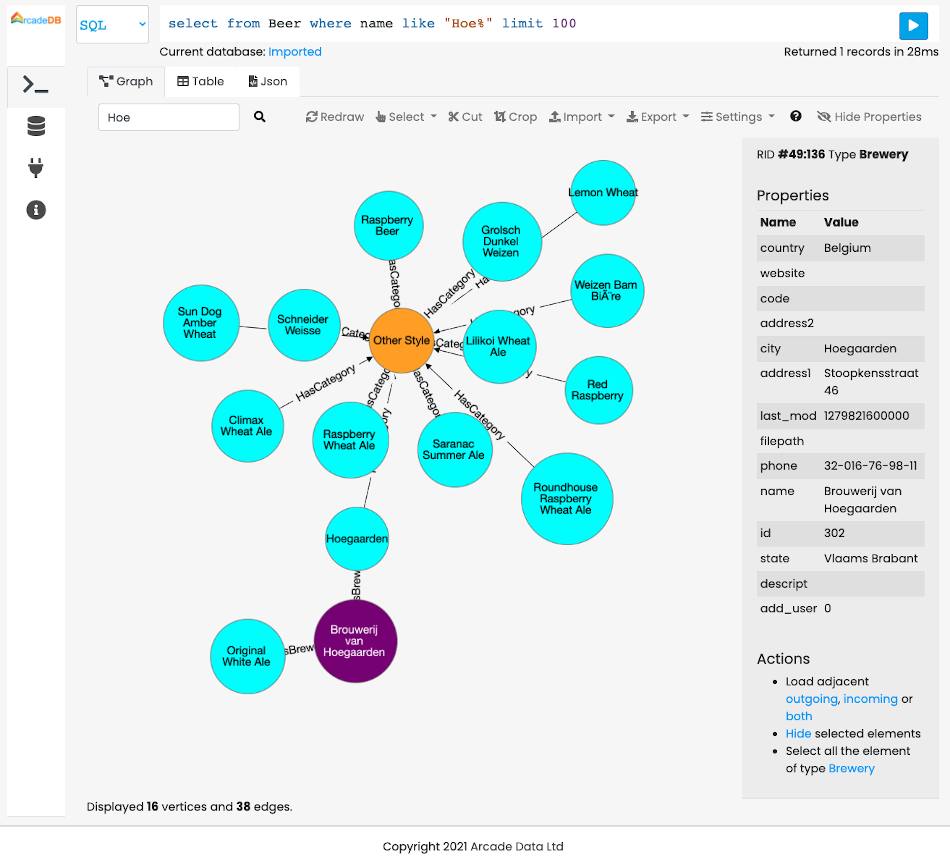
ArcadeDB is cloud-ready with Docker and Kubernetes support.
You can also download the latest release, unpack it on your local hard drive and
start the server with bin/server.sh or bin/server.bat for Windows.
Releases
There are four variants of (about monthly) releases:
full- this is the complete package including all modulesminimal- this package excludes thegremlin,redisw,mongodbw,graphqlmodulesheadless- this package excludes thegremlin,redisw,mongodbw,graphql,studiomodulesbase- core engine, server, and network only — excludes all optional modules (console,gremlin,studio,redisw,mongodbw,postgresw,grpcw,graphql,metrics)
The nightly builds of the repository head can be found here.
You can also build a custom distribution with only the modules you need using the Custom Package Builder:
curl -fsSL https://github.com/ArcadeData/arcadedb/releases/download/26.3.1/arcadedb-builder.sh | \
  bash -s -- --version=26.3.1 --modules=gremlin,studio
Available optional modules: console, gremlin, studio, redisw, mongodbw, postgresw, grpcw, graphql, metrics. The
builder supports interactive mode, Docker image generation, and offline builds from local Maven repositories.
Java Versions
Starting from ArcadeDB 24.4.1 code is compatible with Java 21.
Java 21 packages are available on Maven central and docker images on Docker Hub.
We also support Java 17 on a separate branch java17 for those who cannot upgrade to Java 21 yet through GitHub packages.
To use Java 17 inside your project, add the repository to your pom.xml and reference dependencies as follows:
<repositories>
    <repository>
        <name>github</name>
        <id>github</id>
        <url>https://maven.pkg.github.com/ArcadeData/arcadedb</url>
    </repository>
</repositories>
<dependencies>
<dependency>
    <groupId>com.arcadedb</groupId>
    <artifactId>arcadedb-engine</artifactId>
    <version>26.3.1-java17</version>
</dependency>
</dependencies>
Docker images are available on ghcr.io too:
docker pull ghcr.io/arcadedata/arcadedb:26.3.1-java17
Building and Testing
Build the entire project (skipping tests):
mvn clean install -DskipTests
Build the Docker image (skipping tests):
mvn clean install -DskipTests -Pdocker
Running Unit Tests:
Run the full unit test suite:
mvn test
Some tests are tagged to indicate their cost:
slow- functional tests that take noticeably long (large batches, multi-second elapsed time, big payloads)benchmark- microbenchmarks not intended for regular CI runs
To skip these and run only the fast tests:
mvn test -DexcludedGroups="slow,benchmark"
To run only a specific tag (e.g. benchmark tests in isolation):
mvn test -Dgroups="benchmark"
Running Integration Tests:
Run all the integration tests (requires Docker):
mvn verify -Pintegration
Run integration tests excluding the end-to-end, load, and HA tests:
mvn verify -Pintegration -pl !e2e,!load-tests,!e2e-ha
Running End-to-End Tests:
All end-to-end tests (requires Docker):
mvn verify -Pintegration -pl e2e,load-tests,e2e-ha
Test Suites at a Glance
The codebase is covered by several complementary test suites, each with a distinct scope:
| Suite | How it runs | Scope |
|---|---|---|
| Unit tests | mvn test (*Test) |
Fast, in-process tests of a single component in isolation: engine internals (storage, pages, WAL, indexes, serialization), query parsing and execution (SQL, Cypher, Gremlin, GraphQL), schema, graph traversals, and security. The bulk of coverage; no external services required. Tagged slow/benchmark tests can be excluded. |
| Integration tests | mvn verify -Pintegration (*IT) |
Tests spanning multiple components or a running server within the same JVM/module: HTTP/REST API, wire protocols (Postgres, MongoDB, Redis, Bolt, gRPC), cross-module behavior, and embedded multi-server clustering. Some require Docker. |
End-to-end (e2e) |
mvn verify -Pintegration -pl e2e |
Black-box tests against a real ArcadeDB server in a Docker container (Testcontainers), exercising it the way external clients do: JDBC/Postgres queries, the remote Java API, server-side JavaScript functions, and the Bolt and gRPC drivers. |
Load tests (load-tests) |
mvn verify -Pintegration -pl load-tests |
Throughput and stability under sustained concurrent workloads against single-server and three-node clusters in containers, including high-volume document and time-series ingestion. Verifies no data loss or corruption under contention. |
HA end-to-end (e2e-ha) |
mvn verify -Pintegration -pl e2e-ha |
Resilience and correctness of the high-availability (Raft) cluster under failure: leader failover, rolling restarts, split-brain, network partitions/delay/packet loss, replication convergence, and cluster-wide operations (backup/restore, import, drop database, user management). Uses Testcontainers and fault injection (Toxiproxy). |
Python client (e2e-python) |
cd e2e-python && pytest tests/ |
Verifies the Postgres wire protocol against real Python clients (psycopg2, asyncpg) and the SQLAlchemy ORM, running against a server in a Docker container (Testcontainers). |
JavaScript client (e2e-js) |
cd e2e-js && npm install && npm test |
Verifies Node.js client compatibility over the Bolt (neo4j-driver) and Postgres (pg) protocols, running against a server in a Docker container (Jest + Testcontainers). |
C# client (e2e-csharp) |
cd e2e-csharp/ArcadeDB.E2ETests && dotnet test |
Verifies the Postgres wire protocol against a .NET client (Npgsql), running against a server in a Docker container (xUnit + Testcontainers). |
Community
Join our growing community around the world, for ideas, discussions and help regarding ArcadeDB.
- Chat live with us on Discord
- Follow us on Twitter
- or on Bluesky
- Connect with us on LinkedIn
- or on Facebook
- Questions tagged
#arcadedbon Stack Overflow - View our official Blog
Security
For security issues kindly email us at support@arcadedb.com instead of posting a public issue on GitHub.
License and Attribution
ArcadeDB is Free for any usage and licensed under the liberal Open Source Apache 2 license. We are committed to remaining Open Source Forever — see our Governance for the structural guarantees that make this more than a promise. If you need commercial support, or you need to have an issue fixed ASAP, check our pricing page.
For third-party attributions and copyright notices, see:
- NOTICE - Required legal attributions
- ATTRIBUTIONS.md - Detailed third-party acknowledgments
- LICENSE - Full license text
- GOVERNANCE.md - License guarantee and project governance
Thanks To
 for providing YourKit Profiler to our
committers.
Contributing
We would love for you to get involved with ArcadeDB project. If you wish to help, you can learn more about how you can contribute to this project in the contribution guide.
Have fun with data!
The ArcadeDB Team
Stargazers over time
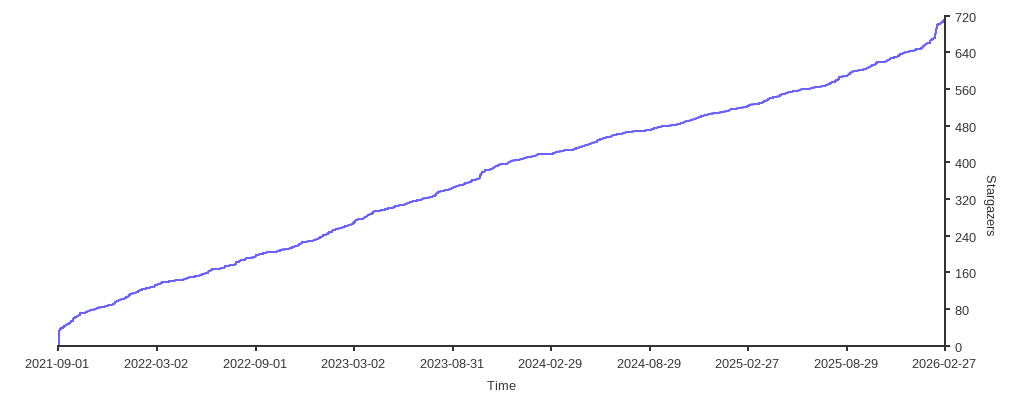
GitHubスター順に並べたClaude Code MCPサーバーの一覧はこちらです。
ArcadeDB MCPに関連するMCPサーバーは?
ArcadeDB MCP Serverは類似ツールとどう違いますか?
データベースネイティブのstdio MCPサーバーです。汎用のSQLアシスタントスキルや、ホスト型のサーバーレスデータストアではありません。
ArcadeDB MCPのよくある質問
com.arcadedb/mcp-serverはどんな人向けですか?
ArcadeDBで開発していて、Claude Code、Cursor、Codexに、MCP経由でグラフ、ドキュメント、ベクトル、時系列のデータを操作させ、推論させたい開発者向けです。
com.arcadedb/mcp-serverはどんなときに使うべきですか?
ArcadeDBが主なストアで、ライブのデータに対して、エージェントの支援を受けながらモデリング、クエリ、結合テストを行いたい、バックエンドの構築の段階で使います。
com.arcadedb/mcp-serverをエージェントに追加するにはどうすればよいですか?
docker.io/arcadedata/arcadedb:26.4.1-SNAPSHOT(または対応するリリース)をプルし、ArcadeDBのプロセスに対してstdioでMCPクライアントを設定したうえで、エージェントでツール一覧を確認してください。