Azure DevOps (ADO) MCPサーバー
- GitHubスター 2083
- 2026年11月6日更新
Azure DevOps用のMCPサーバーです。Azure DevOpsの機能を、エージェントに直接提供します。
Azure DevOps (ADO) MCPとは?
Azure DevOps用のMCPサーバーです。Azure DevOpsの機能を、エージェントに直接提供します。_Trademarks: This project may include trademarks or logos for Microsoft or third parties. Use of Microsoft trademarks or logos must follow [Microsoft’s Trademark & Brand Guidelines](https://www.microsoft.com/en-us/legal/intellectualproperty/trademarks/usage/general). Third-party trademarks are subject to their respective policies._ <!-- version: 2023-04-07 [Do not delete this line, it is used for io.github.PremierInc/azure-devopsやAuthorizationを含む、2つのMCPツールを提供します。Claude Desktop、Cursor、またはMCP互換のクライアントから、アップストリームのサーバーマニフェストを使ってインストールできます。
- "List ADO Builds for 'Contoso'"(「Contosoの ADO ビルドを一覧表示」)
- "List ADO Repos for 'Contoso'"(「Contosoの ADO リポジトリを一覧表示」)
- "List test plans for 'Contoso'"(「Contosoのテスト計画を一覧表示」)
- "List teams for project 'Contoso'"(「プロジェクトContosoのチームを一覧表示」)
- "List iterations for project 'Contoso'"(「プロジェクトContosoのイテレーションを一覧表示」)
数字で見るAzure DevOps (ADO)
- 2026年11月7日時点のデータ(Skillselionカタログ同期)
claude mcp add --transport http azure-devops https://mcp.dev.azure.com/ --header "Authorization: Bearer YOUR_TOKEN"Azure DevOps (ADO)のバッジを追加する
このMCPサーバーがSkillselionに掲載されていることを開発者に示せます。READMEに貼り付けてください。

埋め込みコードを取得
| GitHubスター | ★ 2083 |
|---|---|
| トランスポート | HTTP |
| 認証 | 必要 |
| 最終更新 | 2026年11月6日 |
| リポジトリ | microsoft/azure-devops-mcp ↗ |
ユースケースと機能
Azure DevOps (ADO)をMCPクライアントに接続するにはどうすればよいですか?
Azure DevOps用のMCPサーバーです。Azure DevOpsの機能を、エージェントに直接提供します。
Azure DevOps (ADO) MCPはどんな人に向いていますか?
クラウド・インフラ向けに、Claude、Cursor、独自エージェントにAzure DevOps (ADO)を組み込みたいチームに向いています。
見送ったほうがよい場合: MCP以外のSDKや、stdio/SSEトランスポートを使わないホスト型APIが必要な場合は見送ってください。
Azure DevOps (ADO) MCPは何を生成しますか?
ツール登録とクライアント設定を確認済みの、動作するAzure DevOps (ADO) MCPサーバーが手に入ります。
- エージェントから呼び出せる、Azure DevOpsへのライブ照会と操作
- IDEのチャットとADOのWeb UIを行き来する手間の削減
- [object Object]
Azure DevOps (ADO)で何ができますか?
- 機能
- azure devops (ado):MCPツールの登録 · azure devops (ado):クライアント設定 · azure devops (ado):エージェントのワークフロー連携
- ユースケース
- オーケストレーション
- 実行環境
- リモートサーバー
Azure DevOps (ADO)のドキュメントが説明する機能
The MCP server for Azure DevOps, bringing the power of Azure DevOps directly to your agents.
The MCP server for Azure DevOps, bringing the power of Azure DevOps directly to your agents.
Azure DevOps (ADO)のREADMEには何が書かれていますか?
README.md
⭐ Azure DevOps MCP Server
[!IMPORTANT] The Azure DevOps Remote MCP Server is now available in public preview for all organizations. We recommend migrating to the Remote MCP Server going forward.
This project provides Azure DevOps MCP tooling for AI agents, with a remote-first onboarding experience and a local server option when you need it.
📄 Table of Contents
- 📺 Overview
- 🏆 Expectations
- 🚀 Remote MCP Server (Recommended)
- ⚙️ Supported Tools
- 🔌 Local MCP Server Installation (Optional)
- 🌏 Using Domains (local)
- 🐥 Project and Team Defaults (local)
- 📝 Troubleshooting
- 🎩 Examples & Best Practices
- 🙋♀️ Frequently Asked Questions
- 📌 Contributing
📺 Overview
The Azure DevOps MCP Server brings Azure DevOps context to your agents. Try prompts like:
- "List my ADO projects"
- "List ADO Builds for 'Contoso'"
- "List ADO Repos for 'Contoso'"
- "List test plans for 'Contoso'"
- "List teams for project 'Contoso'"
- "List iterations for project 'Contoso'"
- "List my work items for project 'Contoso'"
- "List work items in current iteration for 'Contoso' project and 'Contoso Team'"
- "List all wikis in the 'Contoso' project"
- "Create a wiki page '/Architecture/Overview' with content about system design"
- "Update the wiki page '/Getting Started' with new onboarding instructions"
- "Get the content of the wiki page '/API/Authentication' from the Documentation wiki"
🏆 Expectations
The Azure DevOps MCP Server is built around tools that are concise, simple, focused, and easy to use, with each one designed for a specific scenario. We intentionally avoid creating complex tools that try to do too much. The goal is to provide a thin abstraction layer over the REST APIs that makes data access straightforward while allowing the language model to handle the more complex reasoning.
🚀 Remote MCP Server (Recommended)
The Azure DevOps Remote MCP Server is now available in public preview.
Over time, the Remote MCP Server will replace this local MCP Server. We will continue to support the local server for now, but future investments will primarily focus on the remote experience.
We encourage all users of the local MCP Server to begin migrating to the Remote MCP Server.
If you encounter issues with tools, need support, or have a feature request, you can report an issue using the Remote MCP Server issue template. During the preview period, we will track Remote MCP Server issues through this repository.
[!WARNING] Internal Microsoft users of the Remote MCP Server should not create issues in this repository. Please use the dedicated Teams channel instead.
For complete instructions, see the Remote MCP Server onboarding documentation.
Quick start with .vscode/mcp.json
Use this configuration to connect directly to the Azure DevOps-hosted endpoint using streamable HTTP transport:
{
  "servers": {
    "ado-remote-mcp": {
      "url": "https://mcp.dev.azure.com/{organization}",
      "type": "http"
    }
  },
  "inputs": []
}
See documentation for additional configuration options.
After saving .vscode/mcp.json, start the server from the MCP view in VS Code, then run a prompt like List ADO projects.
⚙️ Supported Tools
See the Available Tools documentation for the complete list of available remote tools.
For a comprehensive list of local tools, see TOOLSET.md.
🔌 Local MCP Server Installation (Optional)
[!IMPORTANT] Start with the Remote MCP Server first. Use the local MCP Server only if your scenario specifically requires a local
stdiosetup.
Use this section if you specifically need the local stdio server experience. For most users, start with the Remote MCP Server section above.
For the best experience, use Visual Studio Code and GitHub Copilot. See the getting started documentation to use our MCP Server with other tools such as Visual Studio 2022, Codex, Claude Code, Cursor, Opencode, and Kilocode.
Prerequisites
- Install VS Code or VS Code Insiders
- Install Node.js 20+
- Open VS Code in an empty folder
Installation
🧨 Install from Public Feed
This installation method is the easiest for all users of Visual Studio Code.
🎥 Watch this quick start video to get up and running in under two minutes!
Steps
In your project, add a .vscode\mcp.json file with the following content:
{
  "inputs": [
    {
      "id": "ado_org",
      "type": "promptString",
      "description": "Azure DevOps organization name  (e.g. 'contoso')"
    }
  ],
  "servers": {
    "ado": {
      "type": "stdio",
      "command": "npx",
      "args": ["-y", "@azure-devops/mcp", "${input:ado_org}"]
    }
  }
}
🔥 To stay up to date with the latest features, you can use our nightly builds. Simply update your mcp.json configuration to use @azure-devops/mcp@next. Here is an updated example:
{
  "inputs": [
    {
      "id": "ado_org",
      "type": "promptString",
      "description": "Azure DevOps organization name  (e.g. 'contoso')"
    }
  ],
  "servers": {
    "ado": {
      "type": "stdio",
      "command": "npx",
      "args": ["-y", "@azure-devops/mcp@next", "${input:ado_org}"]
    }
  }
}
Save the file, then click 'Start'.
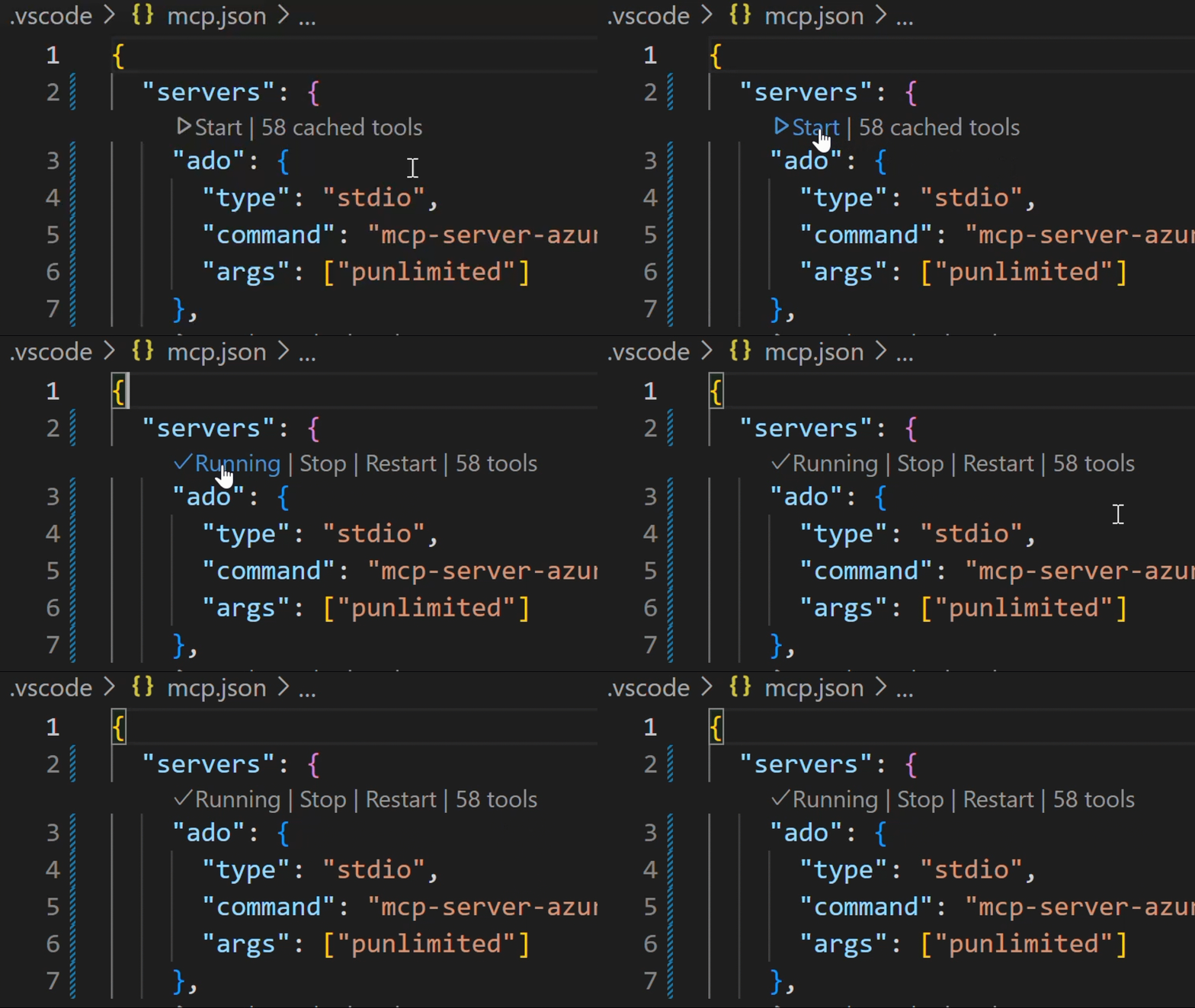
In chat, switch to Agent Mode.
Click "Select Tools" and choose the available tools.

Open GitHub Copilot Chat and try a prompt like List ADO projects. The first time an ADO tool is executed browser will open prompting to login with your Microsoft account. Please ensure you are using credentials matching selected Azure DevOps organization.
💥 We strongly recommend creating a
.github\copilot-instructions.mdin your project. This will enhance your experience using the Azure DevOps MCP Server with GitHub Copilot Chat. To start, just include "This project uses Azure DevOps. Always check to see if the Azure DevOps MCP server has a tool relevant to the user's request" in your copilot instructions file.
See the getting started documentation to use our MCP Server with other tools such as Visual Studio 2022, Codex, Claude Code, and Cursor.
🌏 Using Domains (local)
Azure DevOps exposes a large surface area. As a result, our Azure DevOps MCP Server includes many tools. To keep the toolset manageable, avoid confusing the model, and respect client limits on loaded tools, use Domains to load only the areas you need. Domains are named groups of related tools (for example: core, work, work-items, repositories, wiki). Add the -d argument and the domain names to the server args in your mcp.json to list the domains to enable.
For example, use "-d", "core", "work", "work-items" to load only Work Item related tools (see the example below).
{
  "inputs": [
    {
      "id": "ado_org",
      "type": "promptString",
      "description": "Azure DevOps organization name  (e.g. 'contoso')"
    }
  ],
  "servers": {
    "ado_with_filtered_domains": {
      "type": "stdio",
      "command": "npx",
      "args": ["-y", "@azure-devops/mcp", "${input:ado_org}", "-d", "core", "work", "work-items"]
    }
  }
}
Domains that are available are: core, work, work-items, search, test-plans, repositories, wiki, pipelines, advanced-security
We recommend that you always enable core tools so that you can fetch project level information.
By default all domains are loaded
🐥 Project and Team Defaults (local)
You can also configure default Azure DevOps project and team values from .vscode/mcp.json using project and team, so tools can skip selection prompts.
Example .vscode/mcp.json
{
  "servers": {
    "ado": {
      "type": "stdio",
      "command": "npx",
      "args": ["-y", "@azure-devops/mcp", "myorg", "--authentication", "azcli"],
      "env": {
        "ado_mcp_project": "Contoso",
        "ado_mcp_team": "Fabrikam Team"
      }
    }
  }
}
📝 Troubleshooting
See the Troubleshooting guide for help with common issues and logging.
🎩 Examples & Best Practices
Explore example prompts in our Examples documentation.
For best practices and tips to enhance your experience with the MCP Server, refer to the How-To guide.
🙋♀️ Frequently Asked Questions
For answers to common questions about the Azure DevOps MCP Server, see the Frequently Asked Questions.
📌 Contributing
We welcome contributions! During preview, please file issues for bugs, enhancements, or documentation improvements.
See our Contributions Guide for:
- 🛠️ Development setup
- ✨ Adding new tools
- 📝 Code style & testing
- 🔄 Pull request process
⚠️ Please read the Contributions Guide before creating a pull request.
🤝 Code of Conduct
This project follows the Microsoft Open Source Code of Conduct. For questions, see the FAQ or contact open@microsoft.com.
📈 Project Stats
🏆 Hall of Fame
Thanks to all contributors who make this project awesome! ❤️
Generated with contrib.rocks
License
Licensed under the MIT License.
Trademarks: This project may include trademarks or logos for Microsoft or third parties. Use of Microsoft trademarks or logos must follow Microsoft’s Trademark & Brand Guidelines. Third-party trademarks are subject to their respective policies.
GitHubスター順に並べたClaude Code MCPサーバーの一覧はこちらです。
Azure DevOps (ADO) MCPに関連するMCPサーバーは?
Azure DevOps (ADO)は類似ツールとどう違いますか?
MCP経由のホスト型DevOps API連携です。ローカルのgit用スキルでも、汎用のCIジェネレーターでもありません。
Azure DevOps (ADO) MCPのよくある質問
Azure DevOps (ADO) MCPは何をするものですか?
Azure DevOps用のMCPサーバーです。Azure DevOpsの機能を、エージェントに直接提供します。
Azure DevOps (ADO) MCPはどんなときに使いますか?
Azure DevOps (ADO) MCP MCP、Azure DevOps用のMCPサーバーがAzure DevOpsの機能をエージェントに直接提供することについて知りたいときに使います。
このMCPサーバーは安全にインストールできますか?
本番環境にインストールする前に、このページの「Security Audits」パネルを確認してください。