DBHub MCPサーバー
- GitHubスター 3808
- 2026年11月8日更新
DBHubは、PostgreSQL、MySQL、SQL Server、SQLite、MariaDBへ、トークン効率のよいアクセスをエージェントに提供するMCPサーバーです。
DBHub MCPとは?
DBHubは、Bytebaseが提供するミニマルなModel Context Protocolサーバーです。巨大なスキーマダンプで毎ターンを膨らませることなく、エージェントに実際のデータベースを扱わせたい開発者向けです。Postgres、MySQL、MariaDB、SQL Server、SQLiteの接続文字列または従来のホスト認証情報を指定し、Claude CodeやCursorなどのホストにstdioのnpmパッケージを登録します。SaaSやAPIのプロジェクトで、バックエンドや連携の作業中にクエリのデバッグ、マイグレーションの検証、本番に近いデータの調査を行う場面に適しています。リクエスト単位で課金される場合や、セッションの途中でコンテキストの上限に達する場合には、トークン効率の高さが効いてきます。データストアに接続する、用途を絞ったブリッジであり、完全な管理UIやマイグレーションランナーではないため、ORMやマイグレーションのワークフローと組み合わせてください。DSNやパスワードはシークレットとして扱い、可能なら開発用または読み取り専用のロールにアクセスを限定してください。
- クエリごとのモデルコンテキストの使用量を抑えることを狙った、トークン効率の高いMCP設計
- PostgreSQL、MySQL、MariaDB、SQL Server、SQLiteの5つのエンジンに対応
- DSN、またはDB_TYPE、host、port、user、password、DB_NAMEの各変数で設定
- バージョン0.22.2のstdio npmパッケージ@bytebase/dbhub
- Model Context Protocolクライアント向けに公開されたサーバースキーマ2025-12-11
数字で見るDBHub
- 2026年11月9日時点のデータ(Skillselionカタログ同期)
claude mcp add --env DSN=YOUR_DSN --env DB_TYPE=YOUR_DB_TYPE --env DB_HOST=YOUR_DB_HOST --env DB_PORT=YOUR_DB_PORT --env DB_USER=YOUR_DB_USER --env DB_PASSWORD=YOUR_DB_PASSWORD --env DB_NAME=YOUR_DB_NAME --env TRANSPORT=YOUR_TRANSPORT --env PORT=YOUR_PORT --env ID=YOUR_ID --env SSH_HOST=YOUR_SSH_HOST --env SSH_PORT=YOUR_SSH_PORT --env SSH_USER=YOUR_SSH_USER --env SSH_PASSWORD=YOUR_SSH_PASSWORD --env SSH_KEY=YOUR_SSH_KEY --env SSH_PASSPHRASE=YOUR_SSH_PASSPHRASE dbhub -- npx -y @bytebase/dbhubDBHubのバッジを追加する
このMCPサーバーがSkillselionに掲載されていることを開発者に示せます。READMEに貼り付けてください。

埋め込みコードを取得
| GitHubスター | ★ 3808 |
|---|---|
| パッケージ | @bytebase/dbhub |
| トランスポート | STDIO |
| 認証 | 必要 |
| 最終更新 | 2026年11月8日 |
| リポジトリ | bytebase/dbhub ↗ |
ユースケースと機能
DBHub MCPは何をしますか?
コーディングエージェントから、トークンを大量に消費するコンテキストを避けつつ、PostgreSQL、MySQL、SQL Server、SQLite、MariaDBをクエリ・調査できます。
DBHub MCPはどんな人に向いていますか?
バックエンドを構築していて、統合やデバッグのセッションで、複数のSQLエンジンを1つのMCPサーバーでカバーしたい方に最適です。
見送ったほうがよい場合: 管理された変更管理、ビジュアルなスキーマ設計、接続範囲を厳密に絞らない本番への書き込みアクセスが必要な場合は見送ってください。
DBHub MCPは何を生成しますか?
DSNまたはホスト認証情報でDBHubを登録すれば、用途を絞った小さなツール群を通じて、エージェントがMCP経由でデータベースを意識した作業を実行できます。
- エージェントから、設定した1つのSQLデータベースへのライブMCP接続
- Postgres、MySQL、MariaDB、SQL Server、SQLiteにわたる複数エンジン対応
- 日常的なデータ作業で、スキーマ全体をチャットに貼り付ける手間を軽減
- サーバーバージョンは0.22.2
- npmパッケージ @bytebase/dbhub
- 対応するDBは5種類:postgres、mysql、mariadb、sqlserver、sqlite
DBHubのREADMEには何が書かれていますか?
README.md
[!NOTE]
Brought to you by Bytebase, open-source database DevSecOps platform.

            +------------------+    +--------------+    +------------------+
            |                  |    |              |    |                  |
            |                  |    |              |    |                  |
            |  Claude Desktop  +--->+              +--->+    PostgreSQL    |
            |                  |    |              |    |                  |
            |  Claude Code     +--->+              +--->+    SQL Server    |
            |                  |    |              |    |                  |
            |  Cursor          +--->+    DBHub     +--->+    SQLite        |
            |                  |    |              |    |                  |
            |  VS Code         +--->+              +--->+    MySQL         |
            |                  |    |              |    |                  |
            |  Copilot CLI     +--->+              +--->+    MariaDB       |
            |                  |    |              |    |                  |
            |                  |    |              |    |                  |
            +------------------+    +--------------+    +------------------+
                 MCP Clients           MCP Server             Databases
DBHub is a zero-dependency, token efficient MCP server implementing the Model Context Protocol (MCP) server interface. This lightweight gateway allows MCP-compatible clients to connect to and explore different databases:
- Local Development First: Zero dependency, token efficient with just two MCP tools to maximize context window
- Multi-Database: PostgreSQL, MySQL, MariaDB, SQL Server, and SQLite through a single interface
- Multi-Connection: Connect to multiple databases simultaneously with TOML configuration
- Guardrails: Read-only mode, row limiting, and query timeout to prevent runaway operations
- Secure Access: SSH tunneling and SSL/TLS encryption
Supported Databases
PostgreSQL, MySQL, SQL Server, MariaDB, and SQLite.
MCP Tools
DBHub implements MCP tools for database operations:
- execute_sql: Execute SQL queries with transaction support and safety controls
- search_objects: Search and explore database schemas, tables, columns, indexes, and procedures with progressive disclosure
- Custom Tools: Define reusable, parameterized SQL operations in your
dbhub.tomlconfiguration file
Workbench
DBHub includes a built-in web interface for interacting with your database tools. It provides a visual way to execute queries, run custom tools, and view request traces without requiring an MCP client.
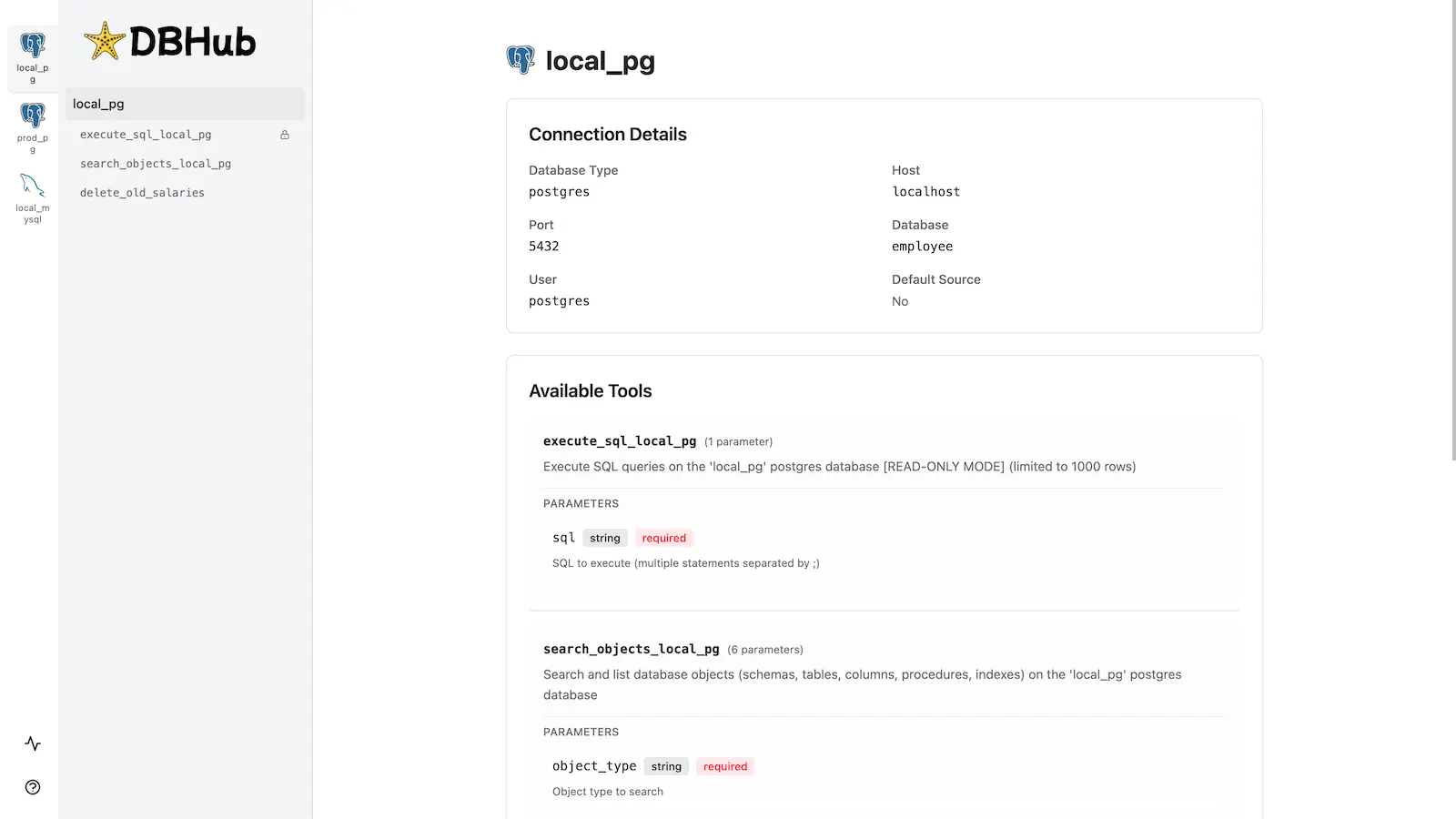
Installation
See the full Installation Guide for detailed instructions.
Quick Start
Docker:
docker run --rm --init \
   --name dbhub \
   --publish 8080:8080 \
   bytebase/dbhub \
   --transport http \
   --port 8080 \
   --dsn "postgres://user:password@localhost:5432/dbname?sslmode=disable"
NPM: (requires Node.js >= 22.5.0)
npx @bytebase/dbhub@latest --transport http --port 8080 --dsn "postgres://user:password@localhost:5432/dbname?sslmode=disable"
Demo Mode:
npx @bytebase/dbhub@latest --transport http --port 8080 --demo
Restrict to loopback (recommended for production):
npx @bytebase/dbhub@latest --transport http --host 127.0.0.1 --port 8080 --demo
The HTTP transport defaults to
--host 0.0.0.0, exposing DBHub on every network interface. For production, bind to127.0.0.1and front DBHub with a reverse proxy (nginx/Caddy) or firewall — DBHub does not authenticate HTTP clients.The HTTP transport also has built-in DNS-rebinding protection: it only accepts requests whose
Hostis loopback, this machine's own hostname/IPs, or a name you allow via--allowed-hosts. If a client behind a reverse proxy or custom DNS name gets a403, add that hostname with--allowed-hosts.
See Command-Line Options for all available parameters.
Multi-Database Setup
Connect to multiple databases simultaneously using TOML configuration files. Perfect for managing production, staging, and development databases from a single DBHub instance.
See Multi-Database Configuration for complete setup instructions.
Development
Requires Node.js >= 22.5.0 (DBHub uses the built-in node:sqlite module).
# Install dependencies
pnpm install

# Run in development mode
pnpm dev

# Build and run for production
pnpm build && pnpm start --transport stdio --dsn "postgres://user:password@localhost:5432/dbname"
Contributors
Star History
GitHubスター順に並べたClaude Code MCPサーバーの一覧はこちらです。
DBHub MCPに関連するMCPサーバーは?
DBHubは類似ツールとどう違いますか?
MCPのデータベースブリッジです。ホスト型のデータベースコンソールでも、マイグレーション用のスキルでもありません。
DBHub MCPのよくある質問
io.github.bytebase/dbhubはどんな人向けですか?
APIやSaaSのバックエンドを構築しながら、Claude Code、Cursor、Codexで一般的なリレーショナルデータベースにMCP経由でSQLアクセスしたい開発者向けです。
io.github.bytebase/dbhubはどんなときに使いますか?
DDLをチャットにコピーする代わりに、データレイヤーの統合、クエリの検証、スキーマの調査を行うBuildフェーズで使います。
io.github.bytebase/dbhubをエージェントに追加するにはどうすればよいですか?
npmから@bytebase/dbhubをインストールし、MCPの設定にDSN、またはDB_TYPEとホストの認証情報を指定します。エージェントのMCP設定で、stdio経由でサーバーに接続してください。