MCP Server Browser
- GitHubスター 4万
- 2026年10月9日更新
mcp-server-browserは、コーディングエージェントがChrome、Edge、Firefoxを操作できるようにする、ByteDance製のMCPサーバーです。
MCP Server Browserとは?
ByteDanceのmcp-server-browserは、Model Context Protocol経由で、コーディングエージェントにブラウザー操作(browser use)へのアクセスを提供します。npmでは @agent-infra/mcp-server-browser として公開されており、対象のブラウザーチャネル(chrome、edge、firefox)に加え、必要に応じてChrome DevTools ProtocolまたはWebSocketのエンドポイント、実行ファイルのパス、出力ディレクトリを指定して設定します。開発者は、エージェントに実際のブラウザーを操作させて、フローの検証やページコンテキストの収集を行わせるために使います。stdio経由でローカル実行され、ホスト型サービスはありません。
- ブラウザー操作(browser use)アクセスをMCPツールとして公開
- chrome、edge、firefoxの各チャネルに対応
- CDPエンドポイント、WebSocketエンドポイント、実行ファイルパスの設定を受け付けます
- @agent-infra/mcp-server-browser でstdio経由のローカル実行
数字で見るMcp Server Browser
- 2026年11月9日時点のデータ(Skillselionカタログ同期)
claude mcp add --env DISPLAY=YOUR_DISPLAY mcp-server-browser -- npx -y @agent-infra/mcp-server-browserMcp Server Browserのバッジを追加する
このMCPサーバーは現在、SkillselionのTop 25で#9です。アワードバッジは最新の順位を表示し、自動で更新されます。

埋め込みコードを取得
このMCPサーバーがSkillselionに掲載されていることを開発者に示せます。READMEに貼り付けてください。

埋め込みコードを取得
| GitHubスター | ★ 4万 |
|---|---|
| パッケージ | @agent-infra/mcp-server-browser |
| トランスポート | STDIO, HTTP, SSE |
| 認証 | 不要 |
| 最終更新 | 2026年10月9日 |
| リポジトリ | bytedance/UI-TARS-desktop ↗ |
ユースケースと機能
MCP Server Browser:エージェントセッションを離れずに、実際のブラウザーを操作してフローを確認したり、ページの内容を取得したりするにはどうすればよいですか?
Webスクレイピング
MCP Server Browserはどんな人に向いていますか?
開発中に、UIフローの検証やページコンテキストの収集のために、実際のブラウザーを操作する必要があるエージェント向けです。
見送ったほうがよい場合: Playwrightのような、メンテナンスされたエンドツーエンドのテストスイートや、本番環境のブラウザー監視が必要なチームには向きません。
MCP Server Browserは何を生成しますか?
エージェントは選択したブラウザーチャネルを操作し、設定したディレクトリにトレースや出力を書き込めます。
- ブラウザ操作、トレース、出力を、設定した出力ディレクトリに書き出す
- 3つのブラウザチャンネルに対応:chrome、edge、firefox
Mcp Server Browserで何ができますか?
無料のオープンソース。ローカルで動作し、APIキーは不要です。
- 機能
- ブラウザ自動化 · ブラウザ利用 · CDP接続
- 連携先
- chrome
- ユースケース
- Webスクレイピング · テスト
- 実行環境
- ローカルで実行
- 料金
- 無料
Mcp Server Browserのドキュメントが説明する機能
MCP server for browser use access
browser or chrome channel to use, possible values: chrome, edge, firefox.
Chrome DevTools Protocol endpoint URL
Mcp Server BrowserのREADMEには何が書かれていますか?
README.md

Introduction
English | 简体中文
TARS* is a Multimodal AI Agent stack, currently shipping two projects: Agent TARS and UI-TARS-desktop:
| Agent TARS | UI-TARS-desktop |
|---|---|
|
Agent TARS is a general multimodal AI Agent stack, it brings the power of GUI Agent and Vision into your terminal, computer, browser and product.
It primarily ships with a CLI and Web UI for usage. It aims to provide a workflow that is closer to human-like task completion through cutting-edge multimodal LLMs and seamless integration with various real-world MCP tools. |
UI-TARS Desktop is a desktop application that provides a native GUI Agent based on the UI-TARS model.
It primarily ships a local and remote computer as well as browser operators. |
Table of Contents
News
- [2025-11-05] 🎉 We're excited to announce the release of Agent TARS CLI v0.3.0! This version brings streaming support for multiple tools (shell commands, multi-file structured display), runtime settings with timing statistics for tool calls and deep thinking, Event Stream Viewer for data flow tracking and debugging. Additionally, it features exclusive support for AIO agent Sandbox as isolated all-in-one tools execution environment.
- [2025-06-25] We released an Agent TARS Beta and Agent TARS CLI - Introducing Agent TARS Beta, a multimodal AI agent that aims to explore a work form that is closer to human-like task completion through rich multimodal capabilities (such as GUI Agent, Vision) and seamless integration with various real-world tools.
- [2025-06-12] - 🎁 We are thrilled to announce the release of UI-TARS Desktop v0.2.0! This update introduces two powerful new features: Remote Computer Operator and Remote Browser Operator—both completely free. No configuration required: simply click to remotely control any computer or browser, and experience a new level of convenience and intelligence.
- [2025-04-17] - 🎉 We're thrilled to announce the release of new UI-TARS Desktop application v0.1.0, featuring a redesigned Agent UI. The application enhances the computer using experience, introduces new browser operation features, and supports the advanced UI-TARS-1.5 model for improved performance and precise control.
- [2025-02-20] - 📦 Introduced UI TARS SDK, is a powerful cross-platform toolkit for building GUI automation agents.
- [2025-01-23] - 🚀 We updated the Cloud Deployment section in the 中文版: GUI模型部署教程 with new information related to the ModelScope platform. You can now use the ModelScope platform for deployment.
Agent TARS




Agent TARS is a general multimodal AI Agent stack, it brings the power of GUI Agent and Vision into your terminal, computer, browser and product.
It primarily ships with a CLI and Web UI for usage.
It aims to provide a workflow that is closer to human-like task completion through cutting-edge multimodal LLMs and seamless integration with various real-world MCP tools.
Showcase
Please help me book the earliest flight from San Jose to New York on September 1st and the last return flight on September 6th on Priceline
https://github.com/user-attachments/assets/772b0eef-aef7-4ab9-8cb0-9611820539d8
| Booking Hotel | Generate Chart with extra MCP Servers |
|---|---|
| Instruction: I am in Los Angeles from September 1st to September 6th, with a budget of $5,000. Please help me book a Ritz-Carlton hotel closest to the airport on booking.com and compile a transportation guide for me | Instruction: Draw me a chart of Hangzhou's weather for one month |
For more use cases, please check out #842.
Core Features
- 🖱️ One-Click Out-of-the-box CLI - Supports both headful Web UI and headless server execution.
- 🌐 Hybrid Browser Agent - Control browsers using GUI Agent, DOM, or a hybrid strategy.
- 🔄 Event Stream - Protocol-driven Event Stream drives Context Engineering and Agent UI.
- 🧰 MCP Integration - The kernel is built on MCP and also supports mounting MCP Servers to connect to real-world tools.
Quick Start
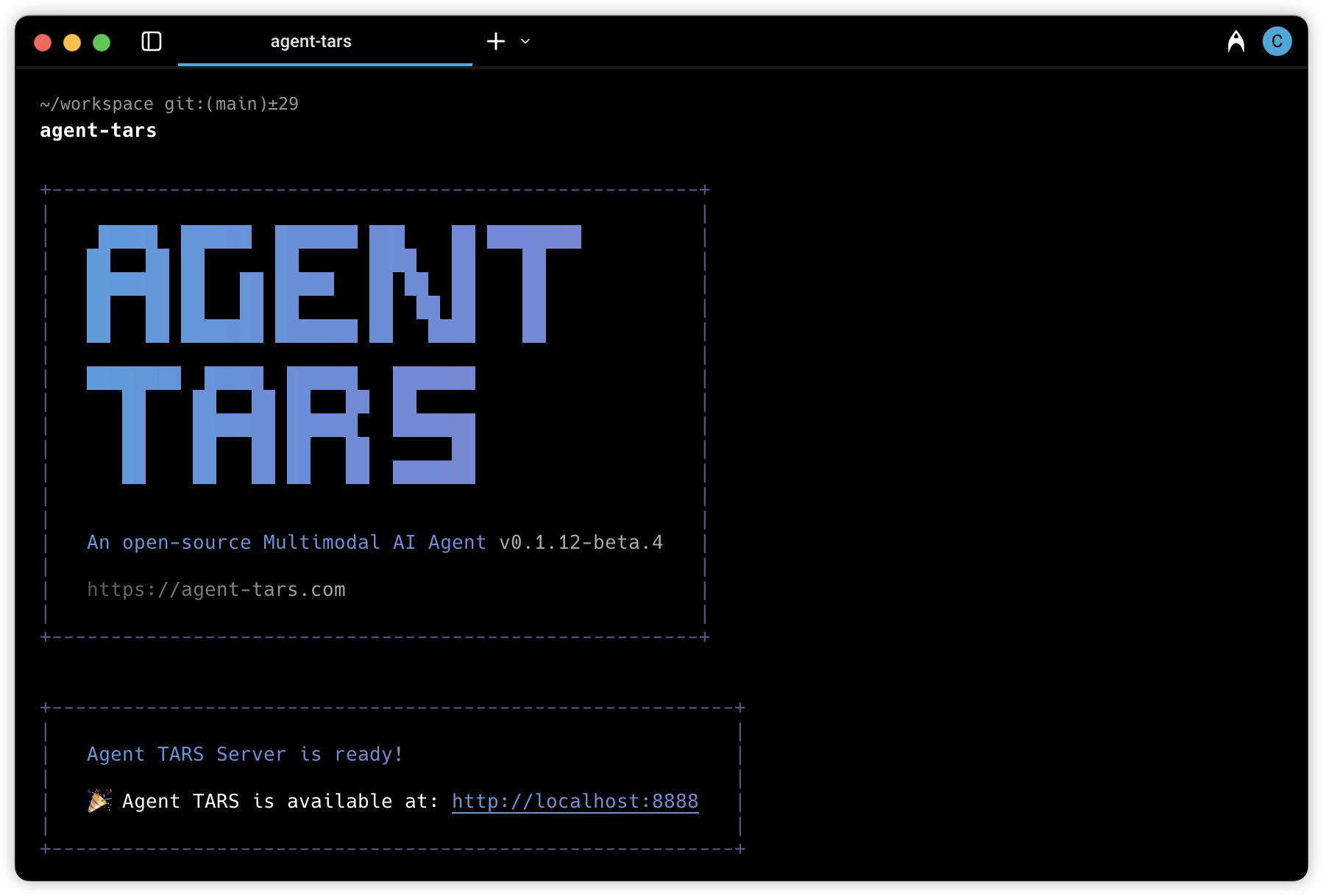
# Launch with `npx`.
npx @agent-tars/cli@latest

# Install globally, required Node.js >= 22
npm install @agent-tars/cli@latest -g

# Run with your preferred model provider
agent-tars --provider volcengine --model doubao-1-5-thinking-vision-pro-250428 --apiKey your-api-key
agent-tars --provider anthropic --model claude-3-7-sonnet-latest --apiKey your-api-key
Visit the comprehensive Quick Start guide for detailed setup instructions.
Documentation
🌟 Explore Agent TARS Universe 🌟
| Category | Resource Link | Description |
|---|---|---|
| 🏠 Central Hub |

|
Your gateway to Agent TARS ecosystem |
| 📚 Quick Start |

|
Zero to hero in 5 minutes |
| 🚀 What's New |

|
Discover cutting-edge features & vision |
| 🛠️ Developer Zone |

|
Master every command & features |
| 🎯 Showcase |

|
View use cases built by the official and community |
| 🔧 Reference |

|
Complete technical reference |
UI-TARS Desktop

UI-TARS Desktop is a native GUI agent for your local computer, driven by UI-TARS and Seed-1.5-VL/1.6 series models.
📑 Paper
| 🤗 Hugging Face Models
| 🫨 Discord
| 🤖 ModelScope
🖥️ Desktop Application
| 👓 Midscene (use in browser)
Showcase
| Instruction | Local Operator | Remote Operator |
|---|---|---|
| Please help me open the autosave feature of VS Code and delay AutoSave operations for 500 milliseconds in the VS Code setting. | ||
| Could you help me check the latest open issue of the UI-TARS-Desktop project on GitHub? |
Features
- 🤖 Natural language control powered by Vision-Language Model
- 🖥️ Screenshot and visual recognition support
- 🎯 Precise mouse and keyboard control
- 💻 Cross-platform support (Windows/MacOS/Browser)
- 🔄 Real-time feedback and status display
- 🔐 Private and secure - fully local processing
Quick Start
See Quick Start
Contributing
See CONTRIBUTING.md.
License
This project is licensed under the Apache License 2.0.
Citation
If you find our paper and code useful in your research, please consider giving a star :star: and citation :pencil:
@article{qin2025ui,
  title={UI-TARS: Pioneering Automated GUI Interaction with Native Agents},
  author={Qin, Yujia and Ye, Yining and Fang, Junjie and Wang, Haoming and Liang, Shihao and Tian, Shizuo and Zhang, Junda and Li, Jiahao and Li, Yunxin and Huang, Shijue and others},
  journal={arXiv preprint arXiv:2501.12326},
  year={2025}
}
GitHubスター順に並べたClaude Code MCPサーバーの一覧はこちらです。
MCP Server Browserに関連するMCPサーバーは?
Mcp Server Browserは類似ツールとどう違いますか?
MCPのブラウザードライバーであり、完全なE2EテストフレームワークやSEOクローラースキルではありません。
MCP Server Browserのよくある質問
mcp-server-browserはどのブラウザーに対応していますか?
browser引数にはchrome、edge、firefoxを指定でき、Chrome DevTools ProtocolまたはWebSocketのエンドポイント経由で既存のセッションにも接続できます。
mcp-server-browserはどうやってインストールしますか?
npmパッケージ @agent-infra/mcp-server-browser をインストールし、エージェントクライアントにstdioのMCPサーバーとして登録してください。