Yutu MCPサーバー
- GitHubスター 717
- 2026年11月8日更新
Yutuは、YouTubeチャンネルと公開ワークフローを自動化するための、MCPとCLIの完全なインターフェースを提供するMCPサーバーです。
Yutu MCPとは?
Yutuは、YouTubeをラップしたModel Context ProtocolサーバーとCLIのセットです。YouTube Studioを手でクリックして操作する代わりに、エージェントからチャンネル運営をプログラムで管理できます。ローンチ段階の開発者にとっては、アップロードのスクリプト化、メタデータの調整、コンテンツ運用の連鎖を、コードをリリースしているのと同じリポジトリとエージェントのセッションで行えるということです。公開パッケージはlocalhostのポート8216でストリーマブルHTTPのMCPとして動作し、通常はghcr.io/eat-pray-ai/yutuのDockerイメージをmcp --mode httpで起動して使います。マウントやユーザーマッピングのオプションにより、コンテナからホストのパスへ安全に書き込めます。これは連携レイヤーであり、コンテンツ戦略のスキルではないため、フックやサムネイルの企画は自分で行う必要がありますが、定期的に公開する際の面倒なAPIまわりの接続コードを省けます。環境にOAuthとGoogle CloudのYouTube認証情報を設定すれば、Claude Code、Cursor、Codexと組み合わせて使えます。
- YouTube操作用の完全なMCPサーバーとCLI
- http://localhost:8216/mcpのストリーマブルHTTPトランスポート
- httpモードで動作するDocker OCIイメージ ghcr.io/eat-pray-ai/yutu
- ホストのユーザーUID/GIDに合わせられる、バインドマウントに適した実行時引数
- レジストリスキーマ上のバージョンはv0.10.8-dev1
数字で見るyutu
- 2026年11月9日時点のデータ(Skillselionカタログ同期)
claude mcp add --transport http yutu http://localhost:8216/mcp --header "YUTU_CREDENTIAL: YOUR_YUTU_CREDENTIAL" --header "YUTU_CACHE_TOKEN: YOUR_YUTU_CACHE_TOKEN" --header "YUTU_LOG_LEVEL: YOUR_YUTU_LOG_LEVEL"先にサーバーを起動してください:docker run --rm -p 8216:8216 ghcr.io/eat-pray-ai/yutu:v0.10.8-dev1
yutuのバッジを追加する
このMCPサーバーがSkillselionに掲載されていることを開発者に示せます。READMEに貼り付けてください。

埋め込みコードを取得
| GitHubスター | ★ 717 |
|---|---|
| トランスポート | HTTP |
| 認証 | 必要 |
| 最終更新 | 2026年11月8日 |
| リポジトリ | eat-pray-ai/yutu ↗ |
ユースケースと機能
Yutu MCPは何をしますか?
YouTube Studioの画面を使わず、コーディングエージェントからYouTubeのアップロード、メタデータ、チャンネルのワークフローを操作できます。
Yutu MCPはどんな人に向いていますか?
ビルドの過程を公開する動画やチュートリアル動画を投稿していて、YouTubeの手順をコードのデプロイと同じ自動化されたローンチパイプラインに組み込みたい場合に最適です。
見送ったほうがよい場合: たまにしか投稿せずStudioで十分な場合や、API自動化が不要なチャンネルには向きません。
Yutu MCPは何を生成しますか?
Docker化したサーバーをファイルのマウントやユーザー権限に合わせたまま、エージェントがlocalhost上のMCPツールを通じてYouTubeの操作を実行できます。
- MCPツール経由で、エージェントから呼び出せるYouTube操作
- エージェントセッション外のスクリプトでも使える、CLIとの機能の一致
- 複数ツールの起動自動化に使えるローカルHTTP MCPエンドポイント
- スキーマバージョンはv0.10.8-dev1
- デフォルトのMCP URL:http://localhost:8216/mcp
- トランスポート:streamable-http
yutuのREADMEには何が書かれていますか?
README.md

yutu











yutu is a CLI, MCP server, and AI agent for YouTube that automates your entire YouTube workflow — from uploading and optimizing videos to managing comments, playlists, and channel branding — so you can get more views, higher click-through rates, and stronger audience engagement with less manual effort. 中文文档
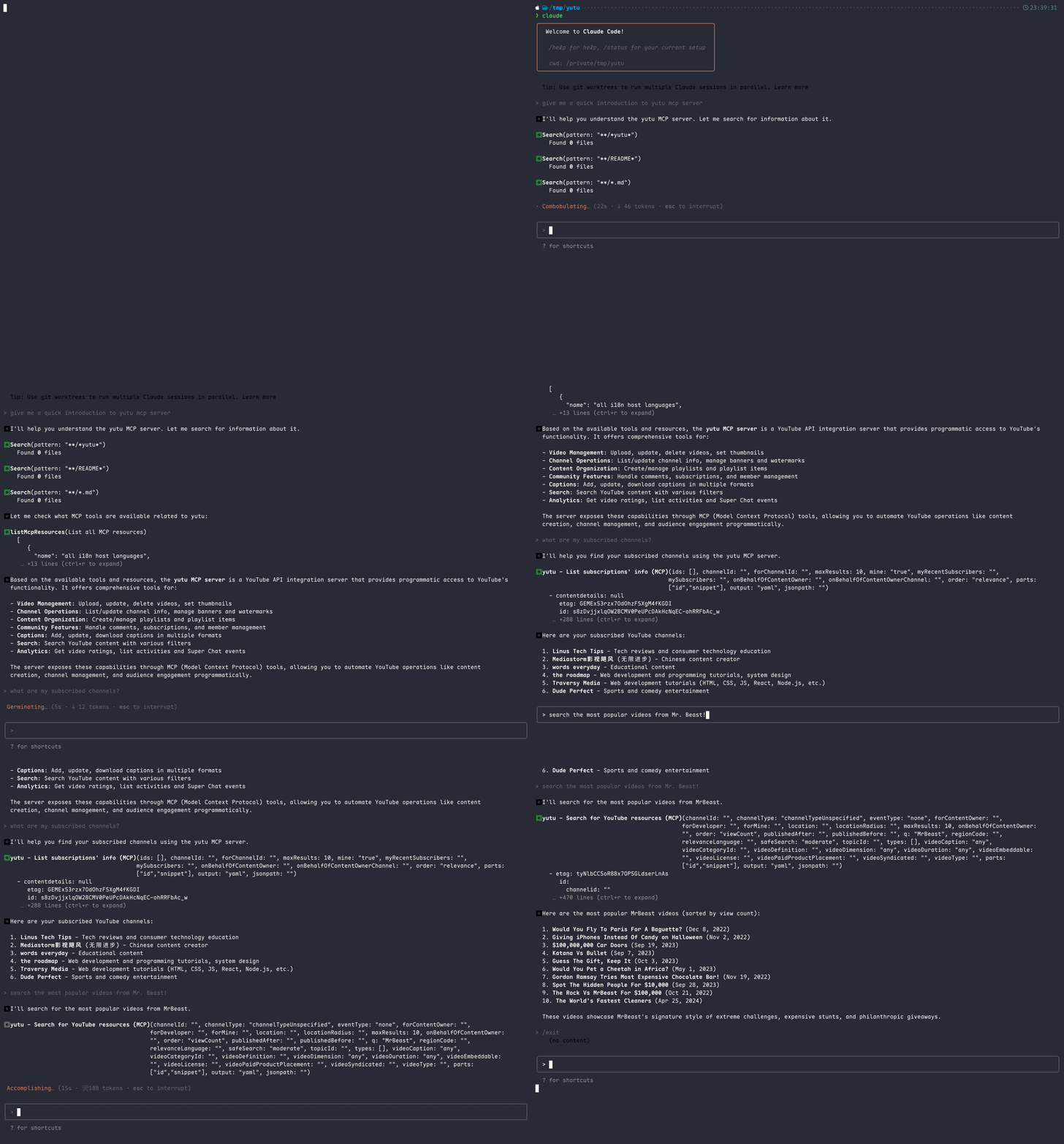
Table of Contents
Prerequisites
An account on Google Cloud Platform is required. Set up the following:
Create a GCP Project and enable these APIs under
APIs & Services -> Enable APIs and services:- YouTube Data API v3 (Required)
- YouTube Analytics API (Optional)
- YouTube Reporting API (Optional)
Create OAuth credentials:
- Go to
APIs & Services -> OAuth consent screen, create a consent screen with yourself as a test user - Go to
Credentials -> Create Credentials -> OAuth Client ID, selectDesktop app - Download the credential file and save it as
client_secret.json, it should look like
{ "installed": { "client_id": "11181119.apps.googleusercontent.com", "project_id": "yutu-11181119", "auth_uri": "https://accounts.google.com/o/oauth2/auth", "token_uri": "https://oauth2.googleapis.com/token", "auth_provider_x509_cert_url": "https://www.googleapis.com/oauth2/v1/certs", "client_secret": "XXXXXXXXXXXXXXXX", "redirect_uris": [ "http://localhost" ] } }- Go to
Authenticate:
yutu auth --credential client_secret.jsonA browser window will open for you to grant YouTube access. After granting permission, a token is saved to
youtube.token.json.{ "access_token": "ya29.XXXXXXXXX", "token_type": "Bearer", "refresh_token": "1//XXXXXXXXXX", "expiry": "2024-05-26T18:49:56.1911165+08:00", "expires_in": 3599 }
By default, yutu will read client_secret.json and youtube.token.json from the current directory, --credential/-c and --cacheToken/-t flags are available only in auth subcommand. To modify the default path in all subcommands, set these environment variables.
Global Environment Variables
| Variable | Description | Default |
|---|---|---|
YUTU_CREDENTIAL |
Path, Base64, or JSON of OAuth client secret | client_secret.json |
YUTU_CACHE_TOKEN |
Path, Base64, or JSON of cached OAuth token | youtube.token.json |
YUTU_ROOT |
Root directory for file resolution | Current working directory |
YUTU_LOG_LEVEL |
Log level: DEBUG, INFO, WARN, ERROR |
INFO |
Installation
You can download yutu from releases page directly, or use the following methods as you prefer.
GitHub Actions
There are two actions available for yutu, one is for general purpose and the other is for uploading video to YouTube. Refer to youtube-action and youtube-uploader for more information.
Node.js
❯ npm i -g @eat-pray-ai/yutu
Docker
❯ docker pull ghcr.io/eat-pray-ai/yutu:latest
❯ docker run --rm ghcr.io/eat-pray-ai/yutu:latest
# make sure client_secret.json is in the current directory
❯ docker run --rm -it -u $(id -u):$(id -g) -v $(pwd):/app -p 8216:8216 ghcr.io/eat-pray-ai/yutu:latest
Gopher
❯ go install github.com/eat-pray-ai/yutu@latest
Linux
❯ curl -sSfL https://raw.githubusercontent.com/eat-pray-ai/yutu/main/scripts/install.sh | bash
macOS
Install yutu using Homebrew🍺(recommended), or run the shell script.
❯ brew install yutu

# or
❯ curl -sSfL https://raw.githubusercontent.com/eat-pray-ai/yutu/main/scripts/install.sh | bash
Windows
❯ winget install yutu
Verifying Installation
Verify the integrity and provenance of yutu using its associated cryptographically signed attestations.
# Docker
❯ gh attestation verify oci://ghcr.io/eat-pray-ai/yutu:latest --repo eat-pray-ai/yutu

# Linux and macOS(if installed using shell script)
❯ gh attestation verify $(which yutu) --repo eat-pray-ai/yutu

# Windows
❯ gh attestation verify $(where.exe yutu.exe) --repo eat-pray-ai/yutu
Agent
yutu provides an agent mode to automate YouTube workflows. The system uses a multi-agent architecture where a central orchestrator delegates tasks to specialized agents:
| Agent | Role | Capabilities |
|---|---|---|
| Orchestrator | Coordinates the entire workflow, plans strategy, and delegates to sub-agents | YouTube growth strategy, SEO optimization, task routing |
| Retrieval | Gathers data from YouTube and the web (read-only) | List/search videos, channels, playlists, comments, captions, subscriptions, members, and more; Google Search |
| Modifier | Creates and updates YouTube content | Upload videos, create playlists, update metadata, post comments, set thumbnails, manage captions and watermarks |
| Destroyer | Handles destructive operations with extra caution | Delete videos, playlists, comments, captions, subscriptions, channel sections, and watermarks |
Currently, the agent mode is under active development, only supports Google's Gemini models with the following environment variables set:
❯ export YUTU_ADVANCED_MODEL=google:gemini-3.1-pro-preview
❯ export YUTU_LITE_MODEL=google:gemini-3-flash-preview
❯ export YUTU_LLM_API_KEY=your_gemini_api_key
// Optional settings
❯ export GOOGLE_GEMINI_BASE_URL=https://generativelanguage.googleapis.com/
❯ export YUTU_AGENT_INSTRUCTION=Your custom instruction here
YUTU_ADVANCED_MODEL is used by the orchestrator agent, while YUTU_LITE_MODEL is used by all other agents. Both use
the provider:modelName format (only google is supported). If only one is set, the other defaults to the same value.
Agent Environment Variables
| Variable | Description | Required |
|---|---|---|
YUTU_ADVANCED_MODEL |
Model for orchestrator agent (format: provider:modelName) |
At least one of YUTU_ADVANCED_MODEL or YUTU_LITE_MODEL |
YUTU_LITE_MODEL |
Model for sub-agents (format: provider:modelName) |
At least one of YUTU_ADVANCED_MODEL or YUTU_LITE_MODEL |
YUTU_LLM_API_KEY |
API key for the model provider | Yes |
GOOGLE_GEMINI_BASE_URL |
Base URL for Gemini API | No |
YUTU_AGENT_INSTRUCTION |
Custom instruction for orchestrator agent | No |
YUTU_RETRIEVAL_INSTRUCTION |
Custom instruction for retrieval agent | No |
YUTU_MODIFIER_INSTRUCTION |
Custom instruction for modifier agent | No |
YUTU_DESTROYER_INSTRUCTION |
Custom instruction for destroyer agent | No |
Then run the following command for detail usage:
❯ yutu agent --help
❯ yutu agent --args "help"
# console mode
❯ yutu agent --args "console"
# web mode with three sub-launchers: api, a2a and webui
❯ yutu agent --args "web api a2a webui"
MCP Server
Before using yutu as an MCP server, make sure yutu is installed(see Installation section), and you have a valid client_secret.json and youtube.token.json files(refer to Prerequisites section).
You can add yutu as an MCP server in VS Code or Cursor by clicking corresponding badge, or use the CLI commands below for your preferred tool.


Claude Code
# Stdio mode
❯ claude mcp add -e YUTU_CREDENTIAL=/absolute/path/to/client_secret.json \
  -e YUTU_CACHE_TOKEN=/absolute/path/to/youtube.token.json \
  yutu -- yutu mcp

# HTTP mode (start the server first: yutu mcp --mode http --auth)
❯ claude mcp add --transport http \
  --client-id YOUR_CLIENT_ID.apps.googleusercontent.com \
  --client-secret \
  yutu http://localhost:8216/mcp
Codex
# Stdio mode
❯ codex mcp add --env YUTU_CREDENTIAL=/absolute/path/to/client_secret.json \
  --env YUTU_CACHE_TOKEN=/absolute/path/to/youtube.token.json \
  yutu -- yutu mcp

# HTTP mode (start the server first: yutu mcp --mode http --auth)
❯ codex mcp add --url http://localhost:8216/mcp \
  --oauth-client-id YOUR_CLIENT_ID.apps.googleusercontent.com \
  yutu
Manual Configuration (VS Code, Cursor, OpenCode, etc.)
Add the following to your MCP settings. Remember to replace the values of YUTU_CREDENTIAL and YUTU_CACHE_TOKEN with correct paths on your local machine.
{
  "yutu": {
    "type": "stdio",
    "command": "yutu",
    "args": [
      "mcp"
    ],
    "env": {
      "YUTU_CREDENTIAL": "/absolute/path/to/client_secret.json",
      "YUTU_CACHE_TOKEN": "/absolute/path/to/youtube.token.json"
    }
  }
}
Skills
yutu provides a unified skill that extends AI agents with YouTube domain knowledge, common workflows, and SEO best practices — covering videos, playlists, comments, channels, captions, subscriptions, and more.
❯ npx skills add https://github.com/eat-pray-ai/yutu/tree/main/skills/youtube
See skills/youtube/SKILL.md for the full list of supported operations.
Usage
❯ yutu
yutu is a CLI, MCP server, and AI agent for YouTube that can automate almost all YouTube workflows.

Environment variables:
  YUTU_CREDENTIAL    Path/Base64/JSON of OAuth client secret (default: client_secret.json)
  YUTU_CACHE_TOKEN   Path/Base64/JSON of cached OAuth token (default: youtube.token.json)
  YUTU_ROOT          Root directory for file resolution (default: current working directory)
  YUTU_LOG_LEVEL     Log level: DEBUG, INFO, WARN, ERROR (default: INFO)

Usage:
  yutu [flags]
  yutu [command]

Available Commands:
  activity               Manage activities on YouTube
  agent                  Start an agent to automate YouTube workflows
  auth                   Authenticate with YouTube APIs
  caption                Manage YouTube video captions
  channel                Manage YouTube channels
  channelBanner          Manage YouTube channel banners
  channelSection         Manage YouTube channel sections
  comment                Manage YouTube comments
  commentThread          Manage YouTube comment threads
  completion             Generate the autocompletion script for the specified shell
  help                   Help about any command
  i18nLanguage           Manage YouTube i18n languages
  i18nRegion             Manage YouTube i18n regions
  mcp                    Start MCP server
  member                 Manage YouTube channel members
  membershipsLevel       Manage YouTube memberships levels
  playlist               Manage YouTube playlists
  playlistImage          Manage YouTube playlist images
  playlistItem           Manage YouTube playlist items
  search                 Manage YouTube search
  subscription           Manage YouTube subscriptions
  superChatEvent         Manage YouTube Super Chat events
  thirdPartyLink         Manage YouTube third-party links
  thumbnail              Manage YouTube video thumbnails
  version                Show the version of yutu
  video                  Manage YouTube videos
  videoAbuseReportReason Manage YouTube video abuse report reasons
  videoCategory          Manage YouTube video categories
  watermark              Manage YouTube watermarks

Flags:
  -h, --help   help for yutu

Use "yutu [command] --help" for more information about a command.
Features
Please refer to FEATURES.md for more information.
Contributing
Please refer to CONTRIBUTING.md for more information.
Star History
GitHubスター順に並べたClaude Code MCPサーバーの一覧はこちらです。
Yutu MCPに関連するMCPサーバーは?
yutuは類似ツールとどう違いますか?
YouTube向けのMCP連携とCLIです。SEOコピーライティングのスキルや、分析のみのダッシュボードとは異なります。
Yutu MCPのよくある質問
Yutu MCPは誰向けですか?
YouTubeで動画を公開していて、Claude CodeやCursorなどのエージェントにMCP経由でチャンネルのタスクを実行させたい開発者や小規模チーム向けです。
Yutu MCPはどんなときに使うべきですか?
リリース動画、チュートリアル、変更履歴のコンテンツを配信するローンチ時に、エージェント主導のYouTube操作を再現可能な形で行いたい場合に使います。
Yutu MCPをエージェントに追加するにはどうすればよいですか?
ghcr.io/eat-pray-ai/Yutu MCPのイメージをmcpと--mode httpで実行し、http://localhost:8216/mcpを公開します。ドキュメントに従ってマウントとユーザーIDを設定したうえで、MCPクライアントをそのHTTPエンドポイントに向けてください。