Hustcc MCP Mermaidサーバー
- GitHubスター 649
- 2026年5月15日更新
ai.smithery/hustcc-mcp-mermaidは、AIの支援でカスタマイズ可能なMermaid図を生成してエクスポートするMCPサーバーです。
Hustcc MCP Mermaidとは?
ai.smithery/hustcc-mcp-mermaidは、コーディングエージェントをMermaidの図の生成に接続します。フローを平易な言葉で説明するだけで、保守しやすいチャートのソース、スタイルの調整、エクスポートをIDEから離れずに得られます。Buildの段階の開発者は、更新の速いリポジトリに合わせて、アーキテクチャ図、シーケンス図、ロードマップのビジュアルを最新の状態に保つために使います。特に、PRやdocsフォルダでの図の更新を前提としたスキルとClaude CodeやCursorを組み合わせる場合に便利です。このサーバーは開発ツールとの連携に特化しており、デザインシステムの代わりにはなりませんが、Markdownネイティブなドキュメント作成の手間を減らします。Smitheryがストリーマブルhttpのエンドポイントをホストしており、シークレットのBearerトークンが必要です。生成された図は出発点として扱ってください。セキュリティ図やデータフロー図の意味的な正確さについては、Shipの前に自分で確認する責任があります。
- AIによる編集支援付きの、ダイナミックなMermaid図とチャートの生成
- サーバーの概要に記載されているスタイルのカスタマイズとエクスポートの手段
- Smithery上のバージョン0.1.3、Smithery APIキーのBearer認証が必須
- ローカルでの開発や貢献に向けた、GitHubの公開リポジトリ hustcc/mcp-mermaid
数字で見るHustcc Mcp Mermaid
- 2026年11月8日時点のデータ(Skillselionカタログ同期)
claude mcp add --transport http hustcc-mcp-mermaid https://server.smithery.ai/@hustcc/mcp-mermaid/mcp --header "Authorization: Bearer YOUR_TOKEN"Hustcc Mcp Mermaidのバッジを追加する
このMCPサーバーがSkillselionに掲載されていることを開発者に示せます。READMEに貼り付けてください。

埋め込みコードを取得
| GitHubスター | ★ 649 |
|---|---|
| トランスポート | HTTP |
| 認証 | 必要 |
| 最終更新 | 2026年5月15日 |
| リポジトリ | hustcc/mcp-mermaid ↗ |
ユースケースと機能
Hustcc MCP Mermaidは何をしますか?
SaaSのアーキテクチャ、API、オンボーディングをドキュメント化する際に、チャットからMermaid図を生成したりスタイルを変更したりできます。
Hustcc MCP Mermaidはどんな人に向いていますか?
ドキュメントをMarkdownで書いていて、開発中にチャットでフローチャート、シーケンス図、スタイル付きのエクスポートを作りたい場合に最適です。
見送ったほうがよい場合: Figmaで仕上げたマーケティング向けのクリエイティブが必要な場合や、ドキュメントのパイプラインでMermaidを使わない場合は不要です。
Hustcc MCP Mermaidは何を生成しますか?
エージェントがMermaidのチャートのテキストとエクスポートを作成・改善できるため、ドキュメントを視覚的に保ちつつ、実装と同期させられます。
- 説明したシステムフローに合ったチャート用のMermaidソース
- サーバーの機能に応じた、スタイル付きの図のバリエーションとエクスポート
- 埋め込める図のコードを追加した、更新済みのREADMEや仕様のセクション
- 公開メタデータ上のサーバーバージョンは0.1.3
- リポジトリ:github.com/hustcc/mcp-mermaid
- リモート:Smithery上のstreamable-http(Authorizationヘッダーが必須)
Hustcc Mcp MermaidのREADMEには何が書かれていますか?
README.md
 MCP Mermaid



Generate mermaid diagram and chart with AI MCP dynamically. Also you can use:
mcp-server-chart to generate chart, graph, map.
Infographic to generate infographic, such as
Timeline,Comparison,List,Processand so on.- 🖼️ figure.ling.pub/gallery to browse and share AI-generated diagrams and figures created with mcp-mermaid and other tools.
✨ Features
Fully support all features and syntax of
Mermaid.Support configuration of
backgroundColorandtheme, enabling large AI models to output rich style configurations.Support exporting to
base64,svg,mermaid,file, and remote-friendlysvg_url,png_urlformats, with validation forMermaidto facilitate the model's multi-round output of correct syntax and graphics. UseoutputType: "file"to automatically save PNG diagrams to disk for AI agents, or the URL modes to share diagrams through public mermaid.ink links.
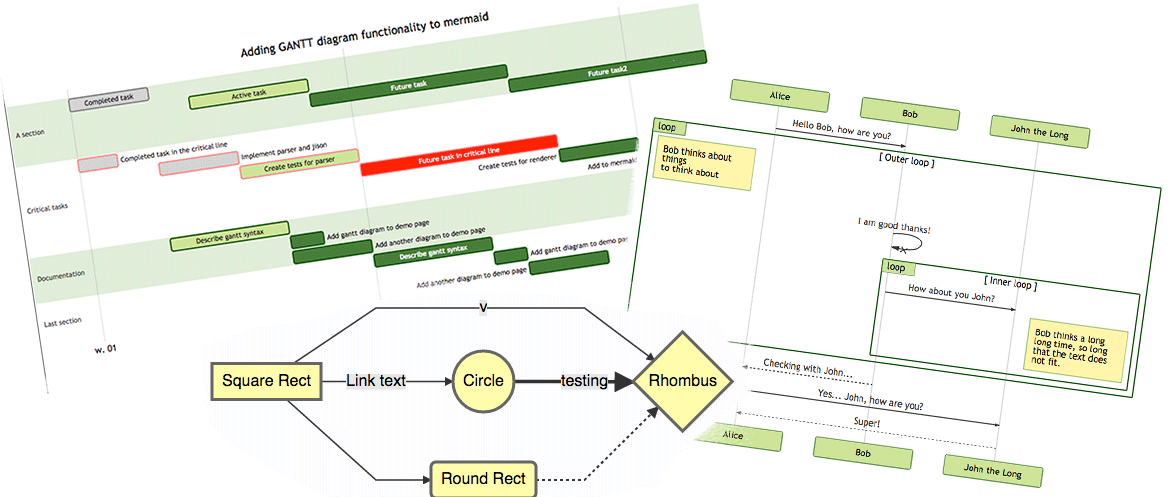
🤖 Usage
To use with Desktop APP, such as Claude, VSCode, Cline, Cherry Studio, and so on, add the MCP server config below. On Mac system:
{
  "mcpServers": {
    "mcp-mermaid": {
      "command": "npx",
      "args": [
        "-y",
        "mcp-mermaid"
      ]
    }
  }
}
On Window system:
{
  "mcpServers": {
    "mcp-mermaid": {
      "command": "cmd",
      "args": [
        "/c",
        "npx",
        "-y",
        "mcp-mermaid"
      ]
    }
  }
}
Also, you can use it on aliyun, modelscope, glama.ai, smithery.ai or others with HTTP, SSE Protocol.
Access Points:
- SSE:
http://localhost:3033/sse - Streamable:
http://localhost:1122/mcp
Available Docker Tags:
susuperli/mcp-mermaid:latest- Latest stable version- View all available tags at Docker Hub
🚰 Run with SSE or Streamable transport
Option 1: Global Installation
Install the package globally:
npm install -g mcp-mermaid
Run the server with your preferred transport option:
# For SSE transport (default endpoint: /sse)
mcp-mermaid -t sse

# For Streamable transport with custom endpoint
mcp-mermaid -t streamable
Option 2: Local Development
If you're working with the source code locally:
# Clone and setup
git clone https://github.com/hustcc/mcp-mermaid.git
cd mcp-mermaid
npm install
npm run build

# Run with npm scripts
npm run start:sse        # SSE transport on port 3033
npm run start:streamable # Streamable transport on port 1122
Access Points
Then you can access the server at:
- SSE transport:
http://localhost:3033/sse - Streamable transport:
http://localhost:1122/mcp(local) orhttp://localhost:3033/mcp(global)
🎮 CLI Options
You can also use the following CLI options when running the MCP server. Command options by run cli with -h.
MCP Mermaid CLI

Options:
  --transport, -t  Specify the transport protocol: "stdio", "sse", or "streamable" (default: "stdio")
  --port, -p       Specify the port for SSE or streamable transport (default: 3033)
  --endpoint, -e   Specify the endpoint for the transport:
                    - For SSE: default is "/sse"
                    - For streamable: default is "/mcp"
  --help, -h       Show this help message
🔨 Development
Install dependencies:
npm install
Build the server:
npm run build
Start the MCP server
Using MCP Inspector (for debugging):
npm run start
Using different transport protocols:
# SSE transport (Server-Sent Events)
npm run start:sse

# Streamable HTTP transport
npm run start:streamable
Direct node commands:
# SSE transport on port 3033
node build/index.js --transport sse --port 3033

# Streamable HTTP transport on port 1122
node build/index.js --transport streamable --port 1122

# STDIO transport (for MCP client integration)
node build/index.js --transport stdio
🐳 Docker Usage
Run MCP Mermaid with Docker:
# Pull the image
docker pull susuperli/mcp-mermaid:latest

# Run with SSE transport (default)
docker run -p 3033:3033 susuperli/mcp-mermaid:latest --transport sse

# Run with streamable transport
docker run -p 1122:1122 susuperli/mcp-mermaid:latest --transport streamable --port 1122
📄 License
MIT@hustcc.
GitHubスター順に並べたClaude Code MCPサーバーの一覧はこちらです。
Hustcc MCP Mermaidに関連するMCPサーバーは?
Hustcc Mcp Mermaidは類似ツールとどう違いますか?
Mermaid特化のMCPジェネレーターです。汎用のホワイトボードアプリや静的なスクリーンショットのスキルとは異なります。
Hustcc MCP Mermaidのよくある質問
ai.smithery/hustcc-mcp-mermaidは誰向けですか?
技術ドキュメントをMarkdownで書いていて、チャットからMCPツールでMermaid図を作成・調整したい開発者やエージェントのユーザー向けです。
ai.smithery/hustcc-mcp-mermaidはどんなときに使うべきですか?
コードの変更と同じタイミングで、アーキテクチャ図、API図、ワークフロー図を更新する必要があるBuildのドキュメント作業で使います。
ai.smithery/hustcc-mcp-mermaidをエージェントに追加するにはどうすればよいですか?
SmitheryのmcpmermaidのストリーマブルhttpのURLをMCP設定に登録し、必須のSmithery APIキーをAuthorizationのBearerとして指定してください。