Agent Device MCPサーバー
- GitHubスター 5302
- 2026年11月9日更新
Agent Deviceは、AIエージェントがiOS、Android、デスクトップ、TVアプリを検査、操作、デバッグできるようにするMCPサーバーです。
Agent Device MCPとは?
Agent Device MCPは、AIコーディングエージェントが実際のモバイル、デスクトップ、TVアプリを検査、操作、デバッグできるようにするMCPサーバーです。React Nativeやマルチプラットフォームのクライアントを開発している方は、ナビゲーションフローの確認、レイアウトの不具合、クラッシュの再現といった繰り返しのデバイス確認をエージェントに任せられます。IDEとシミュレーターを行き来して手動で操作する必要がなくなります。MCPクライアントにnpmパッケージagent-deviceをstdioで登録し、Callstackのセットアップ手順に従って開発環境に接続したら、プロンプトでテスターのようにUIを操作させられます。実行可能なバイナリがそろい、リリース前に確信を得たい出荷・テストの段階で特に力を発揮します。新規のUI開発向けというより、実機での動作検証向けです。CIは別途用意してください。このMCPは、エージェントを介して対話的にデバイスQAを行うためのものです。
- 実機とエミュレーターを操作するMCPサーバーagent-device(v0.16.9)
- CallstackのインキュベータリポジトリによるiOS、Android、デスクトップ、TVアプリに対応
- Claude Code、Cursor、互換MCPクライアント向けのstdio npmトランスポート
- スクリーンショットにとどまらず、検査・操作・デバッグに対応
- Callstackのツール群でよく使われるReact Nativeやクロスプラットフォーム構成に適合
数字で見るagent-device
- 2026年11月9日時点のデータ(Skillselionカタログ同期)
claude mcp add agent-device -- npx -y agent-deviceagent-deviceのバッジを追加する
このMCPサーバーがSkillselionに掲載されていることを開発者に示せます。READMEに貼り付けてください。

埋め込みコードを取得
| GitHubスター | ★ 5302 |
|---|---|
| パッケージ | agent-device |
| トランスポート | STDIO |
| 認証 | 不要 |
| 最終更新 | 2026年11月9日 |
| リポジトリ | callstack/agent-device ↗ |
ユースケースと機能
Agent Device MCPは何をしますか?
出荷前に、コーディングエージェントから実機のiOS、Android、デスクトップ、TVアプリのビルドを検査、タップ操作、デバッグできます。
Agent Device MCPはどんな人に向いていますか?
MCPエージェントを使っていて、コードレビューだけでは足りず、実機に触れながらデバッグしたい方に最適です。
見送ったほうがよい場合: ネイティブアプリのないWeb専用SaaSの開発者や、ローカルでデバイス・エミュレーターのツールを設定したくないチームには向きません。
Agent Device MCPは何を生成しますか?
エージェントがMCP経由で、インストール済みのアプリをプラットフォームをまたいで操作・デバッグできるため、出荷前のテストサイクルを短縮できます。
- 対応プラットフォームで、エージェントが確認と操作を行うセッション
- 実機でのUIやナビゲーションのバグ再現を高速化
- コーディングエージェントとネイティブアプリのデバッグ作業をつなぐMCPブリッジ
- npmパッケージagent-deviceのバージョンは0.16.9
- 対応プラットフォーム:iOS、Android、デスクトップ、TV
- GitHubのリポジトリはcallstackincubator/agent-device
agent-deviceのREADMEには何が書かれていますか?
README.md
agent-device


Mobile app verification for AI agents.
A device automation CLI for real apps on iOS, Android, TV, web, and desktop. Agents get token-efficient snapshots, semantic refs, and evidence captured only when needed.
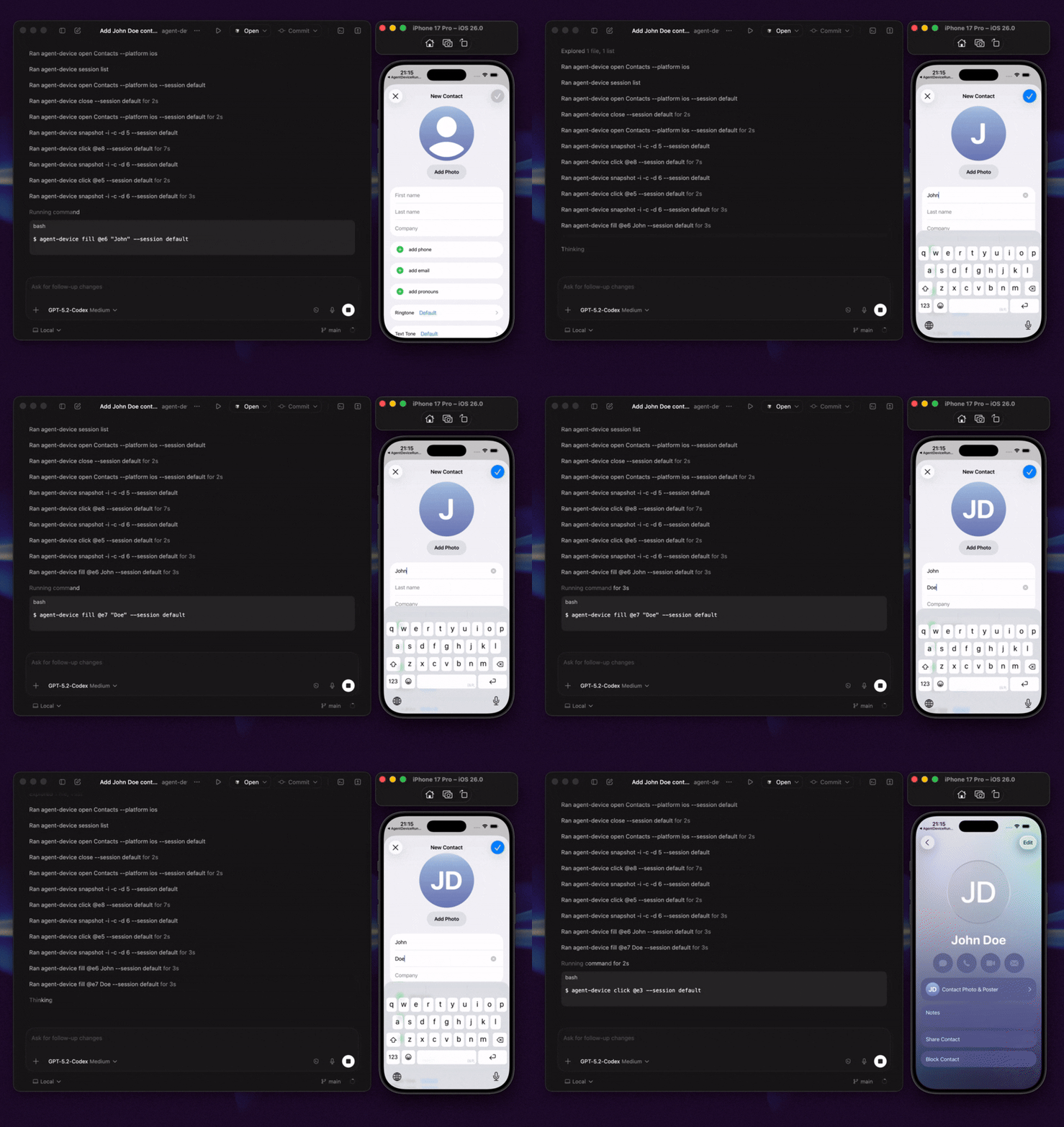
agent-device lets coding agents open apps, inspect the current UI, interact with visible elements, and collect debugging evidence through one CLI. Use it when an agent needs to verify what actually happens on a device, not just reason about code.
If you know Vercel's agent-browser, agent-device is the same idea for mobile, TV, and desktop apps. Minimal --platform web support reuses agent-browser when a browser session needs to fit into the same command/session/replay loop.
It works with native iOS and Android apps, plus apps built with Expo, Flutter, and React Native, as long as the target can run on a supported device, simulator, emulator, or desktop environment.
Capabilities
- Inspect real app UI through structured accessibility snapshots, interactive refs like
@e3, selectors, and React Native component trees. - Interact by opening apps, tapping, typing, scrolling, performing gestures, waiting, asserting state, handling alerts, and closing sessions.
- Capture evidence with screenshots, videos, logs, traces, network traffic, performance samples, crash context, and React profiles.
- Replay workflows by recording
.adscripts for local runs, CI, repeatable e2e checks, and strict Maestro YAML export when a flow needs to run in Maestro. - Run across platforms with iOS Simulator automation, Android Emulator automation, physical devices, tvOS, Android TV, macOS, Linux, and desktop app automation, so agents can see and feel the app they work on.
Use Cases
- Verify mobile changes on real devices, simulators, and emulators before review or merge.
- Give AI coding agents a real app feedback loop while they implement features.
- Debug regressions with screenshots, logs, traces, network evidence, and crash context.
- Profile performance issues with CPU/memory samples and React render profiles when needed.
- Turn exploratory app interactions into replayable e2e checks for CI.
- Use one agent workflow across native iOS, Android, Expo, Flutter, React Native, TV, and desktop apps.

Quick Start
Install the CLI:
npm install -g agent-device@latest
agent-device --version
agent-device help workflow
The installed CLI help is the source of truth for agents. Start with agent-device help workflow, then follow the topic-specific help when a task needs dogfooding, debugging, replay, or React Native profiling.
Prerequisites depend on the target platform: Node.js 22+, Xcode for iOS/tvOS/macOS targets, Android SDK + ADB for Android, and macOS Accessibility permission for desktop automation. Web automation requires Node 24+. See Installation for platform setup.
Try the basic loop:
# Find an app.
agent-device apps --platform ios
agent-device apps --platform android

# Start a session.
agent-device open SampleApp --platform ios

# Inspect the current screen. -i returns interactive elements only.
agent-device snapshot -i
# @e1 [heading] "Settings"
# @e2 [button] "Sign In"
# @e3 [text-field] "Email"

# Act, capture evidence, and close.
agent-device fill @e3 "test@example.com"
agent-device screenshot ./artifacts/settings.png
agent-device close
Snapshots assign refs like @e1, @e2, and @e3 to elements on the current screen. Refs from the latest snapshot are immediately actionable; after scrolling or changing screens, take a fresh snapshot.
Next Steps
- Set up your agent: run the CLI from Cursor, Codex, Claude Code, Windsurf, or another agent terminal. For skills, rules, direct MCP tools, and client-specific setup, see AI Agent Setup.
- Try the sample app: clone the repo and run the bundled Expo fixture when you want a guided first dogfood run with screenshots, replay, and performance evidence. See Quick Start.
- Go deeper: use Commands, Replay & E2E, and Debugging & Profiling for production workflows.
Articles & Videos
Articles
- Build an AI QA agent for Expo apps with EAS Workflows
- Agent Device: iOS & Android automation for AI agents
- Building mobile QA agents with Vercel Eve
- How we optimized Agent Device for mobile app automation
Videos
Where To Run agent-device
| Path | Best for | Start with |
|---|---|---|
| Local | Exploration, debugging, and development loops on simulators, emulators, physical devices, macOS apps, and Linux desktop targets. | Follow the Quick Start. |
| CI/CD | Automated PR and merge validation with replay scripts and captured artifacts. | Try the EAS workflow template. GitHub Actions template coming soon. |
| Cloud / remote execution | Linux runners, managed devices, and remote execution. | Use Agent Device Cloud, see Commands for remote profiles, or contact Callstack for team-scale QA. |
How It Works
agent-device runs session-aware commands through platform backends: XCTest for iOS and tvOS, ADB plus the Android snapshot helper for Android, a local helper for macOS desktop automation, and AT-SPI for Linux desktop targets.
Node consumers can use the typed client and public subpaths for bridge integrations. agent-device/android-adb exposes the Android ADB provider contract, logcat/clipboard/keyboard/app helpers, and port reverse management.
FAQ
What is agent-device?
agent-device is a device automation CLI for AI mobile app testing. It lets AI agents verify real apps on iOS, Android, TV, desktop, simulators, emulators, and physical devices.
Does it work with React Native, Expo, Flutter, and native apps?
Yes. agent-device works with native iOS and Android apps, Expo apps, Flutter apps, React Native apps, TV apps, and desktop apps that run on supported targets.
How is it different from Appium, Detox, or Maestro?
Appium, Detox, and Maestro are traditional mobile automation frameworks. agent-device is optimized for AI agents that need to inspect app state, interact semantically, capture evidence, debug, profile, and turn useful explorations into replayable checks.
Used By
Used by teams and developers at Callstack, JPMorgan Chase, Expensify, Shopify, Kindred, Total Wine & More, LegendList, HerLyfe, App & Flow, and more.
Documentation
Contributing
See CONTRIBUTING.md.
Made at Callstack
agent-device is open source and MIT licensed. Visit agent-device.dev, try the EAS workflow template, read the docs, or contact us at hello@callstack.com.
GitHubスター順に並べたClaude Code MCPサーバーの一覧はこちらです。
Agent Device MCPに関連するMCPサーバーは?
agent-deviceは類似ツールとどう違いますか?
実機を操作するMCPサーバーです。Playwrightだけを使うブラウザ向けスキルではありません。
Agent Device MCPのよくある質問
Agent Device MCPはどんな人向けですか?
ネイティブアプリやクロスプラットフォームアプリを開発していて、Claude CodeやCursorからMCP経由で実機やエミュレーターを操作させたい開発者向けです。
Agent Device MCPはどんなときに使いますか?
出荷前のテスト段階で、実行可能なビルドがあり、iOS、Android、デスクトップ、TVでの再現、UI確認、デバッグセッションをエージェントに手伝ってほしいときに使います。
Agent Device MCPをエージェントに追加するにはどうすればよいですか?
npmパッケージAgent Device MCPをインストールし、GitHubリポジトリの手順に従ってローカルのデバイスやシミュレーターのツールチェーンを設定します。クライアントにstdioのMCPを登録したら、エージェントから操作コマンドや検査コマンドを実行してください。