OpenBrand MCPサーバー
- GitHubスター 807
- 2026年5月12日更新
io.github.ethanjyx/openbrandは、OpenBrand APIを通じて任意のウェブサイトURLからブランドアセットを抽出するMCPサーバーです。
OpenBrand MCPとは?
io.github.ethanjyx/openbrandは、OpenBrand APIを通じて、公開されている任意のウェブサイトURLからロゴ、カラーパレット、背景画像、ブランド名といったブランドアセットを抽出するMCPサーバーです。ポジショニングを検証する開発者には、既存の有力サービスと並べても信頼感のあるランディングページが必要になることがよくありますが、CSSやファビコンを手作業で調べる時間は、本来コピーやオファーに充てるべきものです。MCPクライアントにopenbrand-mcpを登録し、OpenBrandのダッシュボードで取得したOPENBRAND_API_KEYを設定すれば、エージェントが構造化されたブランド要素を取得し、Tailwindのトークンやヒーローセクションにそのまま使えます。Validateの段階のプロトタイプ作業に位置づけられ、Buildのフロントエンドのテーマ設定にも引き継げますが、本格的なブランドガイドラインの策定や商標の確認の代わりにはなりません。難易度は初級で、MCPの設定と1つのシークレットだけで済みます。抽出したアセットは出発点となる参考資料として扱い、商用利用の前にライセンスを確認してください。
- ウェブサイトURLからロゴ、カラー、背景画像、ブランド名を抽出
- OpenBrand MCP:npmのopenbrand-mcp v0.1.2、stdioトランスポート
- openbrand.shのダッシュボードで取得するOPENBRAND_API_KEYが必要
- GitHubのethanjyx/openbrandにあるmcpサブフォルダ
- 個人開発のランディングページ制作で、競合や提携先ブランドの参照を迅速化
数字で見るOpenBrand
- 2026年11月7日時点のデータ(Skillselionカタログ同期)
claude mcp add --env OPENBRAND_API_KEY=YOUR_OPENBRAND_API_KEY openbrand-mcp -- npx -y openbrand-mcpOpenBrandのバッジを追加する
このMCPサーバーがSkillselionに掲載されていることを開発者に示せます。READMEに貼り付けてください。

埋め込みコードを取得
| GitHubスター | ★ 807 |
|---|---|
| パッケージ | openbrand-mcp |
| トランスポート | STDIO |
| 認証 | 必要 |
| 最終更新 | 2026年5月12日 |
| リポジトリ | tight-studio/OpenBrand ↗ |
ユースケースと機能
OpenBrand MCPは何をしますか?
任意のサイトURLからロゴ、カラー、背景画像、ブランド名を取得し、ランディングページやプロトタイプを実在のブランドイメージに素早く合わせられます。
OpenBrand MCPはどんな人に向いていますか?
検証用のランディングページやホワイトラベルのモックを作るために、エージェントの支援を受けながら参照元のデザインを再現する場合に最適です。
見送ったほうがよい場合: 商標の完全なクリアランス、独自のイラストシステム、ウェブ上の情報源を使わないオフラインのブランドブックが必要な場合は不要です。
OpenBrand MCPは何を生成しますか?
エージェントがURLから構造化されたブランド要素を返すので、プロトタイプや初期のUIに、実際のカラーパレットやロゴの特徴を素早く反映できます。
- 抽出されたロゴ、色、背景画像、ブランド名のメタデータ
- プロトタイプUI向けの、エージェントがそのまま使えるブランド参照
- 検証用ランディングページで、見た目の一致を素早く実現
- バージョン 0.1.2
- npmパッケージopenbrand-mcp
- stdioトランスポート
OpenBrandのREADMEには何が書かれていますか?
README.md

OpenBrand
Extract any brand from a URL
Try it out at openbrand.sh
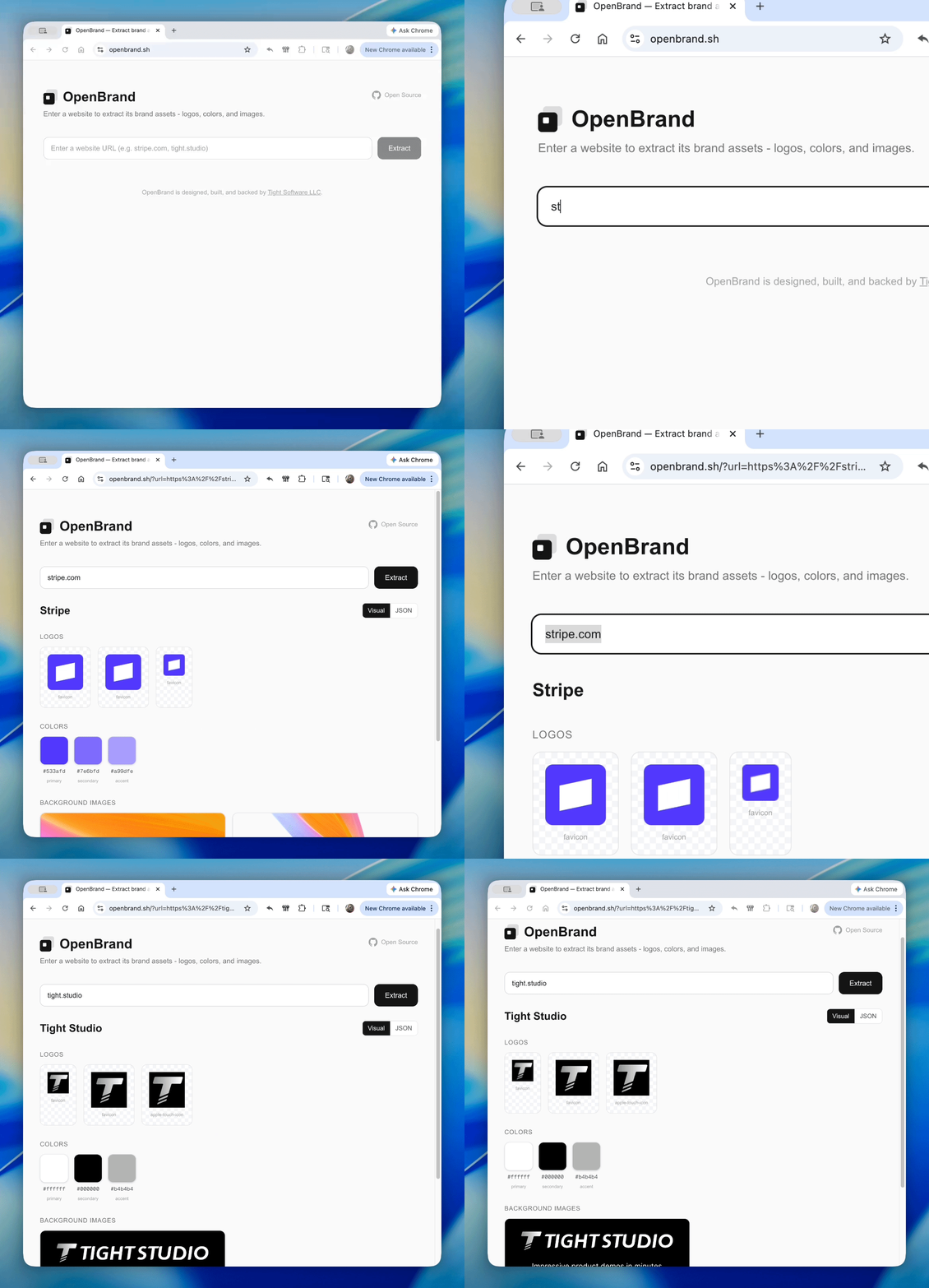
Demo prepared with Tight Studio
Extract brand assets (logos, colors, backdrops, brand name) from any website URL.
As an API call
Get your free API key from openbrand.sh/dashboard.
cURL
curl "https://openbrand.sh/api/extract?url=https://stripe.com" \
  -H "Authorization: Bearer your_api_key"
TypeScript
const res = await fetch(
  "https://openbrand.sh/api/extract?url=https://stripe.com",
  { headers: { Authorization: "Bearer your_api_key" } }
);
const brand = await res.json();
Python
import requests

res = requests.get(
    "https://openbrand.sh/api/extract",
    params={"url": "https://stripe.com"},
    headers={"Authorization": "Bearer your_api_key"},
)
brand = res.json()
As an agent skill
Add OpenBrand to Claude Code, Cursor, Codex, Gemini CLI, and 40+ other agents:
npx skills add tight-studio/openbrand
Once installed, your agent automatically knows how to extract brand assets — just ask it to "extract brand assets from stripe.com".
As an npm package
No API key required. Runs as a library from your server-side code.
npm add openbrand
import { extractBrandAssets } from "openbrand";

const result = await extractBrandAssets("https://stripe.com");
if (result.ok) {
  // result.data.brand_name → "Stripe"
  // result.data.logos → LogoAsset[]
  // result.data.colors → ColorAsset[]
  // result.data.backdrop_images → BackdropAsset[]
} else {
  // result.error.code → "ACCESS_BLOCKED" | "NOT_FOUND" | "SERVER_ERROR" | ...
  // result.error.message → human-readable explanation
}
As an MCP server
Use OpenBrand as a tool in Claude Code, Cursor, or any MCP-compatible client.
- Install the MCP server (no API key needed to install):
claude mcp add --transport stdio openbrand -- npx -y openbrand-mcp
- Get your API key from openbrand.sh/dashboard and add it:
claude mcp add --transport stdio \
  --env OPENBRAND_API_KEY=your_api_key \
  openbrand -- npx -y openbrand-mcp
Or add to .claude/settings.json:
{
  "mcpServers": {
    "openbrand": {
      "command": "npx",
      "args": ["-y", "openbrand-mcp"],
      "env": {
        "OPENBRAND_API_KEY": "your_api_key"
      }
    }
  }
}
Then ask Claude to "extract brand assets from stripe.com" and it will use the extract_brand_assets tool automatically.
Self-hosting the web app
git clone https://github.com/tight-studio/openbrand.git
cd openbrand
bun install
bun dev
No environment variables required. Open http://localhost:3000.
What it extracts
- Logos — favicons, apple-touch-icons, header/nav logos, inline SVGs (with dimension probing)
- Brand colors — from theme-color meta tags, manifest.json, and dominant colors from logo imagery
- Backdrop images — og:image, CSS backgrounds, hero/banner images
- Brand name — from og:site_name, application-name, logo alt text, page title
Tech stack
Next.js, React, TypeScript, Cheerio, Sharp, Tailwind CSS
License
GitHubスター順に並べたClaude Code MCPサーバーの一覧はこちらです。
OpenBrand MCPに関連するMCPサーバーは?
OpenBrandは類似ツールとどう違いますか?
ブランドアセット抽出用のMCP APIです。Figmaプラグインや汎用のスクリーンショットスキルとは異なります。
OpenBrand MCPのよくある質問
openbrandは誰向けですか?
MCPエージェントを使ってサイトのプロトタイプを作り、URLからブランドキットを自動で抽出したい開発者やマーケター向けです。
openbrandはどんなときに使うべきですか?
参考にする企業の見た目を再現したいランディングページやヒーローのプロトタイプを作るValidateの段階で使います。
openbrandをエージェントに追加するにはどうすればよいですか?
npmのopenbrand-mcp 0.1.2に対してstdioのMCPを設定し、https://openbrand.sh/dashboard で取得したOPENBRAND_API_KEY環境変数を設定してください。