Testkube MCPサーバー
- GitHubスター 1678
- 2026年11月7日更新
io.github.kubeshop/testkube-mcpは、コントロールプレーンAPIを通じて、AIアシスタントにTestkubeのテストワークフロー、実行、アーティファクトを管理させるMCPサーバーです。
Testkube MCPとは?
io.github.kubeshop/testkube-mcpは、AIアシスタントをTestkubeのコントロールプレーンに接続するModel Context Protocolサーバーです。開発者や小規模チームは、自然言語でテストワークフローの管理、実行の開始や確認、アーティファクトの操作ができます。Kubernetesやクラウドネイティブなテストがすでにパイプラインにあるときにインストールすると、別のダッシュボードを開かなくても、昨夜失敗したワークフローはどれか、ログを取得して、といった質問にエージェントが答えられます。設定の中心は、Testkubeのアクセストークン、組織ID、環境IDで、APIやダッシュボードのURLはオプションで上書きできます。エージェントが再実行を提案したり、不安定なスイートを要約したり、バージョンのタグ付け前のリリースチェックリストを正確に保ったりできるため、規律ある運用に役立ちます。これはTestkubeへのMCP連携であり、リポジトリ内でテストを定義する作業の代わりにはなりません。
- stdio MCP経由で、Claude Code、Cursor、CodexからTestkubeのテストワークフローと実行を管理
- TK_ACCESS_TOKENと、組織ID・環境IDでTestkubeのコントロールプレーンに認証
- docker.io/kubeshop/mcp-server:2.9.1で実行するか、TK_CONTROL_PLANE_URLやダッシュボードのURLを設定して利用
- CIやリリース前のゲートの後に、AI支援のトリアージ用として実行ステータスとアーティファクトを提示
- 個人開発チームがAPIや結合テストスイートですでに使っている、Kubernetesネイティブな構成のTestkubeと組み合わせて使える
数字で見るTestkube Mcp
- 2026年11月9日時点のデータ(Skillselionカタログ同期)
claude mcp add --env TK_ACCESS_TOKEN=YOUR_TK_ACCESS_TOKEN --env TK_ORG_ID=YOUR_TK_ORG_ID --env TK_ENV_ID=YOUR_TK_ENV_ID --env TK_CONTROL_PLANE_URL=YOUR_TK_CONTROL_PLANE_URL --env TK_DASHBOARD_URL=YOUR_TK_DASHBOARD_URL --env TK_DEBUG=YOUR_TK_DEBUG --env TK_MCP_TRANSPORT=YOUR_TK_MCP_TRANSPORT --env TK_MCP_SHTTP_HOST=YOUR_TK_MCP_SHTTP_HOST --env TK_MCP_SHTTP_PORT=YOUR_TK_MCP_SHTTP_PORT testkube-mcp -- docker run -i --rm -e TK_ACCESS_TOKEN -e TK_ORG_ID -e TK_ENV_ID -e TK_CONTROL_PLANE_URL -e TK_DASHBOARD_URL -e TK_DEBUG -e TK_MCP_TRANSPORT -e TK_MCP_SHTTP_HOST -e TK_MCP_SHTTP_PORT docker.io/kubeshop/mcp-server:2.9.1Testkube Mcpのバッジを追加する
このMCPサーバーがSkillselionに掲載されていることを開発者に示せます。READMEに貼り付けてください。

埋め込みコードを取得
| GitHubスター | ★ 1678 |
|---|---|
| パッケージ | docker.io/kubeshop/mcp-server:2.9.1 |
| トランスポート | STDIO |
| 認証 | 必要 |
| 最終更新 | 2026年11月7日 |
| リポジトリ | kubeshop/testkube ↗ |
ユースケースと機能
Testkube MCPは何をしますか?
エディタを離れずに、コーディングエージェントからTestkubeのワークフローを実行し、実行結果を確認し、テストのアーティファクトを取得できます。
Testkube MCPはどんな人に向いていますか?
Kubernetes上でリリースしていて、すでにTestkubeを使っており、ワークフローや実行をエージェント経由で把握したい場合に最適です。
見送ったほうがよい場合: Testkubeの組織がない場合や、コントロールプレーンなしでローカルのユニットテストだけが必要な場合は不要です。
Testkube MCPは何を生成しますか?
トークンと環境IDでサーバーを登録すれば、コードを修正している同じセッション内で、エージェントがTestkubeのワークフローとアーティファクトを照会・操作できます。
- エージェントから呼び出せるTestkubeのワークフローと実行の操作
- コーディングセッション内に表示されるアーティファクトと実行のコンテキスト
- エージェントのチャットとTestkubeのダッシュボードを行き来する手間の削減
- サーバースキーマのバージョンは2.9.1
- OCIパッケージ docker.io/kubeshop/mcp-server:2.9.1(stdioトランスポート)
- 必須のシークレット:TK_ACCESS_TOKEN、必須のID:TK_ORG_ID、TK_ENV_ID
Testkube McpのREADMEには何が書かれていますか?
README.md

The Open Testing Platform for AI-driven Engineering Teams
Testkube provides a single platform for defining, running and analyzing automated tests, using your existing testing tools/scripts, running in your Kubernetes infrastructure.


Trusted by Engineering Teams at CoreWeave, NVidia, Siemens, T-Mobile, Harvard, SwissCom, and many more..
Website | Docs | Changelog | Blog | Slack | LinkedIn | X
Why Testkube?
- Run any Tests : Execute any tests/tools/scripts at scale; API, E2E, Performance, Security, Infrastructure, etc. - Examples & Guides.
- Trigger Tests whenever needed: Trigger tests manually, on schedules, from CI/CD/GitOps pipelines, on Kubernetes Events, via the REST API, through MCP, etc. - Read More.
- See Everything: All test results, artifacts, logs and resource-metrics are aggregated for centralized troubleshooting and reporting - Read More.
- Integrate Natively: Testkube integrates with existing tools and infrastructure using Webhooks, the Testkube REST API or the MCP Server - see Integration Examples.
- Testkube AI: Use the Testkube MCP Server or native AI Agents for troubleshooting, analysis, remediation, etc - Read More
- Enterprise Ready: SSO/SCIM, RBAC, Teams, Resource-Groups, Audit-logs, etc. - Read More.
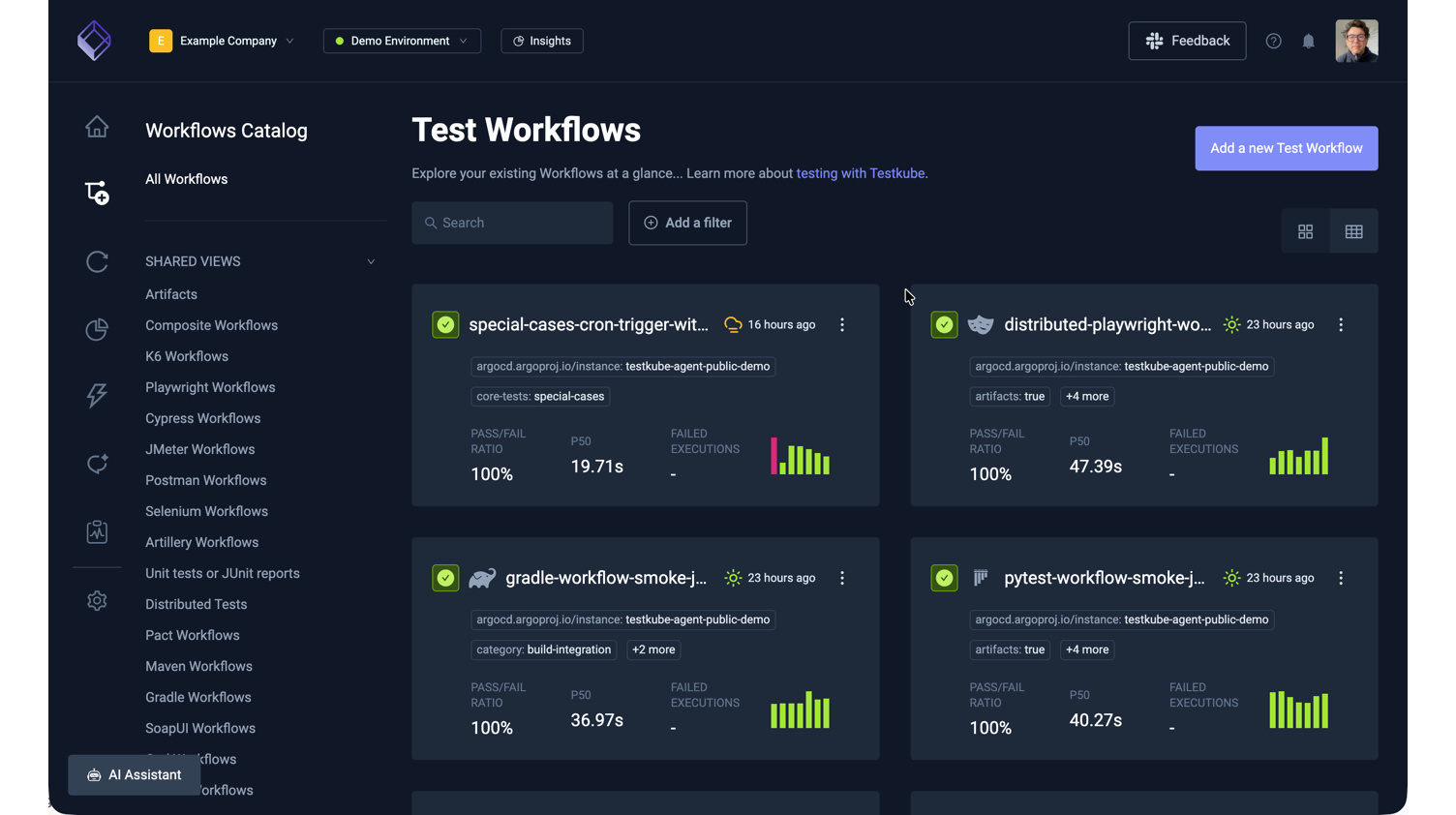
See it in action: Open the interactive TestWorkflows showcase to see how a workflow builds up from a single test to a fully orchestrated pipeline.
Two ways to run Testkube
Open Source Agent - this repo.
MIT-licensed, runs standalone in your Kubernetes cluster, no control plane required. Great for single-cluster setups, self-managed environments, and evaluating Testkube.
- The Helm or CLI Installation will make it easy to deploy the agent into your target cluster.
- The Quickstart is the easiest way to set up Testkube and run your first tests.
Check out the Testkube Open Source Overview to learn more about the open source deployment architecture.
Commercial Control Plane
The control plane connects every Testkube agent across clusters, teams, and environments into a single dashboard:
- One control plane, unlimited clusters - orchestrate and analyze tests across clusters and regions
- Testkube AI - workflow generation, failure investigation, remediation PRs
- Enterprise-grade - SSO/SCIM, RBAC, audit logs, SLA-backed support
Check out the Installation Overview to learn more about different ways to deploy and run the Testkube Control Plane.
The online Trial is the easiest way to try the commercial Testkube offering - Get Started
Marketplace
The Testkube Marketplace provides an open and ready-to-use catalog of Testkube Workflows for Infrastructure Testing - Read More.
Documentation
Extensive documentation is available at docs.testkube.io.
Contributing
Check out our Contributors Guide and the Agent Architecture to find your way around our codebase and process.
If you want to contribute code, this reading order works well:
- CONTRIBUTING.md - contribution workflow, coding standards, and PR process
- DEVELOPMENT.md - local setup with Tilt and day-to-day development loop
- ARCHITECTURE.md - high-level system design and key code paths
Shout-out to our contributors 🎉 - you're great!
- ⭐️ @lreimer - K6 executor Gradle executor Maven executor
- ⭐️ @jdborneman-terminus - Ginkgo executor
- ️⭐️ @abhishek9686
- ⭐️ @ancosma
- ⭐️ @Stupremee
- ⭐️ @artem-zherdiev-ingio
- ⭐️ @chooco13 - Playwright executor
Go to contribution document to read more how can you help us 🔥
Feedback
Whether Testkube helps you or not, we would love to help and hear from you. Please join us on Slack to ask questions and let us know how we can make Testkube even better!
GitHubスター順に並べたClaude Code MCPサーバーの一覧はこちらです。
Testkube MCPに関連するMCPサーバーは?
Testkube Mcpは類似ツールとどう違いますか?
TestkubeのテストオーケストレーションAPIへのMCPブリッジです。テストケースを書いてくれるエージェントスキルではありません。
Testkube MCPのよくある質問
testkube-mcpはどんな人向けですか?
Testkubeを使っている個人開発者や小規模チーム向けです。エージェントを離れずに、Claude Code、Cursor、Codexでテストワークフローを確認・管理したい場合に向いています。
testkube-mcpはどんなときに使うべきですか?
Testkubeの実行結果をリリースのゲートにしているShipフェーズで、エージェントにステータス、アーティファクト、ワークフロー設定を必要に応じて確認させたいときに使います。
testkube-mcpをエージェントに追加するにはどうすればよいですか?
kubeshopのMCPサーバーイメージまたはstdioパッケージを実行し、TK_ACCESS_TOKEN、TK_ORG_ID、TK_ENV_IDを設定します。そのうえで、クライアントのMCP設定にサーバーのエントリを追加してください。